The Hidden Cost of Context Switching in Your Tech Stack
A financial breakdown of how much fragmented productivity apps and constant notification switching cost your enterprise.

Make email marketing simplified

Make email marketing simplified

Make email marketing simplified

Make email marketing simplified

Make email marketing simplified

Make email marketing simplified

Make email marketing simplified

Make email marketing simplified

Make email marketing simplified

Make email marketing simplified

Make email marketing simplified

Make email marketing simplified

Make email marketing simplified

Make email marketing simplified

Make email marketing simplified

We use cookies for our website to give you the most relevant experience by remembering your preferences. By clicking “accept”, you consent to use of ALL the cookies
This website uses cookies to improve your experience while you navigate through the website. Out of these, the cookies that are categorized as necessary are stored on your browser as they are essential for the working of basic functionalities of the website. We also use third-party cookies that help us analyze and understand how you use this website. These cookies will be stored in your browser only with your consent. You also have the option to opt-out of these cookies. But opting out of some of these cookies may affect your browsing experience.
Necessary cookies are absolutely essential for the website to function properly. These cookies ensure basic functionalities and security features of the website, anonymously.
| Cookie | Duration | Description |
|---|---|---|
| cookielawinfo-checkbox-functional | 11 months | This cookie is set by GDPR Cookie Consent plugin. The cookie is used to store the user consent for the cookies in the category “Analytics”. |
| cookielawinfo-checkbox-functional | 11 months | The cookie is set by GDPR cookie consent to record the user consent for the cookies in the category “Functional”. |
| cookielawinfo-checkbox-necessary | 11 months | This cookie is set by GDPR Cookie Consent plugin. The cookies is used to store the user consent for the cookies in the category “Necessary”. |
| cookielawinfo-checkbox-others | 11 months | This cookie is set by GDPR Cookie Consent plugin. The cookie is used to store the user consent for the cookies in the category “Other. |
| cookielawinfo-checkbox-performance | 11 months | This cookie is set by GDPR Cookie Consent plugin. The cookie is used to store the user consent for the cookies in the category “Performance”. |
| viewed_cookie_policy | 11 months | The cookie is set by the GDPR Cookie Consent plugin and is used to store whether or not user has consented to the use of cookies. It does not store any personal data. |
Functional cookies help to perform certain functionalities like sharing the content of the website on social media platforms, collect feedbacks, and other third-party features.
Performance cookies are used to understand and analyze the key performance indexes of the website which helps in delivering a better user experience for the visitors.
Analytical cookies are used to understand how visitors interact with the website. These cookies help provide information on metrics the number of visitors, bounce rate, traffic source, etc.
Advertisement cookies are used to provide visitors with relevant ads and marketing campaigns. These cookies track visitors across websites and collect information to provide customized ads.
Other uncategorized cookies are those that are being analyzed and have not been classified into a category as yet.
Cyberia Tech, Inc. respects your privacy. This Privacy Policy explains how we collect, use, and share your information. By using our services, you agree to this policy. If any other agreements conflict with this Privacy Policy, the terms of those agreements prevail.
Cyberia Tech complies with the EU-US and Swiss-US Privacy Shield Frameworks for handling personal data from the EEA, UK, and Switzerland. In case of any conflict, the Privacy Shield Principles prevail. Learn more at Privacy Shield. Key Definitions
Information linked to an individual, transferred from the EEA, UK, or Switzerland to the U.S.
Data revealing race, religion, health, sexual orientation, and similar categories.
Effective Date: [ 2026 / 11 / 25 ]
Welcome to The Cyberia Tech ! By accessing or using our website or services, you agree to
comply with and be bound by these Terms of Use and our Privacy Policy. If you do not agree with
these terms, please do not use our Services.
Loading
0 %
Your First Piece of the Puzzle in
Business Growth



A software implementation checklist is a structured sequence of steps designed to guide an organization through a new software rollout. It focuses heavily on change management, user adoption, and ongoing workflow governance, ensuring that a newly purchased productivity tool actually integrates into daily operations rather than becoming abandoned shelfware.
Buying software is the easy part; getting people to use it is where the budget actually disappears. According to 2024 data from Panorama Consulting, over 50% of enterprise software implementations exceed their planned budget, and roughly 60% blow past their original timeline. You buy a tool to fix a process, but without a dedicated SaaS deployment plan, you merely add a new login screen to an already fractured workday. To fix this, you must treat your rollout as an organizational transformation. A good starting point is consulting The Ultimate Productivity Software Stack Guide for Teams in 2026 to map out exactly where your new purchase fits into the broader ecosystem.
There is a persistent misconception that software implementation projects fail primarily because the technology itself is flawed, incompatible, or lacking in essential features. In reality, enterprise software implementations are rarely technical failures. They are organizational transformation failures. Poor change management, escalating employee resistance, and low user adoption are responsible for the vast majority of missed returns on investment.
A 2026 Deloitte change management study of 1,000 change leaders found a median 4:1 return on investment (ROI) associated with structured change management investments. You are not just teaching someone which button to click. You are asking them to alter habits they have relied on for years. If a user feels that entering data into a new CRM takes three more clicks than their old spreadsheet, they will find a workaround. That workaround fragments your company data.
This is why your new software rollout must prioritize people over technical provisioning. You need champions in every department who can explain the mechanical benefits of the tool in plain English. Instead of simply saying the new tool is “better,” they must demonstrate that it is better because it pulls live data directly from your database, saving them two hours of manual export time every Friday.
Before you even draft your checklist, you need to understand your current environment. Pushing a new tool into a crowded stack creates confusion. If you introduce a new asynchronous project board while your team still expects immediate responses in Slack, you are going to create friction. You can learn exactly how to map these overlaps by learning How to Conduct a Digital Workspace Audit for Your Remote Team.
You must categorize your existing tools to see what needs to be retired. Teams often purchase software that overlaps heavily with what they already own. This creates a scattered architecture where half the team logs tasks in one tool and the other half updates a different dashboard.
| Tool Category | Primary Function | Implementation Hurdle | Governing Metric |
|---|---|---|---|
| Real-time Chat | Synchronous problem solving | Notification fatigue | Messages per day |
| Project Management | Asynchronous task tracking | Duplication of effort | Tasks updated weekly |
| AI Assistants | Generative drafting & search | Prompt illiteracy | Active daily users |
| Knowledge Base | Long-term documentation | Stale or orphaned pages | Search success rate |
By auditing your stack, you can decide whether a tool actually deserves a place in your workflow. If you are rolling out a new task manager, you must simultaneously establish rules for how it interacts with your chat application. You can explore the nuances of this balance in our guide to Synchronous vs Asynchronous Communication Tools: The 2026 Guide.
A SaaS deployment plan requires meticulous attention to licensing tiers and feature limits. Vendor pricing models shift rapidly, and failing to account for these changes will break your budget months after launch. For example, in November 2026, Slack shifted its integrated AI assistant (Slackbot) to a tiered usage model. They imposed a strict limit of 15 messages per user each week on their Business+ plan, reserving unlimited usage exclusively for Enterprise+.
If you build an internal workflow that relies heavily on employees querying Slackbot for past documentation, and you only budgeted for the Business+ tier, your entire process will hit a hard wall by Tuesday afternoon. Your checklist must account for these mechanical constraints. You need to map out exactly how many API calls, AI prompts, or storage gigabytes your team actually consumes.
You also need to plan your administrative hierarchy. Who holds the primary admin keys? Who provisions seats when a new hire starts? Neglecting these governance steps is one of the most common 7 SaaS Procurement Mistakes That Quietly Drain Your Budget. You must document exactly how licenses are reclaimed when someone leaves the company.
Your rollout should follow a phased approach. A single, company-wide launch on a Monday morning usually results in IT helpdesks being overwhelmed by noon. Break your tool adoption strategy into three distinct phases.
Define the specific business problem the software solves. Assign a dedicated business owner—an executive or senior manager who will champion the tool long after the initial launch. Draft your data security protocols and ensure your Single Sign-On (SSO) integration is fully tested. Create a baseline measurement of your current workflow speeds so you can actually prove the new tool is faster later on.
Select a group of 10 to 20 power users. These should be people who are naturally inclined to test software and break things. Give them a specific set of tasks to complete using the new tool. Do not just ask them if they like it; monitor their completion times and the errors they encounter. If you are testing AI agents, be aware that roughly 88% of AI agent pilots never graduate to production, primarily due to governance friction and model costs.
Once the pilot is successful, roll the software out department by department. Hold mandatory training sessions, but keep them short. Focus entirely on the two or three primary actions the user will perform daily. Establish a dedicated feedback channel, such as a specific chat room, where users can report bugs or ask for help without submitting a formal IT ticket.
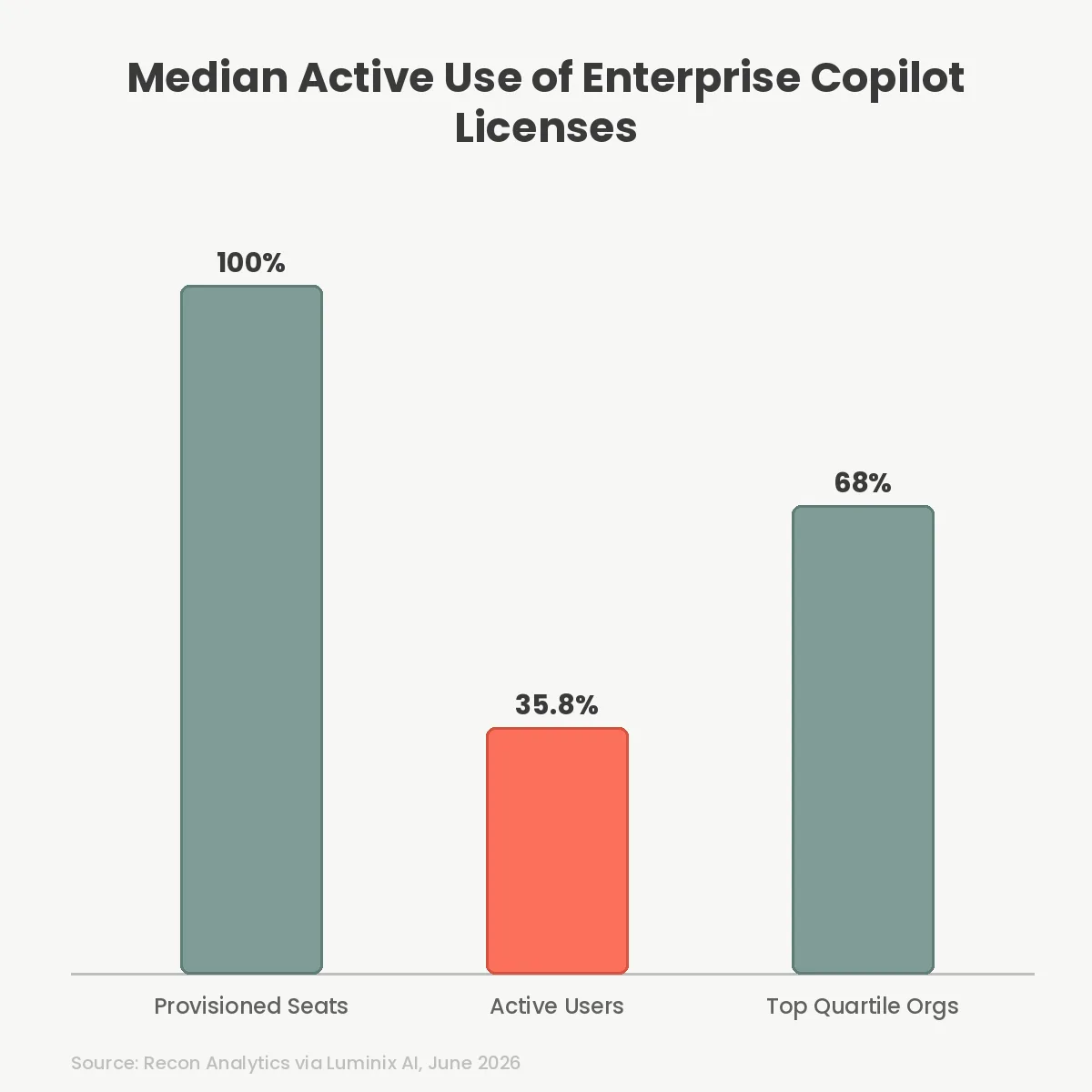
Rolling out AI tools requires a completely different approach to user adoption. High license provisioning does not guarantee daily workflow adoption. By October 2026, Microsoft 365 Copilot reached an estimated 38.1 million paid seats. However, active use among enterprise users with those licenses sits at a median of roughly 35.8%.
People stop using AI tools when they get bad results, and they get bad results because they do not know how to write effective prompts. You cannot just turn Copilot on and expect productivity to skyrocket. You have to build prompt libraries tailored to specific roles. A financial analyst needs a completely different set of instructions for the AI than a marketing copywriter.
Organizations only achieve top-quartile active adoption (between 55% and 68% daily active users) when they heavily invest in internal champions who actively share successful AI workflows with their peers. If you are evaluating different generative models for your team, understanding how vendors charge for these capabilities is critical. You can read more about this shift in our breakdown of AI Agent SaaS Pricing.
The most devastating mistake you can make during a rollout is treating the launch date as the finish line. A 2026 analysis of digital transformation failures found that the single most cited reason for project collapse is not poor user adoption or technical bugs. It is leadership and governance issues, specifically the absence of a business owner who survives past go-live, cited in 39% of practitioner accounts.
When the executive sponsor moves on to their next project the day after launch, the enforcement of the new tool stops. Middle managers slowly allow their teams to drift back to their old spreadsheets. Within six months, you are paying full enterprise licensing fees for a product that only 15% of your company actively uses.
Another failure mode is inadequate data migration. If you move your team to a new project management tool, but leave three years of historical project data in the old system, your team will constantly toggle back and forth between the two. You must migrate enough historical context so that the old tool can be fully decommissioned and its subscription cancelled.
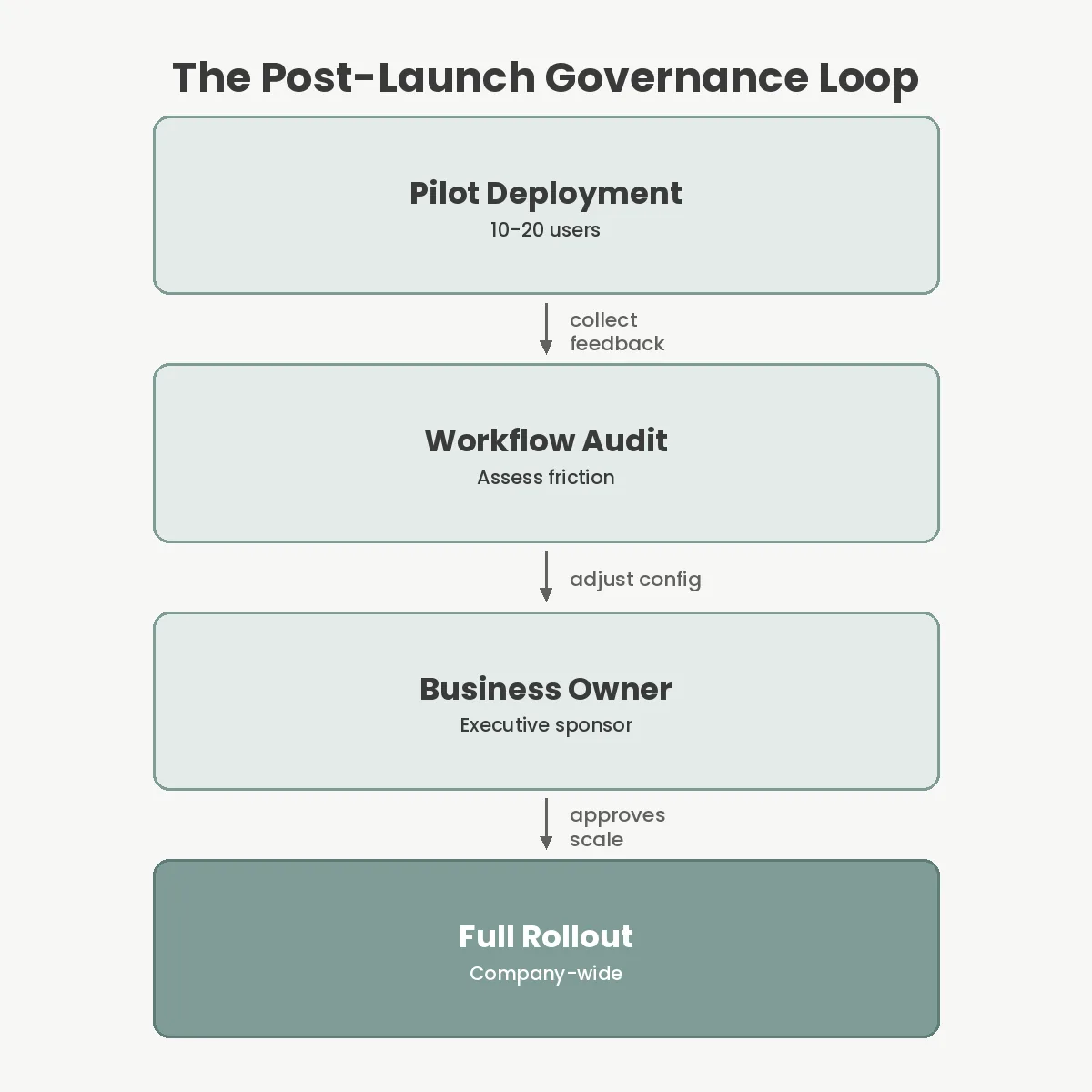
While strict governance is necessary to prevent budget bloat, enforcing it too tightly carries significant trade-offs. If you lock down administrator rights so severely that a department head has to wait three weeks for IT approval just to integrate a calendar app, you kill operational agility.
Heavy governance prevents shadow IT—where employees buy random software on company credit cards—but it also stifles bottom-up innovation. Often, the best workflow improvements come from a small team experimenting with a cheap web app. If your SaaS deployment plan is too rigid, employees will simply stop trying to improve their processes.
You must find a balance. Create a “fast-track” approval process for low-cost, low-risk productivity tools. Allow departments a small discretionary software budget for experimentation, provided those tools do not process sensitive customer data. You want to govern the core architecture while leaving room at the edges for teams to customize their daily habits.
The biggest cause of failure is the lack of continuous executive ownership post go-live. Without a dedicated business owner enforcing the new workflow, employees naturally drift back to their old habits and legacy tools.
You measure adoption by tracking daily active usage and specific workflow completions, not just total logins. If an employee logs in but immediately exports the data to a spreadsheet, they have not truly adopted the software.
AI pilots typically fail because of governance friction, high model costs, and poor prompt literacy among users. Without dedicated prompt libraries and clear use cases, users get poor results and abandon the tool quickly.
No. You should use a phased rollout starting with a pilot group of 10 to 20 power users. This allows you to identify edge cases, refine your training materials, and fix configuration errors before impacting the entire company.
Your implementation does not end when you send the final activation email. That is merely the beginning of the adoption phase. Evaluate your SaaS deployment plan not by how fast IT pushed the update, but by how many employees are successfully using the tool three months later. To secure your ROI, you must maintain your executive sponsorship, actively prune overlapping software, and continuously refine your internal training. Schedule a workspace audit for exactly 90 days post-launch to ensure your team is actually working faster, not just clicking different buttons.
You Can Get More Information!