The Hidden Cost of Context Switching in Your Tech Stack
A financial breakdown of how much fragmented productivity apps and constant notification switching cost your enterprise.

Make email marketing simplified

Make email marketing simplified

Make email marketing simplified

Make email marketing simplified

Make email marketing simplified

Make email marketing simplified

Make email marketing simplified

Make email marketing simplified

Make email marketing simplified

Make email marketing simplified

Make email marketing simplified

Make email marketing simplified

Make email marketing simplified

Make email marketing simplified

Make email marketing simplified

We use cookies for our website to give you the most relevant experience by remembering your preferences. By clicking “accept”, you consent to use of ALL the cookies
This website uses cookies to improve your experience while you navigate through the website. Out of these, the cookies that are categorized as necessary are stored on your browser as they are essential for the working of basic functionalities of the website. We also use third-party cookies that help us analyze and understand how you use this website. These cookies will be stored in your browser only with your consent. You also have the option to opt-out of these cookies. But opting out of some of these cookies may affect your browsing experience.
Necessary cookies are absolutely essential for the website to function properly. These cookies ensure basic functionalities and security features of the website, anonymously.
| Cookie | Duration | Description |
|---|---|---|
| cookielawinfo-checkbox-functional | 11 months | This cookie is set by GDPR Cookie Consent plugin. The cookie is used to store the user consent for the cookies in the category “Analytics”. |
| cookielawinfo-checkbox-functional | 11 months | The cookie is set by GDPR cookie consent to record the user consent for the cookies in the category “Functional”. |
| cookielawinfo-checkbox-necessary | 11 months | This cookie is set by GDPR Cookie Consent plugin. The cookies is used to store the user consent for the cookies in the category “Necessary”. |
| cookielawinfo-checkbox-others | 11 months | This cookie is set by GDPR Cookie Consent plugin. The cookie is used to store the user consent for the cookies in the category “Other. |
| cookielawinfo-checkbox-performance | 11 months | This cookie is set by GDPR Cookie Consent plugin. The cookie is used to store the user consent for the cookies in the category “Performance”. |
| viewed_cookie_policy | 11 months | The cookie is set by the GDPR Cookie Consent plugin and is used to store whether or not user has consented to the use of cookies. It does not store any personal data. |
Functional cookies help to perform certain functionalities like sharing the content of the website on social media platforms, collect feedbacks, and other third-party features.
Performance cookies are used to understand and analyze the key performance indexes of the website which helps in delivering a better user experience for the visitors.
Analytical cookies are used to understand how visitors interact with the website. These cookies help provide information on metrics the number of visitors, bounce rate, traffic source, etc.
Advertisement cookies are used to provide visitors with relevant ads and marketing campaigns. These cookies track visitors across websites and collect information to provide customized ads.
Other uncategorized cookies are those that are being analyzed and have not been classified into a category as yet.
Cyberia Tech, Inc. respects your privacy. This Privacy Policy explains how we collect, use, and share your information. By using our services, you agree to this policy. If any other agreements conflict with this Privacy Policy, the terms of those agreements prevail.
Cyberia Tech complies with the EU-US and Swiss-US Privacy Shield Frameworks for handling personal data from the EEA, UK, and Switzerland. In case of any conflict, the Privacy Shield Principles prevail. Learn more at Privacy Shield. Key Definitions
Information linked to an individual, transferred from the EEA, UK, or Switzerland to the U.S.
Data revealing race, religion, health, sexual orientation, and similar categories.
Effective Date: [ 2026 / 11 / 25 ]
Welcome to The Cyberia Tech ! By accessing or using our website or services, you agree to
comply with and be bound by these Terms of Use and our Privacy Policy. If you do not agree with
these terms, please do not use our Services.
Loading
0 %
Your First Piece of the Puzzle in
Business Growth



A digital workspace audit involves identifying every software application, AI agent, and cloud tool your remote team uses, assessing their security risks, measuring actual license utilization, and eliminating redundant subscriptions. You achieve this by analyzing expense reports for shadow IT, exporting native workspace audit logs, and mapping overlapping tool capabilities to consolidate your tech stack safely.
The financial stakes of an unmanaged tech stack are massive. The average organization spends $55.7 million on software as a service (SaaS) annually, and wastes roughly $19.8 million of that budget on unused licenses and redundant platforms. But the financial drain is only part of the equation. When employees quietly expense unvetted tools or authorize AI agents, they open active data pipelines into your corporate environment. If you want to stop paying for tools nobody uses and close the backdoors into your network, you need a systematic approach. Before adding another subscription to The Ultimate Productivity Software Stack Guide for Teams in 2026, you have to map the digital real estate you already own.
Understanding the actual volume of applications running in your environment is the first major hurdle. Publishers heavily disagree on the sheer volume of shadow IT, and this discrepancy directly impacts how you plan your audit. Data from Torii’s 2026 Benchmark reports an average of 831 applications per organization, categorizing a staggering 61.3% of those as shadow IT. These are tools operating completely outside of IT oversight, often adopted by individual teams to solve immediate problems.
Conversely, older or more procurement-focused datasets suggest the average application count sits closer to 275 apps, with shadow IT representing roughly 33% to 40%. This gap exists because formal spend analytics frequently miss free tools, lightweight browser extensions, and decentralized logins that do not trigger large financial alerts. When you conduct a true tech stack audit, Torii’s higher estimates are usually closer to reality because they account for micro-SaaS and unauthorized AI web extensions.
The median organizational SaaS spend per employee has reached $9,455 annually. With SaaS license utilization currently sitting at just 54%, nearly half of the enterprise licenses you have provisioned are entirely unused or severely underutilized. Identifying these abandoned licenses is the core mechanism of software rationalization, allowing you to reclaim budget without impacting team output.
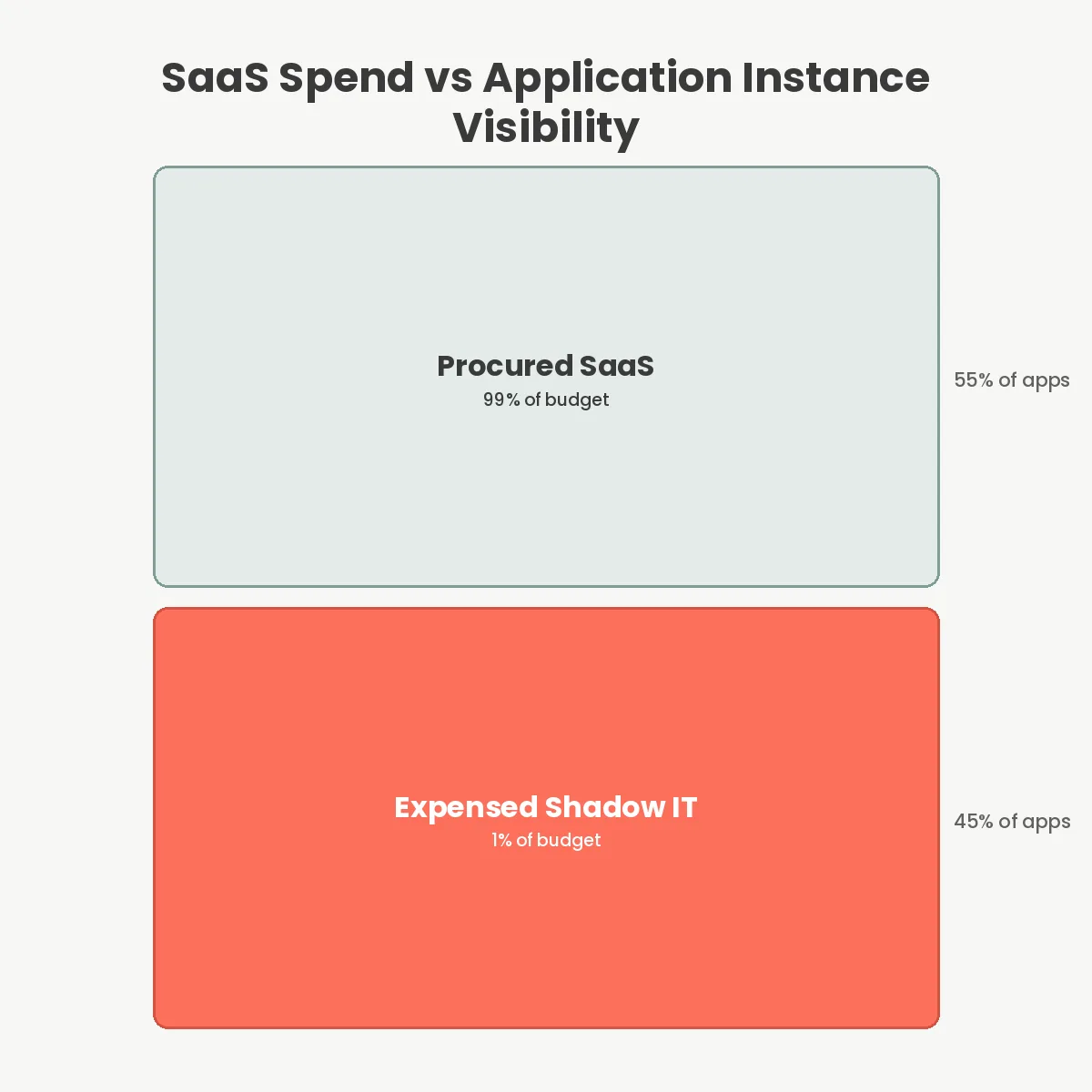
Your first practical step is tracing the financial footprint of your software stack. Formal procurement records only tell a fraction of the story. Expensed applications—tools purchased covertly via employee corporate credit cards—make up roughly 45% of total SaaS application instances in a typical company. Yet, remarkably, they account for only 1% of the total SaaS budget. This massive disparity makes it incredibly difficult for finance teams to spot tool overlap by simply tracking high-dollar invoices.
Because these purchases fly under the radar as low-cost monthly recurring charges, they bypass standard security reviews and compliance checks. You must partner with your finance department to filter the general ledger for common software vendor names, low-value recurring credit card charges, and keywords like “subscription,” “pro plan,” or “cloud.” Analyzing these micro-transactions is a proven way to catch common enterprise software buying errors before they multiply across departments.
The data reveals precisely what your employees are reaching for. ChatGPT ranks as the #1 most expensed software application within corporate finance systems globally, according to a November 2026 SaasSoftwareCore report. When employees cannot get the AI capabilities they need through official channels, they simply swipe a card. Capturing this expense data allows you to pull these disparate accounts into an official, governed enterprise agreement.
Once you have a comprehensive list of applications, the next phase is measuring actual usage. It is not enough to know an app exists; you must understand if it is actively providing value. Relying on self-reported surveys from department heads rarely works, as managers tend to overestimate the necessity of their preferred tools. Instead, you need hard telemetry data.
The most accurate method is funneling all authenticated applications through a single sign-on (SSO) provider. SSO platforms log every authentication event, giving you a precise timestamp of when a user last accessed an application. If an employee has not logged into a premium project management tool in 90 days, you can confidently reclaim that license. This data-driven approach removes the emotion from SaaS vendor consolidation efforts.
However, you will also uncover functional overlap. Your marketing team might use Asana, while engineering uses Jira, and operations uses Monday.com. Unmanaged SaaS estates with overlapping tools can waste 25% to 30% of total software budgets and drain five or more working weeks of employee productivity each year due to fragmented communication. To solve this, categorize every discovered app by its core function (e.g., project management, whiteboarding, file storage) to visually expose the redundancies.
Standard SaaS sprawl is primarily a financial and licensing problem. If an employee abandons a graphic design web app, the company wastes money, but the application sits idle. Abandoned AI agents, however, operate dynamically and present a radically different threat model. This distinction fundamentally changes how you must approach your digital workspace audit.
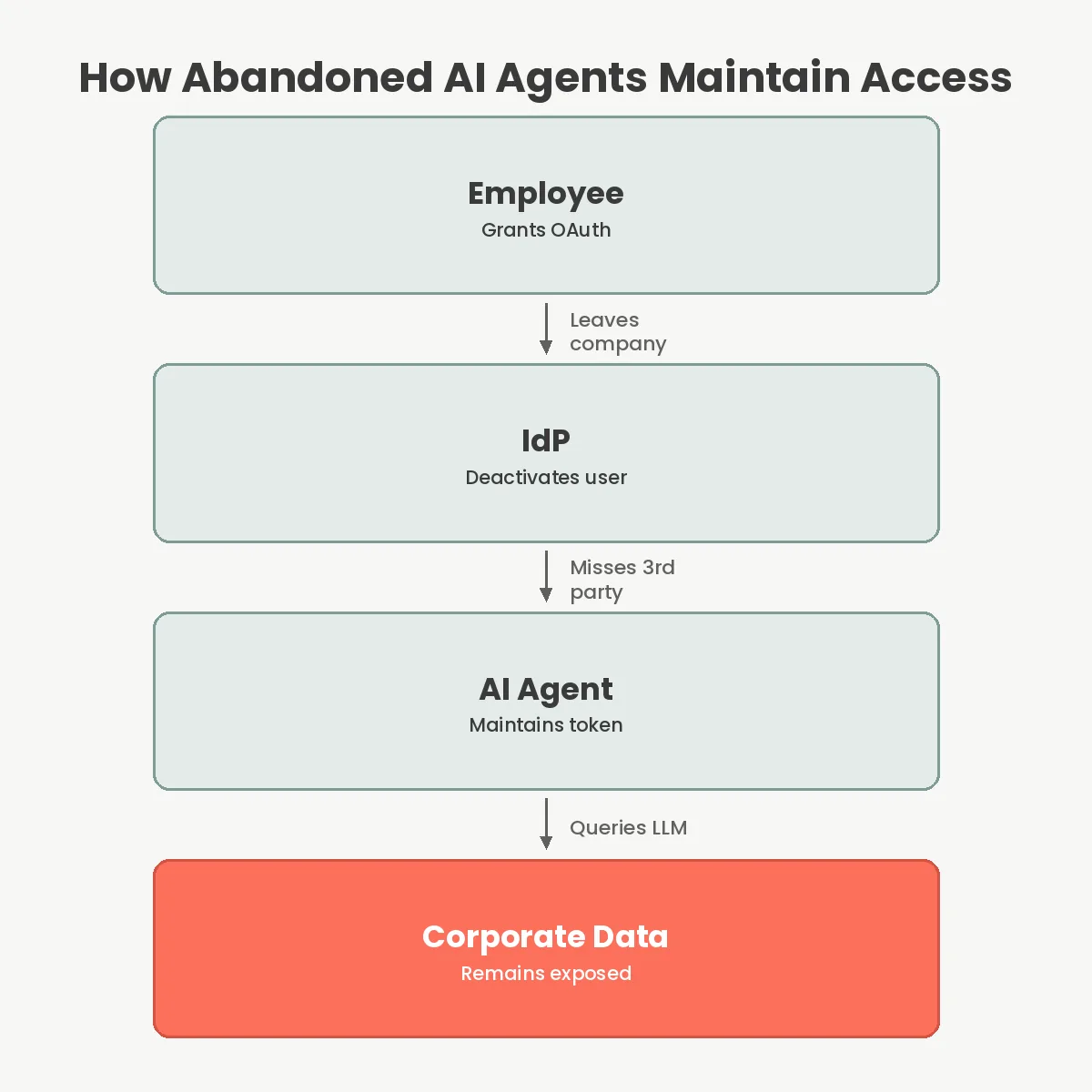
Even when an employee is completely idle or has left the company, an ungoverned AI agent actively maintains user permissions via persistent OAuth tokens. It continues to persistently call large language models (racking up compute costs) and can take autonomous actions on the organization’s behalf without human oversight. An abandoned email-sorting AI agent, for example, retains the ability to read, index, and forward sensitive internal communications long after the employee who installed it has departed.
This persistent access turns ungoverned tools into massive liabilities. Data breaches involving “shadow AI” cost organizations $670,000 more on average than standard breaches, according to a recent AvePoint and IBM analysis. You cannot simply cancel the billing for these tools; you must actively revoke their authentication tokens at the workspace level to sever their access to your data.
Furthermore, this active threat model is changing how software is sold. As you audit your stack, you will notice that outcome-based pricing models are replacing per-seat subscriptions. Tracking consumption metrics for AI agents requires monitoring API calls and token usage, rather than just checking if a user logged in.
To identify what data these third-party tools are accessing, you must dive into your native workspace audit logs. These logs record file creations, sharing permissions, and API interactions. However, relying solely on default settings creates critical blind spots. Native Google Workspace admin audit logs are strictly limited to a 6-month retention period by default, creating a critical gap for long-term compliance and forensic investigations.
If an employee installed a malicious browser extension eight months ago, the initial authorization event will no longer exist in your default Google Workspace logs. You must proactively export these logs to an external security information and event management (SIEM) system, or an immutable storage bucket, to maintain a historical record of who granted access to what.
When analyzing these logs, be prepared for anomalies that require context. For instance, background files synced via “Drive for Desktop” are recorded in the Google Workspace audit log as “download events.” This can inadvertently create the false appearance of massive data exfiltration or insider threat activity during an audit, even if the employee did not manually download anything in a traditional sense. Understanding this mechanism prevents your security team from chasing false positives, as detailed by the Overdrive Workspace team. Proper log analysis also helps you verify the security of foundational tools, like your team password manager web apps.
With usage data, financial metrics, and security logs in hand, you must synthesize this information to make concrete decisions. Software rationalization means looking at a category, evaluating the competing tools currently in use, and standardizing on the one that provides the best security and functionality for the lowest overall cost.
You execute this by creating a rationalization matrix. You score overlapping applications against organizational requirements: Does it support SSO? Does it meet your compliance frameworks? Is the API documented? What is the true cost per active user?
| Application Category | Discovered Tools | Security Risk Score | Rationalization Decision |
|---|---|---|---|
| Digital Whiteboarding | Miro, Mural, FigJam | Low / Acceptable | Consolidate to FigJam (bundled with existing Figma enterprise plan). |
| Async Video Messaging | Loom, Vidyard, Slack Clips | Medium (Loom lacks SSO on current tier) | Upgrade Loom to Enterprise; deprecate Vidyard. |
| AI Meeting Transcription | Otter.ai, Fathom, Fireflies | High (Shadow AI instances) | Ban unvetted browser extensions; deploy Fathom organization-wide. |
| Workflow Automation | Zapier, Make, IFTTT | Medium | Standardize on Make for complex routing; block IFTTT. |
This process forces difficult conversations. You will inevitably find that 46% of SaaS applications have poor or low security risk scores, meaning almost half of the shadow IT your team relies on fails basic corporate security standards. You must provide a secure, sanctioned alternative before revoking access to the vulnerable tools, otherwise employees will simply find a new workaround.
While a digital workspace audit is vital for security and cost control, there are specific scenarios where executing a deep, aggressive consolidation effort will cause more harm than good. You must read the operational environment before launching an initiative that threatens to disrupt daily workflows.
Do not initiate a full software rationalization phase during a major product launch or critical end-of-quarter financial close. Revoking access to an unauthorized, yet functionally critical, data visualization tool right before a board meeting will stall operations and generate immense political friction. If you discover high-risk shadow IT during these periods, focus purely on containment and monitoring rather than immediate deprecation.
Furthermore, if your organization lacks a centralized identity provider (like Okta or Microsoft Entra ID), an automated tech stack audit is nearly impossible. Attempting to manually track user logins across 300 disparate web apps via CSV exports will result in stale, inaccurate data the moment the spreadsheet is saved. You must deploy foundational SSO infrastructure before attempting a deep rationalization project.
The fastest way to fail a workspace audit is to treat it purely as an IT cost-cutting exercise without consulting the actual users. If you look at a spreadsheet, see that 50 people use Notion and 50 people use Confluence, and arbitrarily cancel Notion because it costs slightly more, you will break the workflows of half your company.
Another frequent failure mode is “silent deprecation.” This happens when IT administrators revoke OAuth tokens or cancel subscriptions without giving users adequate warning or a migration path for their data. Employees lose access to historical project files, leading to immediate support ticket spikes and a loss of trust in the IT department. Always announce deprecations at least 30 days in advance and provide clear instructions on how to export data to the sanctioned platform.
Finally, organizations often fail to account for the hidden costs of migration. Moving a complex marketing automation sequence from one platform to another requires hundreds of hours of manual rebuilding and testing. If the annual savings of the new tool is $5,000, but the labor cost of migrating the workflows is $15,000, the consolidation effort is mathematically flawed. You must factor in the switching costs before finalizing any vendor deprecation.
Conducting a single audit will clean up your current environment, but without ongoing governance, software sprawl will immediately begin regenerating. 86% of organizations have had to delay AI agent deployments by an average of six months due to unresolved data security and data governance concerns. To prevent this, establish an automated procurement workflow where new tools are vetted for security and compliance before a credit card is ever swiped.
As you consolidate your critical data into fewer, officially sanctioned SaaS platforms, the concentration of risk increases. If your entire company relies on a single project management workspace, an accidental deletion or a targeted ransomware attack on that platform becomes a catastrophic event. This reality is forcing a shift in disaster recovery strategies.
By 2028, 75% of large enterprises will prioritize SaaS application backups as a critical requirement, up from just 15% in 2024. Relying on a SaaS vendor’s internal recycle bin is not a backup strategy. You must implement independent, third-party backup solutions for your core productivity stacks, ensuring that your rationalized, highly efficient digital workspace is also entirely resilient.
A comprehensive audit usually takes three to six weeks. The timeline depends heavily on your existing SSO infrastructure, the responsiveness of your finance team in exporting expense data, and the total volume of shadow IT discovered in the initial scan.
Finance teams miss sprawl because shadow IT purchases are often buried in individual employee expense reports. Because 45% of app instances make up only 1% of the total budget, these micro-transactions do not trigger traditional high-dollar procurement reviews.
The fastest method is reviewing the active OAuth token grants within your central identity provider or workspace admin console. You must cross-reference these active third-party integrations against your directory of offboarded or reassigned employees to identify orphaned connections.
No, stopping billing does not automatically revoke access. Many applications and AI agents maintain persistent OAuth tokens that keep their data pipelines open even if the account is downgraded to a free tier. You must manually revoke the tokens.
Executing a digital workspace audit stops the quiet drain on your IT budget and secures your environment against the persistent threats of shadow AI. By mapping expense data against SSO telemetry, you identify exactly which tools drive value and which ones merely consume resources. Your next action is to schedule a meeting with your finance department to pull the last 90 days of general ledger data, filtering specifically for low-cost recurring credit card charges. Once you map the true scope of your tech stack, you can confidently prune the excess and build a safer, faster environment for your remote team.
You Can Get More Information!