ZTNA vs VPN: Securing Modern Web App Infrastructure
Zero Trust Network Access (ZTNA) differs from traditional VPNs by...

Make email marketing simplified

Make email marketing simplified

Make email marketing simplified

Make email marketing simplified

Make email marketing simplified

Make email marketing simplified

Make email marketing simplified

Make email marketing simplified

Make email marketing simplified

Make email marketing simplified

Make email marketing simplified

Make email marketing simplified

Make email marketing simplified

Make email marketing simplified

Make email marketing simplified

We use cookies for our website to give you the most relevant experience by remembering your preferences. By clicking “accept”, you consent to use of ALL the cookies
This website uses cookies to improve your experience while you navigate through the website. Out of these, the cookies that are categorized as necessary are stored on your browser as they are essential for the working of basic functionalities of the website. We also use third-party cookies that help us analyze and understand how you use this website. These cookies will be stored in your browser only with your consent. You also have the option to opt-out of these cookies. But opting out of some of these cookies may affect your browsing experience.
Necessary cookies are absolutely essential for the website to function properly. These cookies ensure basic functionalities and security features of the website, anonymously.
| Cookie | Duration | Description |
|---|---|---|
| cookielawinfo-checkbox-functional | 11 months | This cookie is set by GDPR Cookie Consent plugin. The cookie is used to store the user consent for the cookies in the category “Analytics”. |
| cookielawinfo-checkbox-functional | 11 months | The cookie is set by GDPR cookie consent to record the user consent for the cookies in the category “Functional”. |
| cookielawinfo-checkbox-necessary | 11 months | This cookie is set by GDPR Cookie Consent plugin. The cookies is used to store the user consent for the cookies in the category “Necessary”. |
| cookielawinfo-checkbox-others | 11 months | This cookie is set by GDPR Cookie Consent plugin. The cookie is used to store the user consent for the cookies in the category “Other. |
| cookielawinfo-checkbox-performance | 11 months | This cookie is set by GDPR Cookie Consent plugin. The cookie is used to store the user consent for the cookies in the category “Performance”. |
| viewed_cookie_policy | 11 months | The cookie is set by the GDPR Cookie Consent plugin and is used to store whether or not user has consented to the use of cookies. It does not store any personal data. |
Functional cookies help to perform certain functionalities like sharing the content of the website on social media platforms, collect feedbacks, and other third-party features.
Performance cookies are used to understand and analyze the key performance indexes of the website which helps in delivering a better user experience for the visitors.
Analytical cookies are used to understand how visitors interact with the website. These cookies help provide information on metrics the number of visitors, bounce rate, traffic source, etc.
Advertisement cookies are used to provide visitors with relevant ads and marketing campaigns. These cookies track visitors across websites and collect information to provide customized ads.
Other uncategorized cookies are those that are being analyzed and have not been classified into a category as yet.
Cyberia Tech, Inc. respects your privacy. This Privacy Policy explains how we collect, use, and share your information. By using our services, you agree to this policy. If any other agreements conflict with this Privacy Policy, the terms of those agreements prevail.
Cyberia Tech complies with the EU-US and Swiss-US Privacy Shield Frameworks for handling personal data from the EEA, UK, and Switzerland. In case of any conflict, the Privacy Shield Principles prevail. Learn more at Privacy Shield. Key Definitions
Information linked to an individual, transferred from the EEA, UK, or Switzerland to the U.S.
Data revealing race, religion, health, sexual orientation, and similar categories.
Effective Date: [ 2026 / 10 / 11 ]
Welcome to The Cyberia Tech ! By accessing or using our website or services, you agree to
comply with and be bound by these Terms of Use and our Privacy Policy. If you do not agree with
these terms, please do not use our Services.
Loading
0 %
Your First Piece of the Puzzle in
Business Growth



The best team password manager web app depends entirely on your compliance requirements and budget. 1Password delivers the strongest user experience and unique 128-bit Secret Key protection, Bitwarden offers unmatched value for budget-conscious teams with its $5-per-user open-source model, and Dashlane provides a highly optimized, purely web-first architecture.
Forgetting a shared company login is annoying, but passing administrative credentials through unencrypted chat applications creates an immediate security crisis. You face a critical decision: how do you lock down company access without slowing down your daily operations? Consumer-grade tools lack the granular administrative controls a business requires to function safely. When 1Password Teams offers a flat $19.95 monthly rate for up to 10 users, relying on vulnerable spreadsheets or sticky notes is no longer a justifiable operational risk. You need a centralized system that proves its security mathematically.
Individual password managers work perfectly until a key employee goes on sudden leave or leaves the company on bad terms. If that employee holds the only credentials to your domain registrar or primary database, you are effectively locked out of your own infrastructure. Consumer tools operate on a single-user zero-knowledge model, meaning nobody else can ever recover the data if the master password is lost.
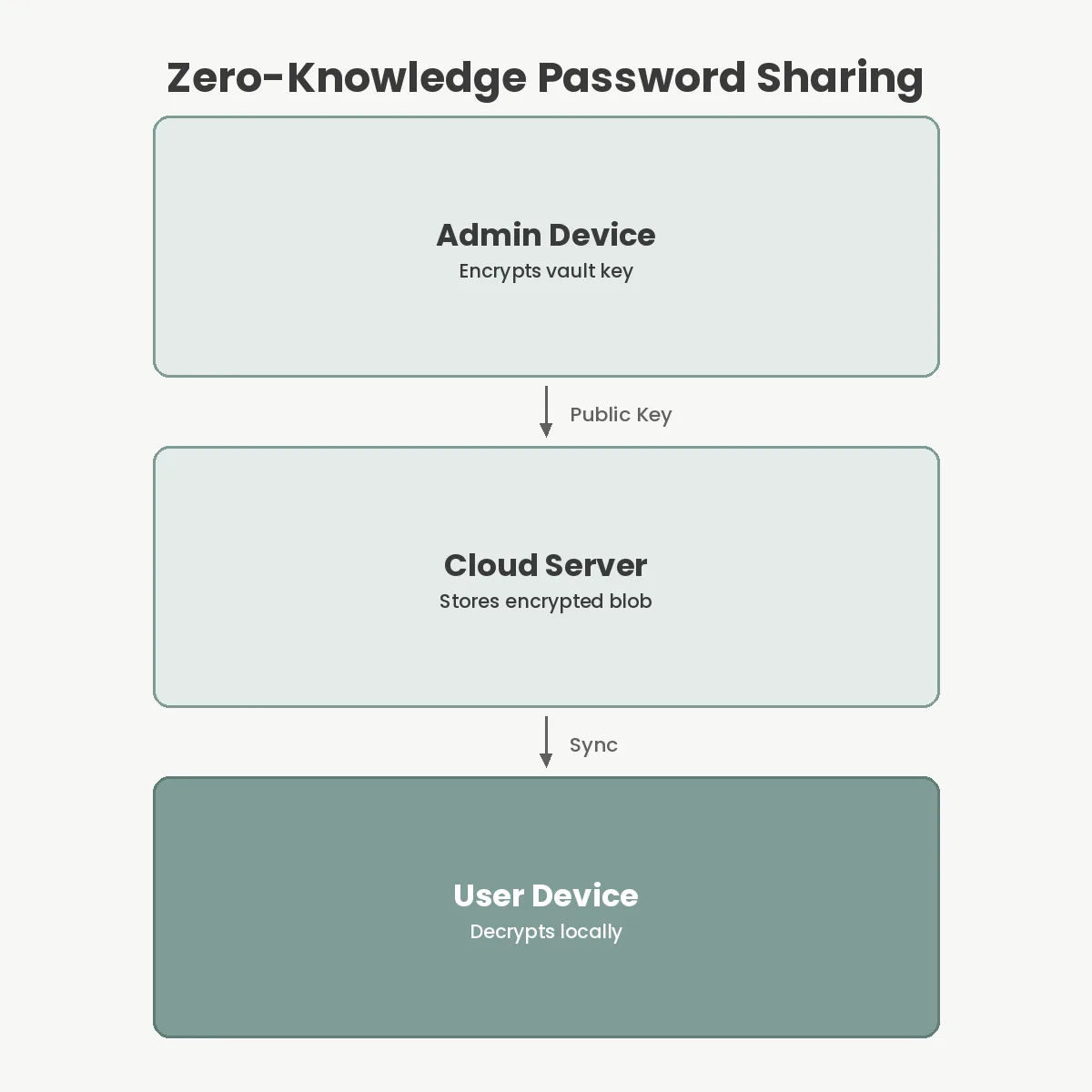
Business-tier managers solve this through cryptographic secret sharing. When you invite a user to a team plan, the system generates a public-private key pair for them. Administrators encrypt shared vault keys using the new employee’s public key. The employee then decrypts access locally using their private key. This mechanism guarantees that the central server never sees the underlying passwords, yet administrators retain the power to revoke access instantly.
Furthermore, consumer accounts lack policy enforcement. You cannot force a consumer account to require two-factor authentication (2FA), nor can you mandate minimum password lengths. Business plans enforce these rules at the organizational level, establishing a secure baseline across your entire startup technology roadmap before anyone can access a single secret.
1Password remains the standard-bearer for corporate credential management. Its Business tier costs $7.99 per user per month, which is a premium price point, but it justifies that cost through exceptional user experience and deep developer tooling. The platform’s transition to an Electron-based desktop app drew initial criticism from power users, but the unified codebase allows them to ship security updates simultaneously across all operating systems.
The standout feature is the 1Password Secret Key. Standard zero-knowledge systems rely entirely on the strength of your master password. If an attacker breaches the company’s cloud servers and steals the encrypted vaults, they can run offline dictionary attacks to guess weak master passwords. 1Password mitigates this by requiring a locally generated 128-bit Secret Key alongside your master password. Because this key never leaves your authorized devices, it mathematically prevents remote offline decryption even if the central servers are completely compromised.
For smaller groups, the 1Password Teams plan provides an excellent entry point. At a flat $19.95 per month for up to 10 users, it removes the per-seat friction that often discourages small agencies from adopting proper security tools. It includes dual-control admin recovery, meaning you never permanently lose access to company vaults.
Bitwarden approaches the market with radical transparency. As an open-source platform, its entire codebase is available for public scrutiny. The company routinely subjects itself to rigorous third-party testing; most recently, it passed a comprehensive security audit by Cure53 in October 2023 with excellent results. This transparency makes it highly attractive to teams that prefer open ecosystems over proprietary black boxes.
Financially, Bitwarden is highly aggressive. The Enterprise plan costs just $5 per user per month while including advanced features like Single Sign-On (SSO) integration, enterprise policies, and API access. For organizations managing hundreds of employees, this represents a massive cost reduction compared to 1Password or Dashlane, without sacrificing core cryptographic security.
Bitwarden also caters to strict compliance environments by offering self-hosting capabilities. If your organization operates entirely offline or faces severe data residency regulations, you can deploy the Bitwarden infrastructure on your own servers. This is a rare capability in modern web apps, making it a frequent choice for defense contractors and specialized health care providers.
Dashlane has taken a distinctly different architectural path. The company recently completed a total transition to a purely web-first extension model, deliberately retiring its native desktop applications for macOS and Windows. By building heavily on Google’s Manifest V3 extension architecture, Dashlane ensures tight integration directly within the browser where users actually need their credentials.
Many users mistakenly believe that web extensions are inherently less secure than native desktop apps. In reality, Manifest V3 enforces strict execution environments, preventing background scripts from accessing sensitive data indiscriminately. Dashlane leverages this to provide highly optimized autofill that works across complex web apps versus native software, avoiding the heavy memory overhead often associated with running a separate Electron background process.
Priced at $8 per user per month for the Business tier, Dashlane sits at the premium end of the spectrum. It justifies this with a patented zero-knowledge architecture and unique features like built-in VPN access for employees on public Wi-Fi. It is an excellent choice if your workforce relies entirely on browser-based tools rather than legacy desktop software.
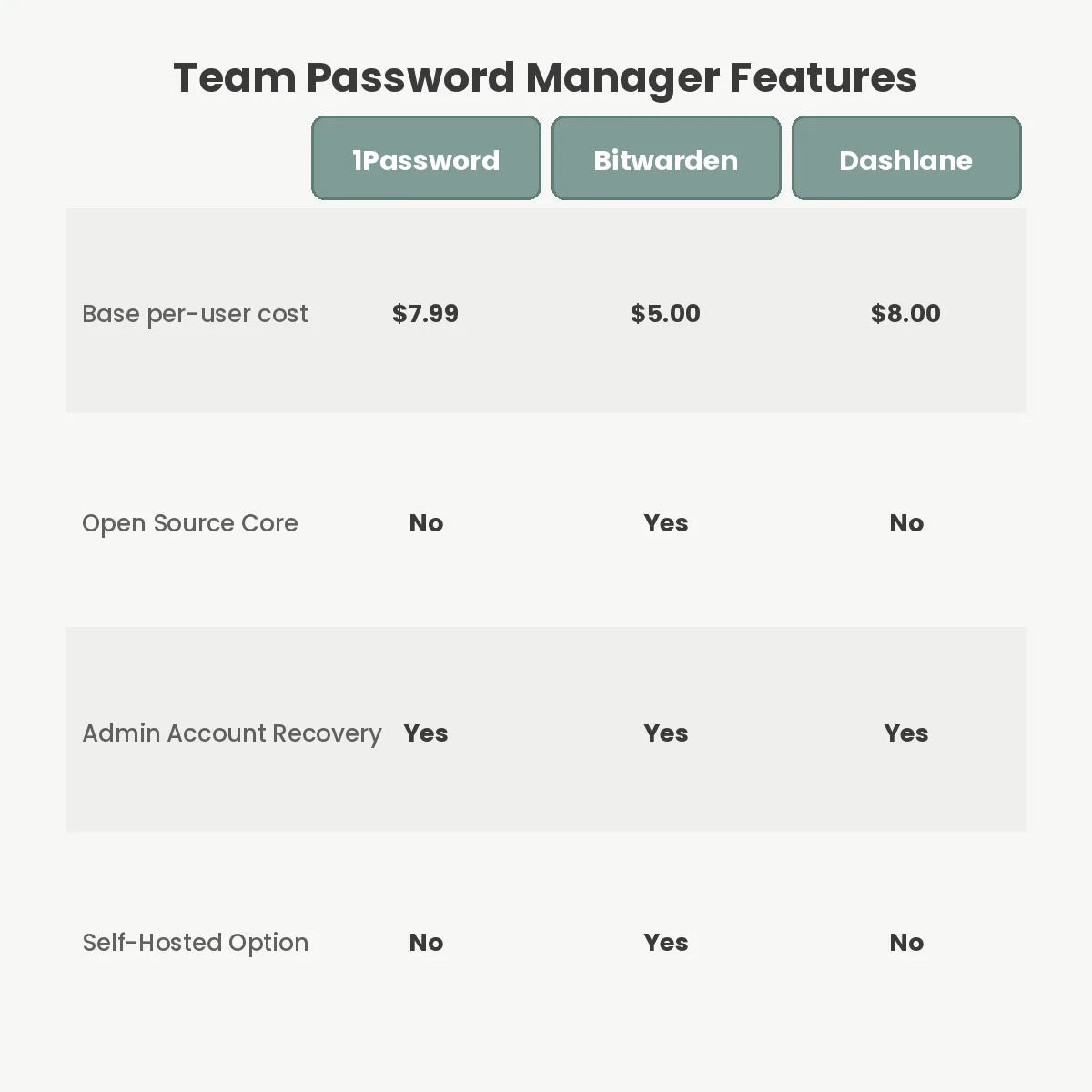
Selecting the right tool requires mapping features to your exact operational requirements. Below is a breakdown of how the major platforms compare on price, architecture, and deployment options.
| Platform | Business Price (Per User) | Architecture Focus | Self-Hosting Option | Unique Security Feature |
|---|---|---|---|---|
| 1Password | $7.99 / month | Native / Electron | No | 128-bit Secret Key |
| Bitwarden | $5.00 / month | Open Source | Yes | Cure53 Audited Codebase |
| Dashlane | $8.00 / month | Web-First (Manifest V3) | No | Included Employee VPN |
Do not decide based on price alone. A $3 difference per user becomes irrelevant if the platform’s user experience causes employees to bypass the system entirely.
Purchasing licenses is only the first step; poor rollout strategies routinely undermine the investment. The most frequent failure mode is neglecting to configure account recovery protocols before inviting users. Zero-knowledge encryption is unforgiving. If an employee forgets their master password and you have not explicitly enabled admin recovery policies, their personal vault data is permanently destroyed. You must configure these safety nets on day one.
Another major error is failing to utilize role-based access control (RBAC). Small businesses often dump every company credential into a single “Shared Company Vault.” This violates the principle of least privilege. Support staff do not need access to the AWS root accounts, and engineers do not need access to the corporate social media logins. Group credentials logically and assign access based strictly on job functions.
Finally, organizations frequently fail to integrate their off-the-shelf software tools with their primary identity provider. If you use Google Workspace or Microsoft Entra ID (formerly Azure AD), you should connect it to your password manager via SCIM (System for Cross-domain Identity Management). This ensures that when you disable an employee’s email account, their access to the password vault is revoked instantly and automatically.
A successful deployment requires careful communication and phased adoption. Start by provisioning the administrative account and immediately locking it down with hardware-based 2FA, such as a YubiKey. This root account holds the keys to your entire organization; a simple authenticator app is insufficient protection for this level of access.
Next, map out your vault structure before inviting a single employee. Create discrete vaults for “Engineering,” “Marketing,” “Finance,” and “General IT.” Populate these vaults with the most critical shared credentials first. Establishing this architecture early prevents the chaotic sprawl that happens when users start creating their own undocumented shared folders.
Draft a clear internal policy explaining how the tool works. Employees are often highly skeptical of corporate password managers because they fear administrators can read their personal data. Address this directly. Explain the zero-knowledge architecture in plain English, assuring them that their private vaults are mathematically inaccessible to the company.
Finally, run a pilot program with a small group of tech-savvy users. Let them test the browser extensions and mobile apps for a week to identify any friction points. Once the pilot group is comfortable, roll the software out to the rest of the company, mandating its use for all new securing e-commerce operations and internal system logins.
No, administrators cannot read passwords stored in your personal vault. They only have access to items explicitly placed in shared team folders. The software encrypts your private data using a key derived from your master password, which the company does not possess.
If an employee forgets their master password, an administrator can initiate an account recovery process. This resets the employee login credentials without exposing the underlying vault data. You must configure these recovery policies in advance, as they cannot apply retroactively.
Web-based managers use strong client-side encryption before data ever reaches the browser memory. While browser extensions are fundamentally secure, you must keep your browser updated and strictly avoid installing unverified extensions that might attempt to read your screen or clipboard.
Bitwarden offers complete self-hosting capabilities for teams that require strict data residency compliance or operate offline air-gapped networks. In contrast, 1Password and Dashlane operate strictly as cloud-hosted SaaS products and do not provide any on-premises deployment options for their software.
Centralizing your credentials is the single highest-leverage security decision a growing company makes. If you have fewer than a dozen employees, buy the 1Password Teams plan for its unmatched user experience and flat-rate pricing. If you are scaling rapidly, require SSO, or need strict self-hosting compliance, deploy Bitwarden. Pick a system today, map out your shared vaults, and stop pasting production database keys into your company chat client.
You Can Get More Information!