eBPF vs iptables: Why Netfilter is a Bottleneck in 2026
eBPF replaces the traditional iptables networking stack in Kubernetes by...

Make email marketing simplified

Make email marketing simplified

Make email marketing simplified

Make email marketing simplified

Make email marketing simplified

Make email marketing simplified

Make email marketing simplified

Make email marketing simplified

Make email marketing simplified

Make email marketing simplified

Make email marketing simplified

Make email marketing simplified

Make email marketing simplified

Make email marketing simplified

Make email marketing simplified

We use cookies for our website to give you the most relevant experience by remembering your preferences. By clicking “accept”, you consent to use of ALL the cookies
This website uses cookies to improve your experience while you navigate through the website. Out of these, the cookies that are categorized as necessary are stored on your browser as they are essential for the working of basic functionalities of the website. We also use third-party cookies that help us analyze and understand how you use this website. These cookies will be stored in your browser only with your consent. You also have the option to opt-out of these cookies. But opting out of some of these cookies may affect your browsing experience.
Necessary cookies are absolutely essential for the website to function properly. These cookies ensure basic functionalities and security features of the website, anonymously.
| Cookie | Duration | Description |
|---|---|---|
| cookielawinfo-checkbox-functional | 11 months | This cookie is set by GDPR Cookie Consent plugin. The cookie is used to store the user consent for the cookies in the category “Analytics”. |
| cookielawinfo-checkbox-functional | 11 months | The cookie is set by GDPR cookie consent to record the user consent for the cookies in the category “Functional”. |
| cookielawinfo-checkbox-necessary | 11 months | This cookie is set by GDPR Cookie Consent plugin. The cookies is used to store the user consent for the cookies in the category “Necessary”. |
| cookielawinfo-checkbox-others | 11 months | This cookie is set by GDPR Cookie Consent plugin. The cookie is used to store the user consent for the cookies in the category “Other. |
| cookielawinfo-checkbox-performance | 11 months | This cookie is set by GDPR Cookie Consent plugin. The cookie is used to store the user consent for the cookies in the category “Performance”. |
| viewed_cookie_policy | 11 months | The cookie is set by the GDPR Cookie Consent plugin and is used to store whether or not user has consented to the use of cookies. It does not store any personal data. |
Functional cookies help to perform certain functionalities like sharing the content of the website on social media platforms, collect feedbacks, and other third-party features.
Performance cookies are used to understand and analyze the key performance indexes of the website which helps in delivering a better user experience for the visitors.
Analytical cookies are used to understand how visitors interact with the website. These cookies help provide information on metrics the number of visitors, bounce rate, traffic source, etc.
Advertisement cookies are used to provide visitors with relevant ads and marketing campaigns. These cookies track visitors across websites and collect information to provide customized ads.
Other uncategorized cookies are those that are being analyzed and have not been classified into a category as yet.
Cyberia Tech, Inc. respects your privacy. This Privacy Policy explains how we collect, use, and share your information. By using our services, you agree to this policy. If any other agreements conflict with this Privacy Policy, the terms of those agreements prevail.
Cyberia Tech complies with the EU-US and Swiss-US Privacy Shield Frameworks for handling personal data from the EEA, UK, and Switzerland. In case of any conflict, the Privacy Shield Principles prevail. Learn more at Privacy Shield. Key Definitions
Information linked to an individual, transferred from the EEA, UK, or Switzerland to the U.S.
Data revealing race, religion, health, sexual orientation, and similar categories.
Effective Date: [ 2026 / 10 / 18 ]
Welcome to The Cyberia Tech ! By accessing or using our website or services, you agree to
comply with and be bound by these Terms of Use and our Privacy Policy. If you do not agree with
these terms, please do not use our Services.
Loading
0 %
Your First Piece of the Puzzle in
Business Growth



If you need rapid setup and access to over 7,000 apps, Zapier is the better workflow automation web app. However, if your team requires complex visual routing or a highly cost-effective scaling path—offering 10,000 operations for $9 a month—Make is the superior choice for 2026.
Gartner projects that non-technology professionals will build 80% of technology products and services by the end of this decade. Your team is likely already stringing together tools to bypass engineering bottlenecks. But picking the wrong automation platform creates a silent financial drain. When you hit volume constraints, migrating a tangled web of integrations is painful and expensive. You face a direct choice between Zapier’s conversational simplicity and Make’s architectural power.
Both platforms function as middleware. They sit between your software applications, listen for specific events, and execute defined actions based on the payload received. Instead of writing custom API wrappers and hosting them on AWS Lambda, you authenticate your accounts once. The platform handles the OAuth tokens, webhooks, and retry logic.
This abstraction layer allows a marketing manager to connect Facebook Lead Ads directly to a Slack channel without writing a single line of Python. You construct a sequence: a trigger initiates the process, filters determine if the data meets your criteria, and actions push the data into the final destination.
While the core premise is identical, their execution models differ completely. Zapier structures your logic as a top-down list. Make forces you to map processes on a two-dimensional canvas. This structural difference dictates how complex your workflows can become before the interface becomes unmanageable. If you are bootstrapping your SaaS, the platform you choose will act as your shadow engineering team for years.
Zapier uses a step-by-step, vertical builder. You add Step 1, then Step 2, then Step 3. If you need conditional logic—where a lead goes to Mailchimp if they have a budget, but goes to Salesforce if they are an enterprise prospect—you use a feature called Paths. Paths are only available if you pay for the Professional tier or higher. Even then, visualizing nested logic inside Zapier requires scrolling up and down through isolated menus.
Make behaves like a digital whiteboard. You drag application nodes onto a canvas and connect them with visible wires. You can see the entire logic flow at a glance. Routing is not locked behind an expensive tier; it is a fundamental building block available on the Free plan. You place a Router module, and the execution path branches out visually.
This visual approach allows for advanced data manipulation. If you receive an array of data—such as multiple line items in a single Shopify order—Make allows you to place an Iterator module. This module separates the array into individual bundles, allowing downstream modules to process each item independently. You can then use an Aggregator module to pack them back together into a single email summary. In Zapier, dealing with line items requires specialized formatter steps that are notoriously difficult to debug. You are often forced to write a JavaScript code block to handle arrays, defeating the purpose of buying a no-code tool.
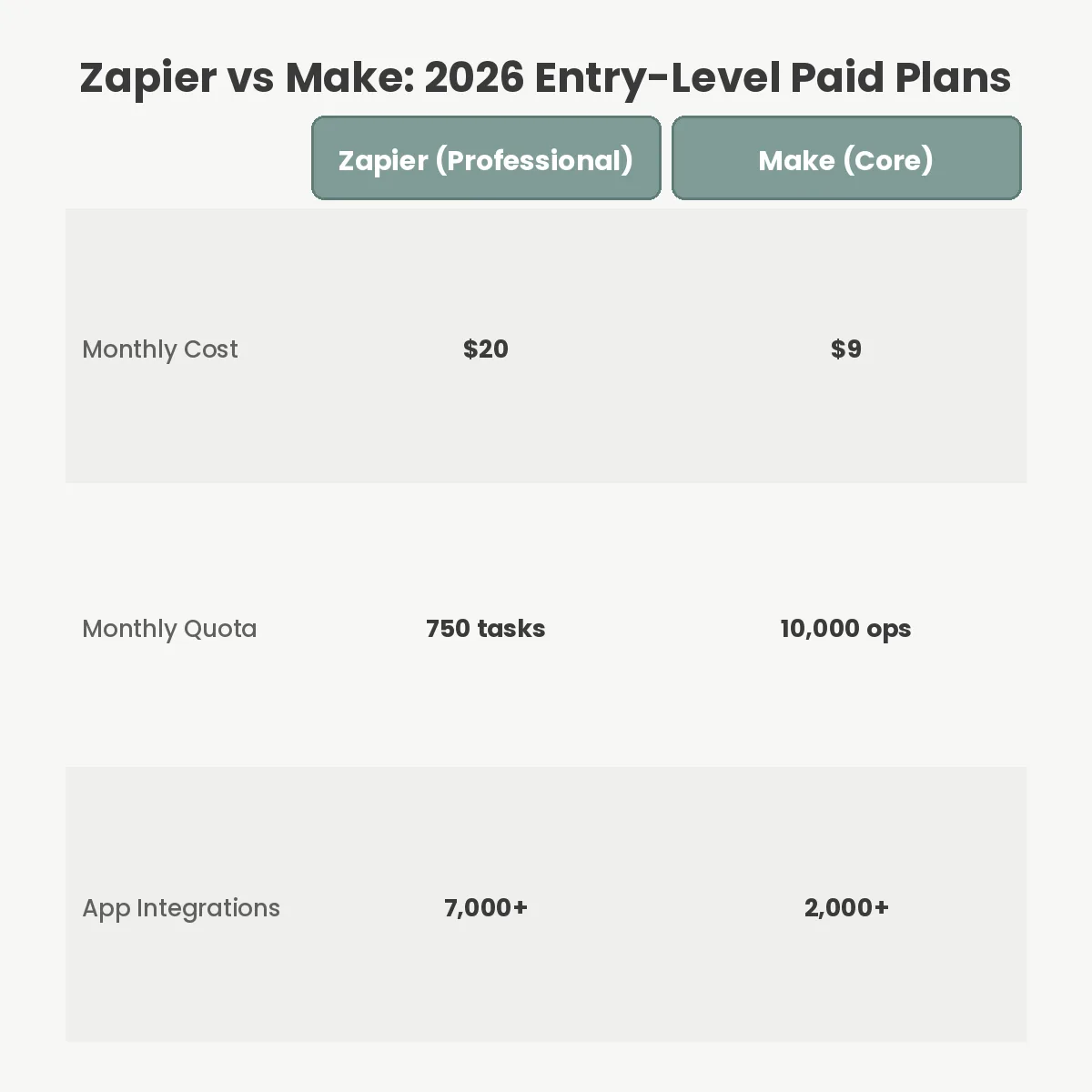
Comparing the pricing pages side-by-side reveals a stark contrast. According to Zapier’s pricing documentation, their Free tier allows 100 tasks per month. The entry-level Professional plan costs $20 per month (billed annually) for 750 tasks.
In contrast, Make’s official tier list offers a Free plan with 1,000 operations per month. Upgrading to their Core plan costs just $9 per month for 10,000 operations.
However, comparing tasks to operations is not a one-to-one exercise. Zapier only charges you a task when an action successfully completes. If a trigger checks your inbox and finds no new emails, Zapier charges you nothing. If a filter halts a workflow because an email lacks an attachment, Zapier charges you nothing.
| Action Type | Zapier Impact | Make Impact |
|---|---|---|
| Polling a trigger with no new data | 0 Tasks | 1 Operation |
| Successful data filter halts flow | 0 Tasks | 1 Operation |
| Pushing data to external CRM | 1 Task | 1 Operation |
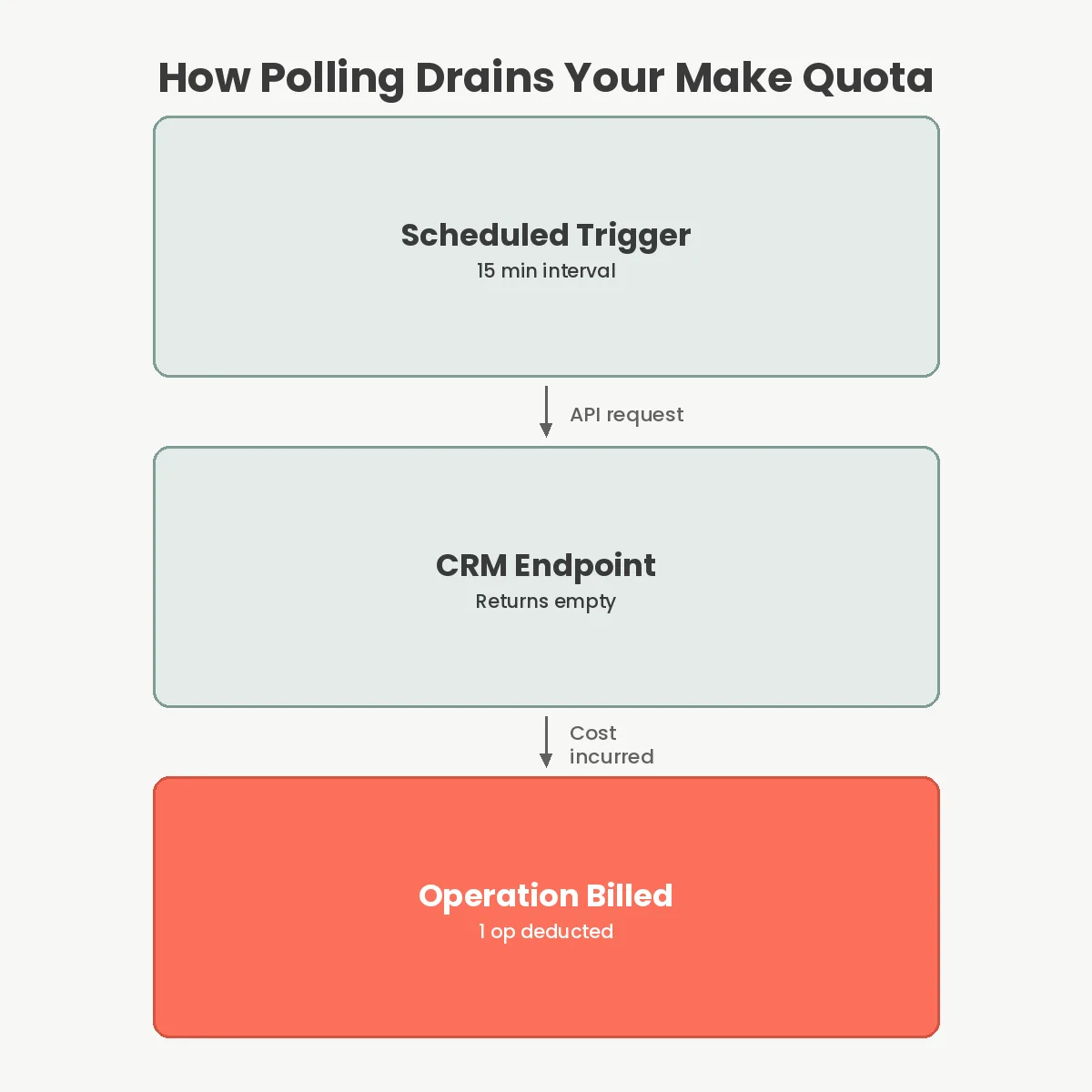
Make charges an operation for every module that executes. If you schedule a trigger to check a Google Sheet every 15 minutes, Make deducts an operation every single time it checks, even if the sheet is empty. A workflow with a trigger, a router, a filter, and two actions will consume at least four operations per run.
This mathematical reality means you must build workflows defensively in Make. You must rely on instant webhooks rather than scheduled API polling whenever possible. Webhooks only fire when data actually changes, completely bypassing the polling tax. Beyond the entry-level plans, the pricing disparity widens. Zapier’s Team plan starts at $69 per month for 2,000 tasks. Make’s Teams plan costs $29 per month for 10,000 operations. If your startup scales to 50,000 automated actions per month, Zapier will bill you roughly $400 per month, while Make will charge you just $89.
Zapier dominates the market because of its sheer volume of integrations. As of 2026, Zapier natively connects to over 7,000 applications. If a new AI writing tool or niche CRM launches today, their first priority is building a Zapier app. You rarely need to touch an API documentation page when using Zapier.
Make currently supports just over 2,000 applications. While this covers all major platforms like Google Workspace, Slack, Salesforce, and Airtable, you will occasionally encounter a missing tool. When this happens, Make offers an HTTP module that allows you to make raw API requests.
Using the HTTP module requires reading API documentation, handling authentication headers, and parsing JSON payloads. It provides infinite flexibility but abandons the conversational simplicity of a pure integration. If your tech stack relies heavily on obscure, industry-specific software, Zapier will save you hours of configuration time. If you are comfortable configuring OAuth 2.0 requests, Make’s HTTP module is significantly more powerful than Zapier’s equivalent Webhooks feature.
Neither platform replaces a proper backend database or dedicated enterprise RPA software. A common mistake teams make is using Zapier as a pseudo-database, chaining together dozens of Google Sheets lookups to maintain state. This creates fragile infrastructure that breaks the moment a column header changes.
Latency is another critical limitation. Both tools operate asynchronously. If you need sub-second response times—for instance, validating a user’s coupon code during a live checkout flow before the page loads—you should avoid middleware entirely. The network hops involved introduce 500ms to 3,000ms of latency, which ruins real-time user experiences. For synchronous operations, you must write custom logic inside your own web app development environment.
Make’s learning curve is steep. Handing a Make workspace over to a non-technical marketing assistant often results in broken automations. The interface assumes you understand concepts like arrays, collections, and Boolean logic. Zapier hides these concepts, making it far safer for broad team adoption.
The most expensive failure mode in workflow automation is the infinite loop. If Zapier updates a Hubspot contact, and that update triggers a webhook that fires the same Zapier workflow again, your 750-task quota will vanish in three minutes. Always use distinct trigger conditions to prevent recursive loops.
Another failure point involves error handling. When an API goes down temporarily, Zapier’s Professional plan includes automatic autoreplay. It will wait and try the failed step again. Make’s approach is more complex. It places failed runs into an Incomplete Executions queue. You must configure error-handler modules—like a Break or Ignore directive—directly on the canvas. If you forget to attach error handlers, a single failed row in a spreadsheet can pause the entire scenario.
Finally, shadow IT sprawl occurs when individual employees build competing automations under their personal accounts. When that employee leaves, their email is deactivated, the authentication tokens expire, and critical business processes halt silently. Always use a dedicated service account to authenticate connections in both platforms.
Yes, Make provides a generous free tier that includes 1,000 operations per month and access to its visual workflow builder. This is significantly higher than Zapier’s 100-task free limit, making it ideal for testing simple personal automations.
There is no one-click migration tool available between the two platforms. You must manually rebuild your workflows by mapping out the triggers and recreating the logic on Make’s visual canvas, which requires careful testing.
Neither platform requires formal programming skills. However, constructing advanced multi-step workflows on Make demands a solid understanding of data mapping, conditional logic, and API structures, whereas Zapier keeps the interface strictly conversational.
Zapier consumes a task only when an action step successfully moves data. Make consumes an operation every time a module runs, including scheduled trigger checks that return no new data, meaning frequent polling will drain your quota quickly.
Your decision rests on a trade-off between simplicity and architectural control. Choose Zapier if you have a non-technical team, rely on obscure niche software, and prioritize speed of deployment over unit economics. The premium you pay covers the sheer convenience of a 7,000-app ecosystem.
Choose Make if you are scaling your startup with technology, need to process high volumes of data, or require complex branching logic. Once you master the difference between an API poll and an instant webhook, Make’s $9/month tier provides enough capacity to run an entire early-stage business. Stop paying the simplicity tax once your workflows require actual engineering logic.
You Can Get More Information!