Fathom vs Otter vs Fireflies: The Best AI Meeting Assistants for 2026
The best AI meeting assistant depends on your core workflow:...

Make email marketing simplified

Make email marketing simplified

Make email marketing simplified

Make email marketing simplified

Make email marketing simplified

Make email marketing simplified

Make email marketing simplified

Make email marketing simplified

Make email marketing simplified

Make email marketing simplified

Make email marketing simplified

Make email marketing simplified

Make email marketing simplified

Make email marketing simplified

Make email marketing simplified

We use cookies for our website to give you the most relevant experience by remembering your preferences. By clicking “accept”, you consent to use of ALL the cookies
This website uses cookies to improve your experience while you navigate through the website. Out of these, the cookies that are categorized as necessary are stored on your browser as they are essential for the working of basic functionalities of the website. We also use third-party cookies that help us analyze and understand how you use this website. These cookies will be stored in your browser only with your consent. You also have the option to opt-out of these cookies. But opting out of some of these cookies may affect your browsing experience.
Necessary cookies are absolutely essential for the website to function properly. These cookies ensure basic functionalities and security features of the website, anonymously.
| Cookie | Duration | Description |
|---|---|---|
| cookielawinfo-checkbox-functional | 11 months | This cookie is set by GDPR Cookie Consent plugin. The cookie is used to store the user consent for the cookies in the category “Analytics”. |
| cookielawinfo-checkbox-functional | 11 months | The cookie is set by GDPR cookie consent to record the user consent for the cookies in the category “Functional”. |
| cookielawinfo-checkbox-necessary | 11 months | This cookie is set by GDPR Cookie Consent plugin. The cookies is used to store the user consent for the cookies in the category “Necessary”. |
| cookielawinfo-checkbox-others | 11 months | This cookie is set by GDPR Cookie Consent plugin. The cookie is used to store the user consent for the cookies in the category “Other. |
| cookielawinfo-checkbox-performance | 11 months | This cookie is set by GDPR Cookie Consent plugin. The cookie is used to store the user consent for the cookies in the category “Performance”. |
| viewed_cookie_policy | 11 months | The cookie is set by the GDPR Cookie Consent plugin and is used to store whether or not user has consented to the use of cookies. It does not store any personal data. |
Functional cookies help to perform certain functionalities like sharing the content of the website on social media platforms, collect feedbacks, and other third-party features.
Performance cookies are used to understand and analyze the key performance indexes of the website which helps in delivering a better user experience for the visitors.
Analytical cookies are used to understand how visitors interact with the website. These cookies help provide information on metrics the number of visitors, bounce rate, traffic source, etc.
Advertisement cookies are used to provide visitors with relevant ads and marketing campaigns. These cookies track visitors across websites and collect information to provide customized ads.
Other uncategorized cookies are those that are being analyzed and have not been classified into a category as yet.
Cyberia Tech, Inc. respects your privacy. This Privacy Policy explains how we collect, use, and share your information. By using our services, you agree to this policy. If any other agreements conflict with this Privacy Policy, the terms of those agreements prevail.
Cyberia Tech complies with the EU-US and Swiss-US Privacy Shield Frameworks for handling personal data from the EEA, UK, and Switzerland. In case of any conflict, the Privacy Shield Principles prevail. Learn more at Privacy Shield. Key Definitions
Information linked to an individual, transferred from the EEA, UK, or Switzerland to the U.S.
Data revealing race, religion, health, sexual orientation, and similar categories.
Effective Date: [ 2026 / 10 / 22 ]
Welcome to The Cyberia Tech ! By accessing or using our website or services, you agree to
comply with and be bound by these Terms of Use and our Privacy Policy. If you do not agree with
these terms, please do not use our Services.
Loading
0 %
Your First Piece of the Puzzle in
Business Growth



The best AI meeting assistant depends on your core workflow: Fathom provides the best free tier with unlimited 1-on-1 recording, Fireflies.ai excels for sales teams requiring automated data entry across 40+ CRMs, and Otter.ai offers the strongest collaborative transcript workspace for internal project management.
If you spend your Zoom calls frantically typing notes instead of listening to the client, you are missing critical nuance. An automated transcription bot solves this problem by generating exact transcripts and formatted summaries the moment you hang up. However, picking the wrong platform introduces entirely new headaches—from unexpected paywalls cutting off the recording mid-conversation to bots joining confidential internal reviews uninvited. Selecting the right tool requires looking past the marketing pages to understand the strict usage limits these companies hide in their pricing tiers.
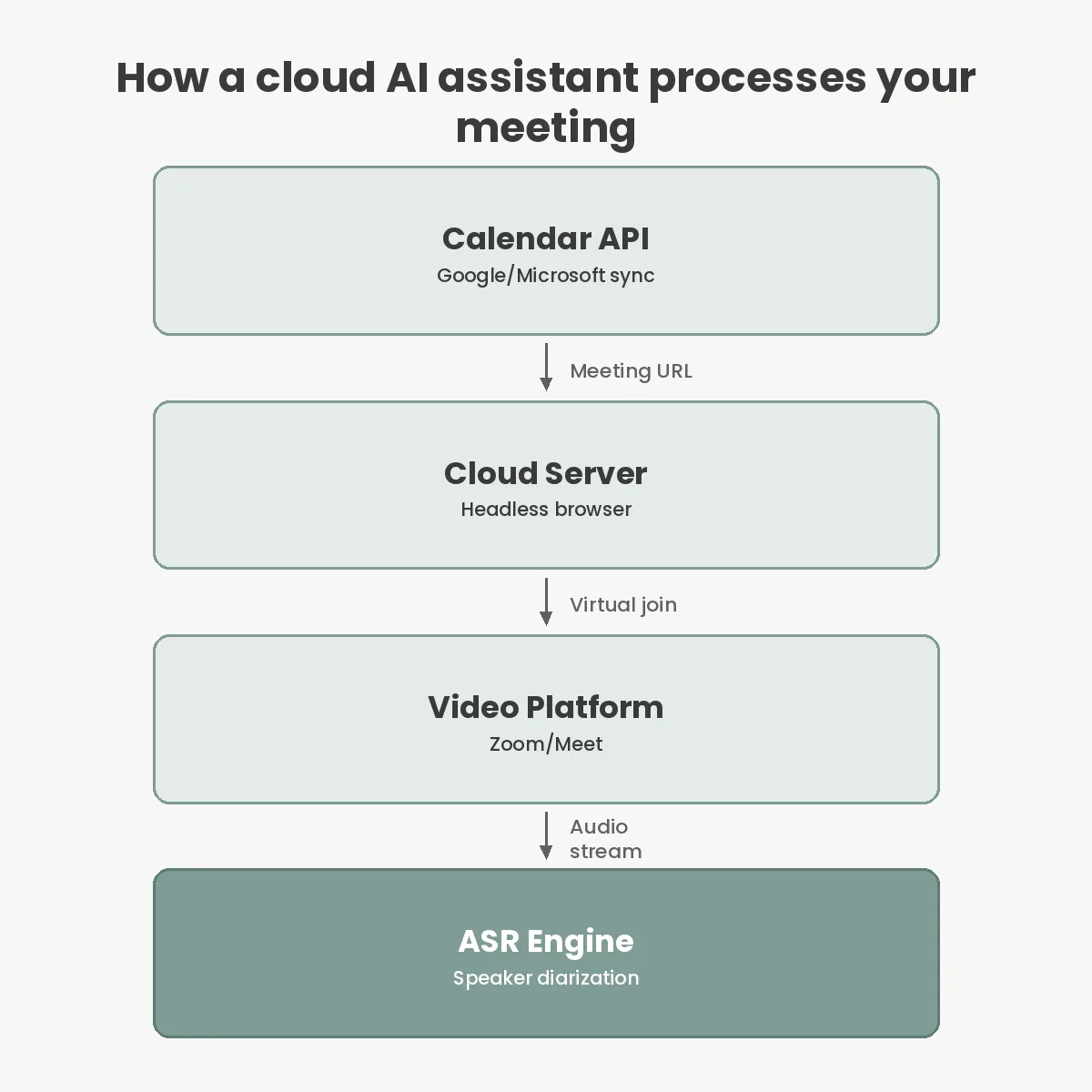
You have likely seen an “OtterPilot” or “Fireflies Notetaker” quietly appear in your Google Meet grid. These cloud applications do not intercept audio directly from your physical microphone. Instead, they authenticate with your calendar provider—typically Google Workspace or Microsoft 365—and parse your schedule for recognized video conferencing links. When the calendar event begins, the service spins up a headless browser on a remote server that clicks your meeting link and joins as a virtual guest participant.
Fathom operates slightly differently if you use their native Zoom application. Rather than dialing in a separate bot participant that takes up a square on the screen, Fathom processes the WebRTC stream directly via Zoom’s internal API. This distinction matters deeply for user experience. A standard bot participant requires the meeting host to manually admit it from the waiting room, which causes awkward friction if you are running five minutes late. Native API integration sidesteps the waiting room entirely.
Understanding this calendar-sync mechanism is the first step in automating your core business operations. The moment the bot has access to the audio stream, it passes the data through an automatic speech recognition (ASR) engine, separating speakers by voice signature before handing the text file off to a large language model for summarization.
For solo consultants, freelancers, or independent contractors, Fathom completely alters the standard cost equation. While most competitors throttle their free plans by severely capping the length of a single meeting, Fathom offers unlimited transcription and recording duration for standard one-on-one calls. You can run a three-hour discovery workshop and Fathom will record the entire session without asking for a credit card.
Their revenue model relies entirely on their enterprise offering, Fathom Team, which costs $24 per user per month. At that paid tier, you gain advanced keyword alerts, aggregated team analytics, and the ability to standardize formatting across an entire sales department. The free version, however, remains remarkably capable. It includes automatic summaries, action item extraction, and direct syncing to basic task managers.
If you are tired of watching your current free tool stop recording exactly when a client conversation gets important, Fathom is the immediate answer. It forces a wedge into the market by treating standard transcription as a commodity while charging a premium for management features.
Otter.ai approaches transcription less as a background utility and more as a shared multiplayer workspace. Inside the Otter dashboard, your team can highlight text, tag colleagues directly in the transcript, and automatically generate slide captures from screen shares. This makes it highly effective for product managers tracking technical deliverables across weekly syncs.
However, you must pay close attention to their usage caps. On the Otter Basic (free) plan, you are restricted to just 30 minutes per conversation and 300 total monthly minutes. If you run hour-long client intakes, this cuts off halfway through. Upgrading to the Pro tier at $10 per user per month (billed annually) raises this ceiling significantly to 1,200 minutes a month. Yet, even on the Pro plan, individual conversations are capped at 90 minutes. If your team regularly runs two-hour sprint planning sessions, Otter Pro will drop off the call before the meeting finishes, requiring you to upgrade to the Business tier.
Despite these limits, the platform remains incredibly sticky. The ability to chat with the AI about past meetings—asking it questions like “what did engineering say about the database migration last Tuesday?”—is a highly effective way of measuring the return on investment of AI tools within your organization.
Sales and recruiting departments have entirely different requirements than internal project managers. They do not want another separate workspace to check; they want the data pushed directly into the software they already use. Fireflies is built specifically to pipe conversational data into other systems. The platform boasts native integrations with over 40 distinct applications, pushing call logs, summaries, and exact customer quotes directly into Salesforce, HubSpot, Slack, and Asana.
The Fireflies Pro tier also costs $10 per user per month, but its limits are structured entirely differently than Otter’s. Instead of capping monthly transcription minutes, Fireflies limits your total account storage to 8,000 minutes on the Pro plan. You can record as many long meetings as you want, provided you do not exceed your total historical storage allowance.
Additionally, Fireflies offers a feature called AskFred, an AI assistant that uses custom prompts to extract highly specific data from every call—such as pulling out “budget constraints” and “timeline” into a formatted table. AskFred costs an additional $5 per user per month on top of the Pro subscription, but for outbound sales teams, eliminating the manual copy-paste routine easily justifies the cost.
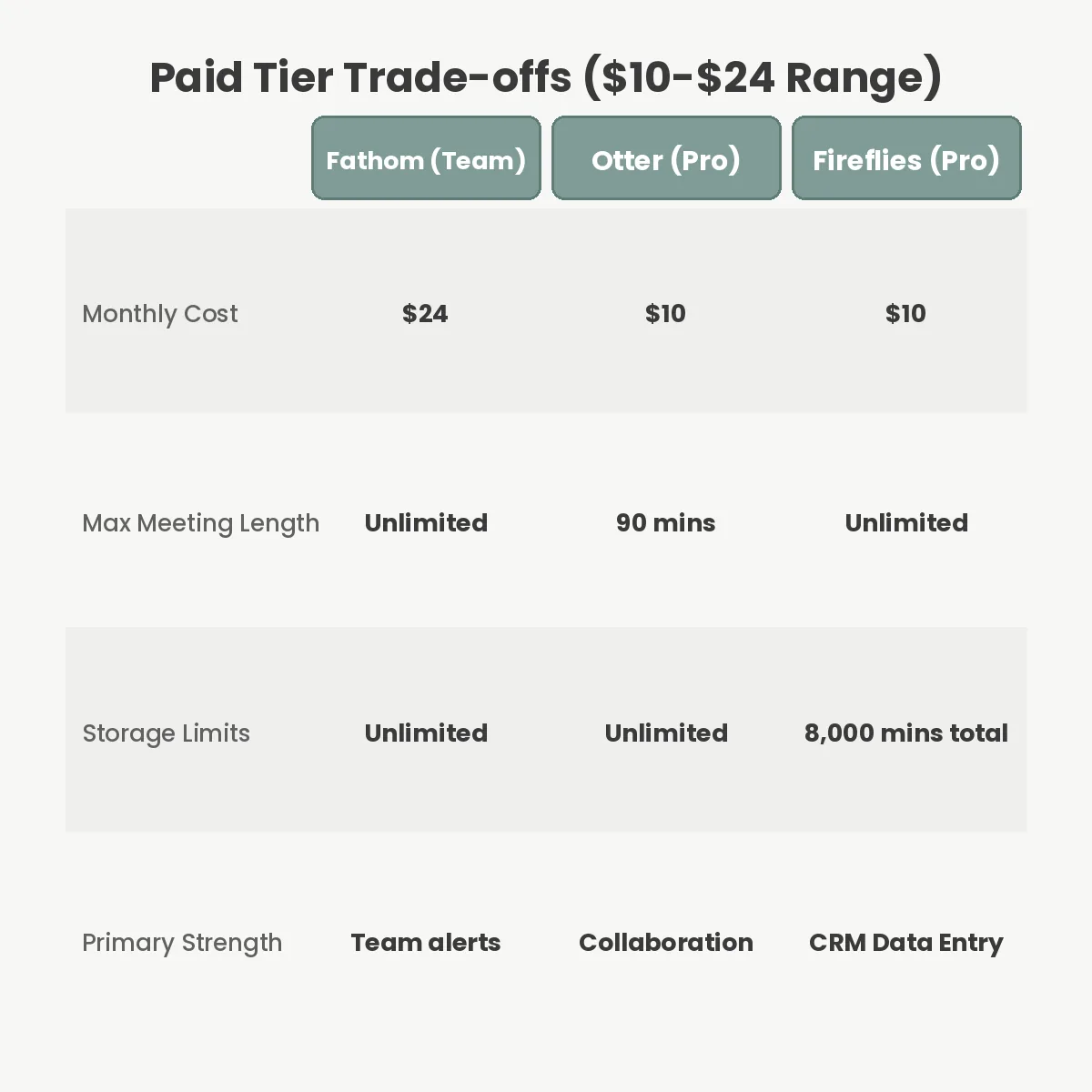
To make the right choice, you need to see exactly where these platforms draw the line on their entry-level paid plans. The table below outlines the exact constraints you will face when deploying these tools.
| Feature Limit | Fathom (Free) | Otter Pro ($10/mo) | Fireflies Pro ($10/mo) |
|---|---|---|---|
| Max Meeting Length | Unlimited | 90 minutes | Unlimited |
| Monthly Allowance | Unlimited | 1,200 minutes | Unlimited |
| Storage Limit | Unlimited | Unlimited | 8,000 minutes total |
| CRM Integrations | Limited (HubSpot/SFDC) | Basic | 40+ Native Apps |
Comparing these tools directly reveals where their business models diverge. Otter and Fireflies compete heavily at the $10 price point but structure their restrictions differently to appeal to either internal managers or external sales reps.
Feeding proprietary business discussions into a third-party server carries inherent security risks. Fathom, Otter, and Fireflies all hold SOC 2 Type 2 certifications, meaning independent auditors have verified their security controls. However, the critical detail is how they handle machine learning training data.
By default, many consumer AI services reserve the right to use anonymized platform data to improve their proprietary language models. You must explicitly navigate to the administrator settings and opt out of AI training. Fathom states clearly in its current privacy documentation that they do not train third-party AI models on user data, which gives them a distinct advantage for privacy-conscious organizations. If your team discusses unreleased product code, client financial data, or legal strategy, you should carefully review the latest GDPR compliance guidelines before deploying any recording bot.
The most frequent mistake administrators make during deployment is leaving the “Auto-Join” setting enabled for all calendar events. If you schedule a highly sensitive one-on-one performance review or a confidential HR disciplinary meeting, you do not want a transcription bot loudly announcing its presence in the waiting room. You must actively configure your assistant to only join meetings where you are the designated host, or strictly require manual invitations.
Another common failure mode occurs when companies attempt to use transcription bots as a complete replacement for active listening. A generated summary will perfectly highlight action items, but it routinely strips away the tone, hesitation, and emotional nuance of a conversation. If you rely solely on the AI summary rather than participating, you will miss the non-verbal cues indicating a client is quietly unhappy with a proposal. Treating these tools as assistants rather than replacements is critical for maintaining control over automated systems.
Finally, failing to manage storage limits on platforms like Fireflies will eventually cause older, potentially valuable transcripts to be overwritten or locked behind an upgrade wall. Establish a clear data retention policy from day one.
Yes, all major platforms allow you to disable the auto-join feature in your dashboard settings. You can configure the bot to only join meetings you manually invite it to, or set rules to exclude specific recurring calendar events like internal one-on-ones.
Yes. Fireflies supports over 60 languages, including Spanish, French, and German. Fathom supports 28 languages, while Otter.ai focuses primarily on English but has recently expanded its transcription engine to support varied accents and regional dialects.
If you hit the 300-minute free limit or 1,200-minute Pro limit on Otter.ai, the bot will immediately stop recording and transcribing new meetings until your billing cycle resets. You must upgrade to a higher tier to resume transcription services.
Legality depends entirely on your local jurisdiction. In two-party consent regions, you must clearly inform all participants they are being recorded. Most AI platforms now display a visible notification or require participants to click a consent prompt upon joining.
Choosing an AI meeting assistant requires matching the software’s structural limits to your daily schedule. If you are an independent worker focused on avoiding subscription fees, Fathom is the definitive choice. If your priority is building a searchable, collaborative database of project discussions, Otter.ai’s workspace provides the best interface. For sales teams that need to update HubSpot or Salesforce without manual data entry, Fireflies.ai justifies its cost on the first day. Audit your team’s average meeting length, review the platform limits carefully, and run a two-week pilot before fully connecting your calendar.
You Can Get More Information!