The Hidden Cost of Context Switching in Your Tech Stack
A financial breakdown of how much fragmented productivity apps and constant notification switching cost your enterprise.

Make email marketing simplified

Make email marketing simplified

Make email marketing simplified

Make email marketing simplified

Make email marketing simplified

Make email marketing simplified

Make email marketing simplified

Make email marketing simplified

Make email marketing simplified

Make email marketing simplified

Make email marketing simplified

Make email marketing simplified

Make email marketing simplified

Make email marketing simplified

Make email marketing simplified

We use cookies for our website to give you the most relevant experience by remembering your preferences. By clicking “accept”, you consent to use of ALL the cookies
This website uses cookies to improve your experience while you navigate through the website. Out of these, the cookies that are categorized as necessary are stored on your browser as they are essential for the working of basic functionalities of the website. We also use third-party cookies that help us analyze and understand how you use this website. These cookies will be stored in your browser only with your consent. You also have the option to opt-out of these cookies. But opting out of some of these cookies may affect your browsing experience.
Necessary cookies are absolutely essential for the website to function properly. These cookies ensure basic functionalities and security features of the website, anonymously.
| Cookie | Duration | Description |
|---|---|---|
| cookielawinfo-checkbox-functional | 11 months | This cookie is set by GDPR Cookie Consent plugin. The cookie is used to store the user consent for the cookies in the category “Analytics”. |
| cookielawinfo-checkbox-functional | 11 months | The cookie is set by GDPR cookie consent to record the user consent for the cookies in the category “Functional”. |
| cookielawinfo-checkbox-necessary | 11 months | This cookie is set by GDPR Cookie Consent plugin. The cookies is used to store the user consent for the cookies in the category “Necessary”. |
| cookielawinfo-checkbox-others | 11 months | This cookie is set by GDPR Cookie Consent plugin. The cookie is used to store the user consent for the cookies in the category “Other. |
| cookielawinfo-checkbox-performance | 11 months | This cookie is set by GDPR Cookie Consent plugin. The cookie is used to store the user consent for the cookies in the category “Performance”. |
| viewed_cookie_policy | 11 months | The cookie is set by the GDPR Cookie Consent plugin and is used to store whether or not user has consented to the use of cookies. It does not store any personal data. |
Functional cookies help to perform certain functionalities like sharing the content of the website on social media platforms, collect feedbacks, and other third-party features.
Performance cookies are used to understand and analyze the key performance indexes of the website which helps in delivering a better user experience for the visitors.
Analytical cookies are used to understand how visitors interact with the website. These cookies help provide information on metrics the number of visitors, bounce rate, traffic source, etc.
Advertisement cookies are used to provide visitors with relevant ads and marketing campaigns. These cookies track visitors across websites and collect information to provide customized ads.
Other uncategorized cookies are those that are being analyzed and have not been classified into a category as yet.
Cyberia Tech, Inc. respects your privacy. This Privacy Policy explains how we collect, use, and share your information. By using our services, you agree to this policy. If any other agreements conflict with this Privacy Policy, the terms of those agreements prevail.
Cyberia Tech complies with the EU-US and Swiss-US Privacy Shield Frameworks for handling personal data from the EEA, UK, and Switzerland. In case of any conflict, the Privacy Shield Principles prevail. Learn more at Privacy Shield. Key Definitions
Information linked to an individual, transferred from the EEA, UK, or Switzerland to the U.S.
Data revealing race, religion, health, sexual orientation, and similar categories.
Effective Date: [ 2026 / 11 / 25 ]
Welcome to The Cyberia Tech ! By accessing or using our website or services, you agree to
comply with and be bound by these Terms of Use and our Privacy Policy. If you do not agree with
these terms, please do not use our Services.
Loading
0 %
Your First Piece of the Puzzle in
Business Growth



Asynchronous communication tools allow team members to exchange information without requiring a simultaneous, real-time response, unlike synchronous apps that demand immediate presence. By defaulting to recorded videos, threaded documents, and status updates, asynchronous tools protect focused work hours while maintaining a searchable record of company decisions.
If you force your developers to monitor a chat channel all day, you are burning money. A massive behavioral study tracking 61,182 Microsoft employees over six months proved that how you communicate literally rewires your company. When synchronous interruptions take over, deep work dies. Deciding how to balance real-time chats with delayed responses is the core of building your modern productivity software stack. You need an architecture that makes asynchronous work the default and treats live meetings as an expensive, strictly rationed resource.
The distinction between synchronous vs asynchronous communication fundamentally comes down to how a system handles human presence and cognitive load. Synchronous tools require both the sender and the receiver to be actively engaged in the same virtual space at the exact same moment. Think of a live video call or a rapid-fire direct messaging session. The mechanism relies on immediate cognitive interrupts: your computer chimes, you drop what you are doing, and you process the incoming data stream in real time.
Asynchronous communication tools decouple the sending of a message from the receiving and processing of it. When a product manager leaves a detailed comment on a Figma file, the data rests in a queue until the designer actively fetches it. This architecture matters because human brains do not handle continuous context switching well. You are effectively choosing between running your team like a single-threaded processor constantly halting for new inputs, or a multi-threaded system that batches jobs efficiently.
| Feature | Synchronous (Sync) | Asynchronous (Async) |
|---|---|---|
| Presence Requirement | Simultaneous (both online at once) | Independent (consume on demand) |
| Response Expectation | Seconds to minutes | Hours to days |
| Cognitive Impact | High interruption, forces immediate context switches | Low interruption, supports deep concentrated work |
| Best Use Case | Emergencies, sensitive feedback, complex blockers | Status updates, documentation, initial briefs |
Every time a developer stops coding to answer a brief question in chat, the hidden cost of context switching hits your bottom line. It takes an average of twenty minutes for a human to re-enter a state of deep focus after a notification interrupt. Research by Cal Newport in his book Deep Work indicates that knowledge workers have a hard cognitive limit for focused, distraction-free “maker” work of roughly four hours per day. Sync tools eat those precious hours alive; async tools protect them by moving requests out of working memory and onto a searchable disk.
The software you buy brings its own cultural assumptions into your company. Buying an app that technically supports delayed responses does not mean your remote team will actually work asynchronously. The user interface (UX) dictates the behavior.
Consider Slack. Some tech analysts classify Slack as an asynchronous tool because you do not strictly have to reply immediately. The platform technically supports delayed workflows with its searchable history—though Slack’s free plan restricts searchable message history to the last 90 days and caps integrations at 10 apps. But Slack’s user interface is explicitly designed to incentivize synchronous behavior. The prominent green online dots, real-time typing indicators, and aggressive red unread badges create intense psychological pressure to stay online and reply instantly.
Contrast this with tools deliberately built for asynchronous workflows, such as Twist. True async collaboration apps intentionally omit status indicators and read receipts. By removing the surveillance features that are standard in modern SaaS, they strip away the anxiety of immediate presence. Choosing a tool that defaults to real-time presence when you want delayed, thoughtful answers is one of the most common enterprise software buying errors teams make today.
One major critique of asynchronous communication is that text lacks nuance. Written documentation is excellent for exact specifications, but terrible for conveying tone or visually demonstrating a complex bug in a user interface. If a developer needs to show how an animation stutters on page load, describing it in three paragraphs of text is highly inefficient. This is where async video bridges the gap.
Using a tool like Loom allows developers to record their screen, voice, and face simultaneously. Instead of scheduling a 30-minute synchronous meeting to walk a product owner through a new feature, the developer records a concise five-minute demonstration. The product owner watches it at 1.5x speed whenever their schedule permits. Loom’s free Starter tier limits workspaces to 50 members, 25 videos per person, and a maximum recording length of 5 minutes per video.
For larger teams requiring deeper technical demonstrations, the premium Business and Enterprise plans expand that recording limit to six hours. These tiers also include full AI capabilities like auto-summaries and auto-chapters, which allow viewers to skim the video asynchronously just like a text document. Notably, for architectural planning, customers who signed up for a Loom account after February 2026 have their accounts fully integrated into and billed through Atlassian Administration, simplifying procurement for teams already running Jira.
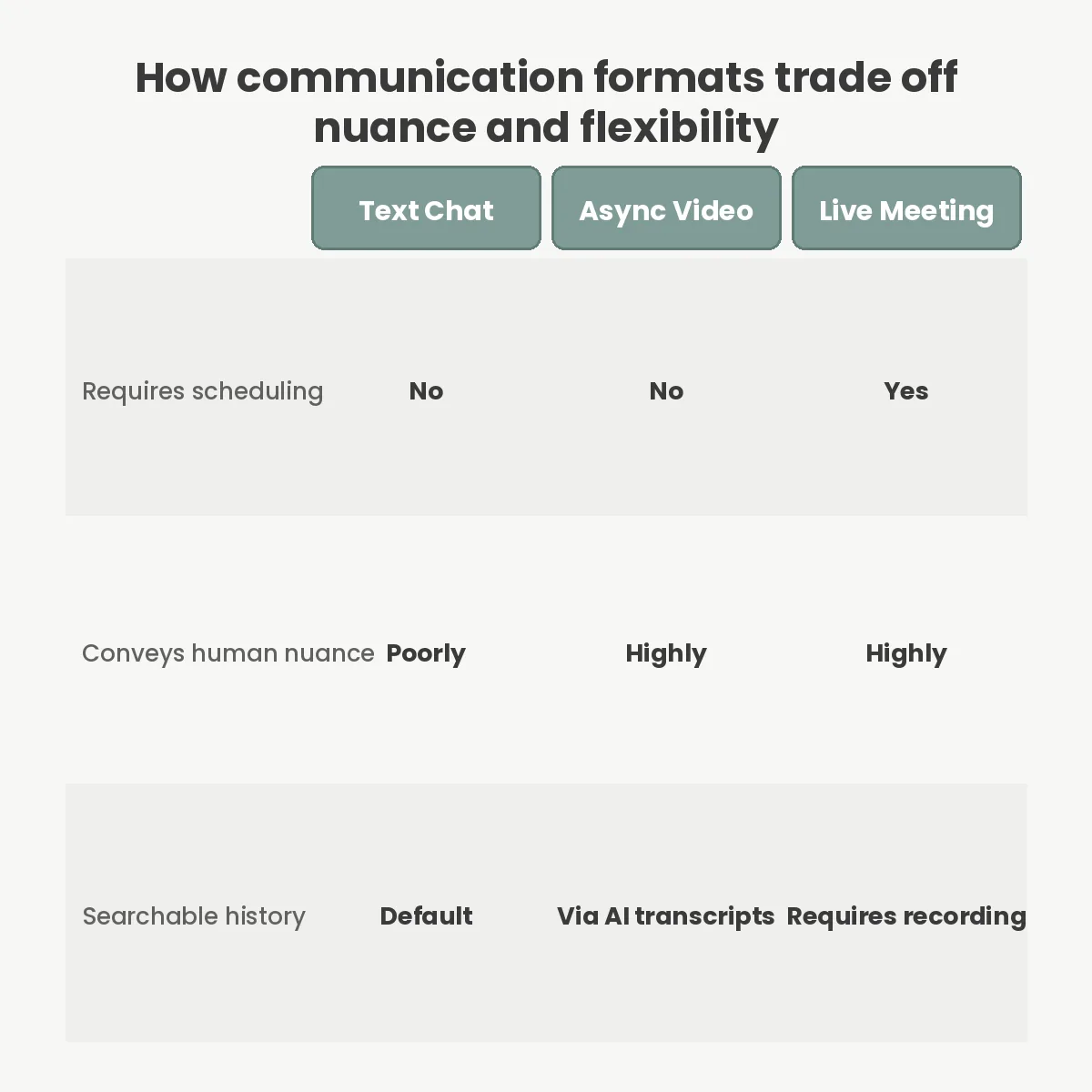
By shifting visual demonstrations to an async video format, you completely eliminate the scheduling tetris that paralyzes global teams operating across multiple time zones. You get the nuance of a live meeting without the synchronization penalty.
Transitioning to async collaboration apps yields measurable gains, provided the implementation is deliberate. The October 2026 Whimsical State of Async survey found that an overwhelming 82.9% of workers reported productivity gains from asynchronous work, while only 10.6% reported productivity losses.
Furthermore, the same survey noted that 52.8% of workers actively desire more async work in their day, compared to just 8.3% who want less. Yet, a massive disconnect exists between what workers want and what companies successfully implement. A 2023 Buffer survey revealed that only 32% of remote workers describe their current work setup as mostly or fully asynchronous.
Beyond individual output, there are direct financial savings tied to how you license your tools. For example, Slack operates a Fair Billing Policy, where workspaces automatically receive a prorated credit on their next billing statement if a paid member becomes inactive. By moving core work to async hubs and strictly reducing reliance on constant chat, fewer external contractors or peripheral staff require active, paid chat seats. Just as engineering teams evaluate migrating web app caching layers to lower backend compute costs, actively auditing your communication seats can significantly lower your frontend SaaS burn rate.
Despite the massive individual productivity gains, asynchronous communication is not flawless. If you simply cancel all real-time meetings without building a strong, searchable centralized architecture, you will break your company’s alignment. You trade interruption for isolation.
Remember the behavioral study tracking 61,182 Microsoft employees? That research uncovered a severe side effect of sudden remote isolation: as asynchronous communication rose, company collaboration networks became highly static and siloed. Because workers were heads-down in their own tasks and no longer bumping into colleagues in live spaces, the critical “weak tie” bridges between different departments eroded. Engineering stopped talking to sales; marketing lost touch with product development.
At the individual project execution level, 22% of workers report that async actually hinders team alignment. Critical project status updates often disappear into deep, nested comment threads that no one reopens. When updates are scattered across ten different written channels instead of centralized in one brief daily standup, the product owner loses sight of the critical path. If you do not actively curate your written documentation, your async stack becomes a graveyard of unread updates.
The most dangerous misconception about async-first remote team communication is that it completely outlaws live meetings. The reality is that the most successful remote companies treat synchronous communication as a deliberate escalation path, not an absolute enemy.
GitLab operates a fully distributed workforce of over 1,600 people across 60+ countries entirely on a written, async-default communication model. However, their official company handbook dictates a strict, non-negotiable circuit breaker: if a written conversation goes back and forth three times asynchronously without reaching a resolution, employees are required to stop typing and transition to a synchronous video call.
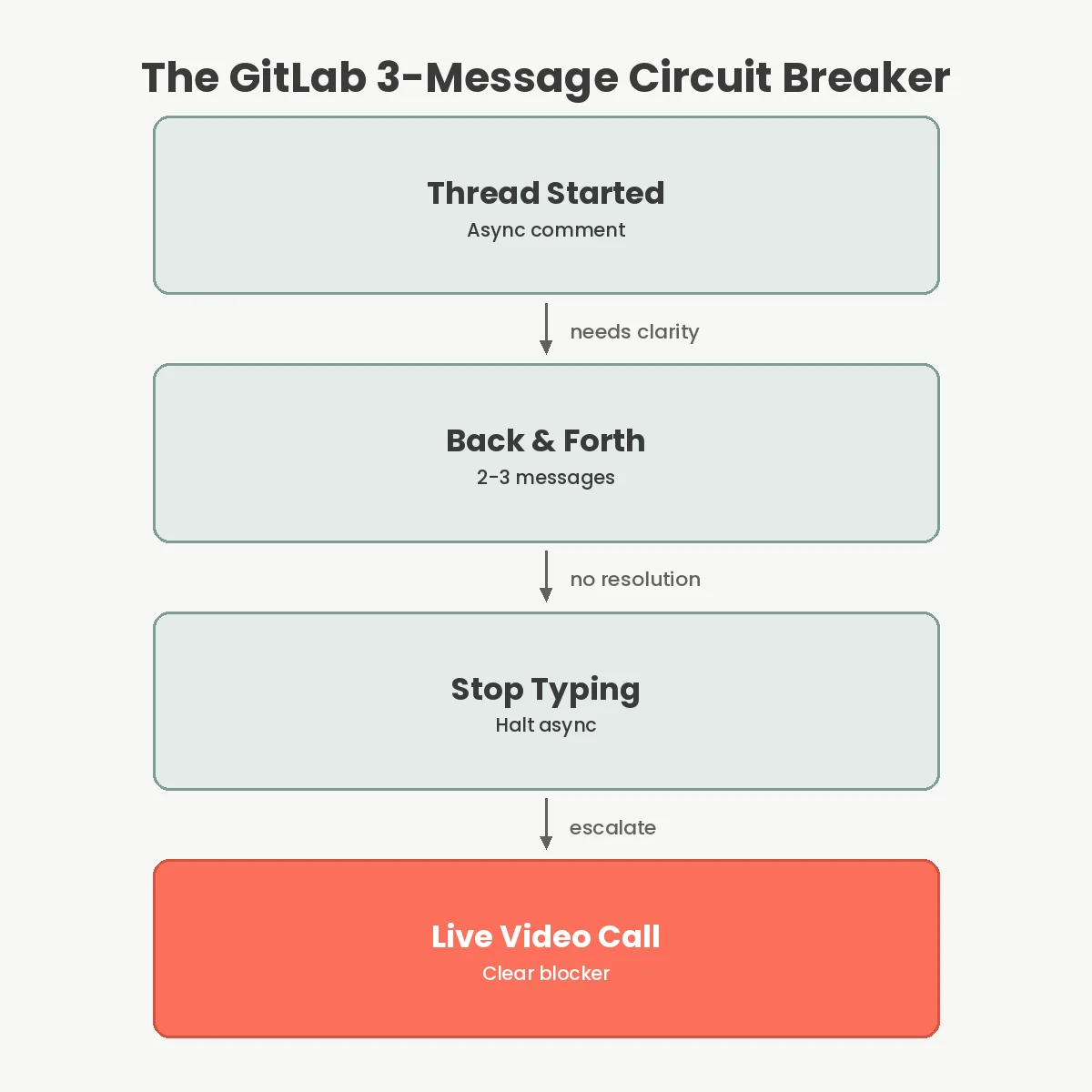
This simple mechanical rule prevents the slow, agonizing death of a project via endless comment threads. If two lead developers are arguing over how to route database calls—perhaps debating the nuances between Zapier and Make—and cannot agree after three messages, they jump on a live call.
They resolve the architectural blocker in five minutes of high-bandwidth sync communication, document the final decision back in the async system, and immediately return to their deep work. The goal is not zero meetings; the goal is zero wasted meetings.
Choosing the right asynchronous communication tools is about much more than picking software with the cheapest per-user pricing tier. It requires a fundamental, architectural shift in how your team perceives presence, urgency, and productivity.
Start by auditing the default settings on your current software. Force notifications to bundle on a schedule rather than arriving instantly. Turn off the green active dots and read receipts that artificially manufacture urgency. Above all, implement clear, written rules for escalation so your engineers know exactly when they are permitted to interrupt someone else’s flow state, and when they must respect the queue.
An asynchronous communication tool is software that allows users to send, receive, and process information without requiring both parties to be online simultaneously. Examples include email, recorded video platforms like Loom, and threaded project management boards where tasks are updated on demand.
While Slack technically supports asynchronous work through its searchable history and video clips, its user interface heavily promotes synchronous behavior. Features like typing indicators, unread notification badges, and green online dots create intense psychological pressure for immediate, real-time responses.
Remote teams prefer asynchronous communication because it easily accommodates multiple global time zones and protects deep work hours. By decoupling message delivery from response time, developers and designers can execute complex tasks without continuous cognitive interruptions from live pings.
To prevent stalling, teams must establish strict escalation rules. For example, if a team member cannot resolve an issue after three written back-and-forth exchanges, they should immediately schedule a synchronous video call to clear the blocker, then document the outcome asynchronously.
Your ultimate goal is to architect your communication stack so that deep work is fiercely protected, and live collaboration is reserved strictly for high-value emergencies. If you want to increase your team’s velocity in 2026, stop asking them to reply faster. Ask them to reply better, on their own schedule.
You Can Get More Information!