Microsoft Loop vs Notion: Choosing the Right Workspace App
Microsoft Loop and Notion serve fundamentally different purposes, despite their...

Make email marketing simplified

Make email marketing simplified

Make email marketing simplified

Make email marketing simplified

Make email marketing simplified

Make email marketing simplified

Make email marketing simplified

Make email marketing simplified

Make email marketing simplified

Make email marketing simplified

Make email marketing simplified

Make email marketing simplified

Make email marketing simplified

Make email marketing simplified

Make email marketing simplified

We use cookies for our website to give you the most relevant experience by remembering your preferences. By clicking “accept”, you consent to use of ALL the cookies
This website uses cookies to improve your experience while you navigate through the website. Out of these, the cookies that are categorized as necessary are stored on your browser as they are essential for the working of basic functionalities of the website. We also use third-party cookies that help us analyze and understand how you use this website. These cookies will be stored in your browser only with your consent. You also have the option to opt-out of these cookies. But opting out of some of these cookies may affect your browsing experience.
Necessary cookies are absolutely essential for the website to function properly. These cookies ensure basic functionalities and security features of the website, anonymously.
| Cookie | Duration | Description |
|---|---|---|
| cookielawinfo-checkbox-functional | 11 months | This cookie is set by GDPR Cookie Consent plugin. The cookie is used to store the user consent for the cookies in the category “Analytics”. |
| cookielawinfo-checkbox-functional | 11 months | The cookie is set by GDPR cookie consent to record the user consent for the cookies in the category “Functional”. |
| cookielawinfo-checkbox-necessary | 11 months | This cookie is set by GDPR Cookie Consent plugin. The cookies is used to store the user consent for the cookies in the category “Necessary”. |
| cookielawinfo-checkbox-others | 11 months | This cookie is set by GDPR Cookie Consent plugin. The cookie is used to store the user consent for the cookies in the category “Other. |
| cookielawinfo-checkbox-performance | 11 months | This cookie is set by GDPR Cookie Consent plugin. The cookie is used to store the user consent for the cookies in the category “Performance”. |
| viewed_cookie_policy | 11 months | The cookie is set by the GDPR Cookie Consent plugin and is used to store whether or not user has consented to the use of cookies. It does not store any personal data. |
Functional cookies help to perform certain functionalities like sharing the content of the website on social media platforms, collect feedbacks, and other third-party features.
Performance cookies are used to understand and analyze the key performance indexes of the website which helps in delivering a better user experience for the visitors.
Analytical cookies are used to understand how visitors interact with the website. These cookies help provide information on metrics the number of visitors, bounce rate, traffic source, etc.
Advertisement cookies are used to provide visitors with relevant ads and marketing campaigns. These cookies track visitors across websites and collect information to provide customized ads.
Other uncategorized cookies are those that are being analyzed and have not been classified into a category as yet.
Cyberia Tech, Inc. respects your privacy. This Privacy Policy explains how we collect, use, and share your information. By using our services, you agree to this policy. If any other agreements conflict with this Privacy Policy, the terms of those agreements prevail.
Cyberia Tech complies with the EU-US and Swiss-US Privacy Shield Frameworks for handling personal data from the EEA, UK, and Switzerland. In case of any conflict, the Privacy Shield Principles prevail. Learn more at Privacy Shield. Key Definitions
Information linked to an individual, transferred from the EEA, UK, or Switzerland to the U.S.
Data revealing race, religion, health, sexual orientation, and similar categories.
Effective Date: [ 2026 / 11 / 06 ]
Welcome to The Cyberia Tech ! By accessing or using our website or services, you agree to
comply with and be bound by these Terms of Use and our Privacy Policy. If you do not agree with
these terms, please do not use our Services.
Loading
0 %
Your First Piece of the Puzzle in
Business Growth



Microsoft Loop and Notion serve fundamentally different purposes, despite their visual similarities. Notion is a page-centric workspace designed to build complex, interconnected wikis and databases, while Microsoft Loop is a component-centric engine that embeds live, syncing fragments of work directly into your Teams chats and Outlook emails.
Your team’s collaboration platform dictates how fast you move. Pick the wrong workspace app, and you create isolated data silos that require endless copying and pasting. If you try to force a sprawling company wiki into Microsoft Loop, or demand instant, cross-application real-time sync from Notion, your workflows will break. Understanding the architectural differences between Notion’s structured databases and Loop’s Fluid Framework is the only way to avoid a costly migration six months from now.
When you open Notion, you start with a blank page. That page can house text, boards, and relational databases. You build up a structured hierarchy, creating an organized library of company knowledge. It acts as a destination—you have to leave your communication tools and open Notion to do your work. While it excels at structure, heavily loaded pages with over 10,000 blocks can occasionally experience rendering lag.
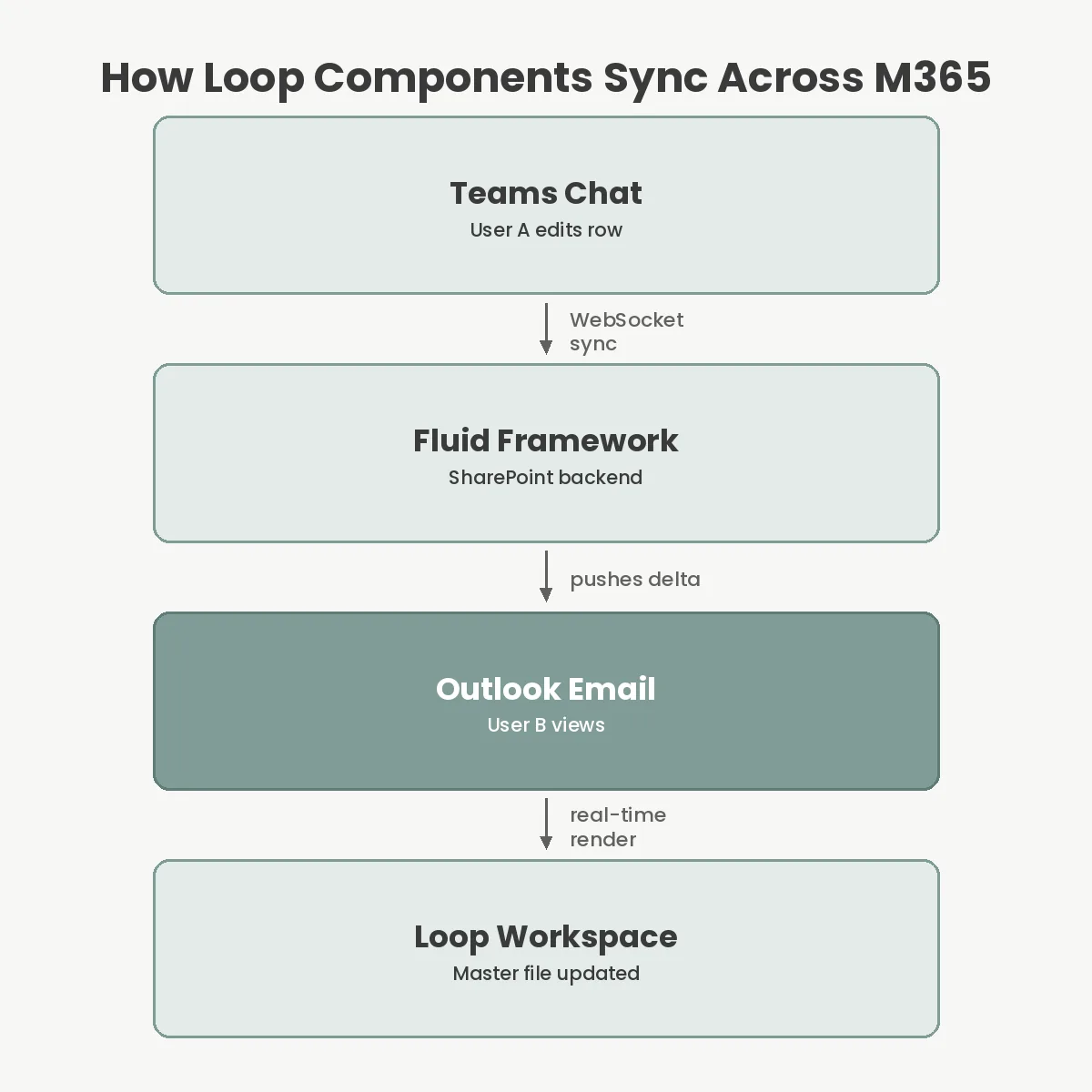
Microsoft Loop operates in reverse. Instead of forcing you to visit a central page, Loop pushes the work to where you already are. Under the hood, Loop’s Fluid Framework leverages WebSockets to maintain a persistent connection between clients. When two users edit a table simultaneously in different apps—one in Teams, one in Outlook—the framework synchronizes the differential changes in milliseconds without locking the file.
This resolves the classic SharePoint problem where documents get locked for editing by a single user. This means Notion is a destination for your data, while Loop is a highly portable distribution method. If your team practically lives inside Microsoft 365, Loop reduces the friction of context-switching. If you rely on standalone apps, Notion provides the structural integrity a growing business needs.
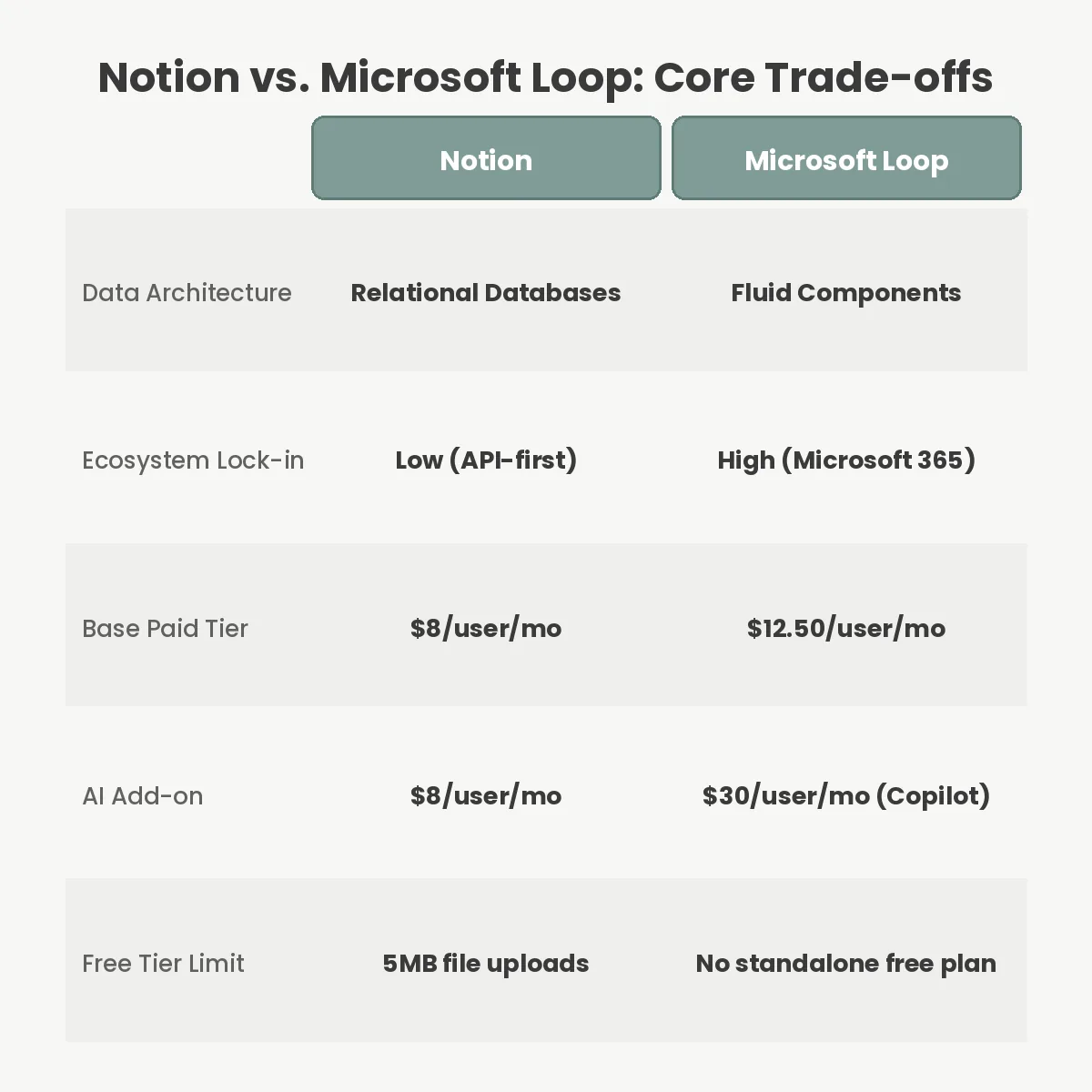
Cost structures between the two platforms cater to very different buyers. Checking the Notion official pricing page reveals a generous Free plan, though it strictly restricts file uploads to 5MB per file. To remove this limit and unlock team collaboration, you need the Notion Plus plan, which costs $8 per user per month when billed annually.
Microsoft Loop is not sold as a standalone subscription. It is bundled directly into existing enterprise licenses. To get full access to the Loop app, your organization needs Microsoft 365 Business Standard, which runs $12.50 per user per month, or a higher-tier enterprise plan. If you are already paying for Microsoft 365 to get Word, Excel, and Teams, Loop is effectively free.
For AI capabilities, both charge a premium. Notion AI is an add-on that costs $8 per user per month. Microsoft’s equivalent, Copilot for Microsoft 365—which integrates heavily into Loop to generate pages and summarize components—is a significantly steeper investment at $30 per user per month.
Notion’s biggest advantage is its relational database engine. You can create a master task list, then create a dozen different views—Kanban boards, calendars, Gantt charts, and galleries—filtered by department or sprint. Notion’s databases are technically materialized views. When you create a board view and a calendar view of the same data, you are not duplicating the information.
You are simply querying the underlying database with different filters. This means you can create a master task database for the entire company, and then embed a filtered view on the Marketing team’s dashboard showing only tasks tagged ‘Marketing’. This level of custom architecture is why Notion can act as a lightweight custom software solution for teams.
Loop lacks relational databases entirely. Its tables are simple spreadsheets without complex rollups or formula constraints. Instead, Loop wins on frictionless sharing. Both tools support heavy automation, but through different avenues. Notion connects beautifully to third-party ecosystems via platforms like Zapier, making it easy to build complex automation sequences.
Before committing, you need to understand what you are trading away. The biggest limitation with Microsoft Loop is data portability. According to the Microsoft Loop documentation, because Loop components are effectively proprietary Fluid Framework files stored in SharePoint, exporting them is incredibly restrictive. You can export to Microsoft Word or a PDF, but extracting a massive workspace in Markdown is nearly impossible.
Notion suffers from its own distinct drawbacks, primarily around offline access. Despite years of user requests, Notion still lacks a true, local offline mode. If you lose your internet connection on a flight, you cannot reliably access or edit your workspace. Loop’s architecture also makes offline access incredibly difficult, because a live component fundamentally requires a server connection to broker the state changes.
Security and compliance also differ. Loop inherits your organization’s overarching Microsoft Purview data loss prevention policies automatically. Securing Notion requires configuring its distinct enterprise tier, which operates outside your existing Microsoft or Google Workspace security perimeter.
The most frequent failure mode when adopting Loop is trying to treat it like an exact Notion clone. If you try to build a massive, interconnected company wiki in Loop, you will immediately hit a wall. The navigation is too shallow, and the lack of relational databases means your documents will become disorganized fast. If you need a dense knowledge base, you are much better off comparing Notion to Confluence.
Conversely, teams fail with Notion when they overcomplicate the architecture. Because you can build almost anything in Notion, managers often construct wildly complex databases with dozens of mandatory fields. This friction discourages daily use. When team members resort to sharing meeting notes in Slack rather than filling out your massive Notion template, your system has failed.
Another major mistake is ignoring meeting workflows. If you use external AI meeting assistants to capture transcripts, feeding that data into Notion via API is straightforward. Getting third-party AI summaries directly into a Loop component is much harder unless you pay the premium for Microsoft Copilot.
| Feature | Notion | Microsoft Loop |
|---|---|---|
| Core Architecture | Page-centric & Relational Databases | Component-centric (Fluid Framework) |
| Starting Price | $8/user/mo (Plus Plan) | $12.50/user/mo (M365 Business Standard) |
| AI Add-on Cost | $8/user/month | $30/user/month (Copilot) |
| Data Portability | Excellent (Markdown, CSV, PDF) | Poor (Word, PDF, SharePoint lock-in) |
No, Microsoft Loop cannot fully replace Notion for complex use cases. Loop lacks the relational databases, varied custom views, and deep organizational hierarchy that Notion offers. It is best used for active, fast-moving collaboration rather than serving as a permanent, structured company wiki.
Notion does have a Microsoft Teams integration that allows you to unfurl links and get notifications, but it is not native. Unlike Loop components, which render live, editable tables directly inside the chat interface, Notion links simply bounce you out to your browser.
Yes, Microsoft Loop components are highly secure. They are stored natively in your organization’s SharePoint and OneDrive instances, meaning they automatically inherit all your existing Microsoft Purview data loss prevention, eDiscovery, and compliance policies out of the box.
Notion is vastly superior for personal use. Its generous free tier includes almost every core feature, only capping file uploads at 5MB. Microsoft Loop is strictly an enterprise tool; while there is a lightweight personal version, it lacks the true power of the Microsoft integration.
Your choice comes down to your current software stack. If your company already pays for Microsoft 365, uses Microsoft Teams heavily, and struggles with document version control via email, Microsoft Loop will solve your immediate collaboration problems at zero extra software cost. It reduces the friction of opening new tabs and keeps conversations adjacent to the work.
However, if you need a true operating system for your business, Notion remains unmatched. Its relational databases, flexible page hierarchy, and highly customizable interfaces make it the obvious choice for startups, design teams, and anyone who needs their documentation to scale structurally. Pick Loop for speed and Microsoft integration, but choose Notion for permanent, structured organizational memory.