Notion vs Confluence: Which Knowledge Base Fits Your Team?
Confluence is best for engineering teams heavily invested in Jira...

Make email marketing simplified

Make email marketing simplified

Make email marketing simplified

Make email marketing simplified

Make email marketing simplified

Make email marketing simplified

Make email marketing simplified

Make email marketing simplified

Make email marketing simplified

Make email marketing simplified

Make email marketing simplified

Make email marketing simplified

Make email marketing simplified

Make email marketing simplified

Make email marketing simplified

We use cookies for our website to give you the most relevant experience by remembering your preferences. By clicking “accept”, you consent to use of ALL the cookies
This website uses cookies to improve your experience while you navigate through the website. Out of these, the cookies that are categorized as necessary are stored on your browser as they are essential for the working of basic functionalities of the website. We also use third-party cookies that help us analyze and understand how you use this website. These cookies will be stored in your browser only with your consent. You also have the option to opt-out of these cookies. But opting out of some of these cookies may affect your browsing experience.
Necessary cookies are absolutely essential for the website to function properly. These cookies ensure basic functionalities and security features of the website, anonymously.
| Cookie | Duration | Description |
|---|---|---|
| cookielawinfo-checkbox-functional | 11 months | This cookie is set by GDPR Cookie Consent plugin. The cookie is used to store the user consent for the cookies in the category “Analytics”. |
| cookielawinfo-checkbox-functional | 11 months | The cookie is set by GDPR cookie consent to record the user consent for the cookies in the category “Functional”. |
| cookielawinfo-checkbox-necessary | 11 months | This cookie is set by GDPR Cookie Consent plugin. The cookies is used to store the user consent for the cookies in the category “Necessary”. |
| cookielawinfo-checkbox-others | 11 months | This cookie is set by GDPR Cookie Consent plugin. The cookie is used to store the user consent for the cookies in the category “Other. |
| cookielawinfo-checkbox-performance | 11 months | This cookie is set by GDPR Cookie Consent plugin. The cookie is used to store the user consent for the cookies in the category “Performance”. |
| viewed_cookie_policy | 11 months | The cookie is set by the GDPR Cookie Consent plugin and is used to store whether or not user has consented to the use of cookies. It does not store any personal data. |
Functional cookies help to perform certain functionalities like sharing the content of the website on social media platforms, collect feedbacks, and other third-party features.
Performance cookies are used to understand and analyze the key performance indexes of the website which helps in delivering a better user experience for the visitors.
Analytical cookies are used to understand how visitors interact with the website. These cookies help provide information on metrics the number of visitors, bounce rate, traffic source, etc.
Advertisement cookies are used to provide visitors with relevant ads and marketing campaigns. These cookies track visitors across websites and collect information to provide customized ads.
Other uncategorized cookies are those that are being analyzed and have not been classified into a category as yet.
Cyberia Tech, Inc. respects your privacy. This Privacy Policy explains how we collect, use, and share your information. By using our services, you agree to this policy. If any other agreements conflict with this Privacy Policy, the terms of those agreements prevail.
Cyberia Tech complies with the EU-US and Swiss-US Privacy Shield Frameworks for handling personal data from the EEA, UK, and Switzerland. In case of any conflict, the Privacy Shield Principles prevail. Learn more at Privacy Shield. Key Definitions
Information linked to an individual, transferred from the EEA, UK, or Switzerland to the U.S.
Data revealing race, religion, health, sexual orientation, and similar categories.
Effective Date: [ 2026 / 11 / 01 ]
Welcome to The Cyberia Tech ! By accessing or using our website or services, you agree to
comply with and be bound by these Terms of Use and our Privacy Policy. If you do not agree with
these terms, please do not use our Services.
Loading
0 %
Your First Piece of the Puzzle in
Business Growth



Confluence is best for engineering teams heavily invested in Jira that require strict, top-down document hierarchies and compliance features, while Notion is the better choice for cross-functional teams needing flexible, database-driven workspaces where marketing, design, and product collaborate.
Your company’s collective intelligence lives in your documentation. If your team cannot find standard operating procedures, project briefs, or meeting notes, you are paying them to search instead of work. Moving to a centralized knowledge base forces a decision between two distinct philosophies: Atlassian’s structured Confluence and the highly flexible Notion workspace. Picking the wrong system creates information silos, abandoned wikis, and frustrated employees.
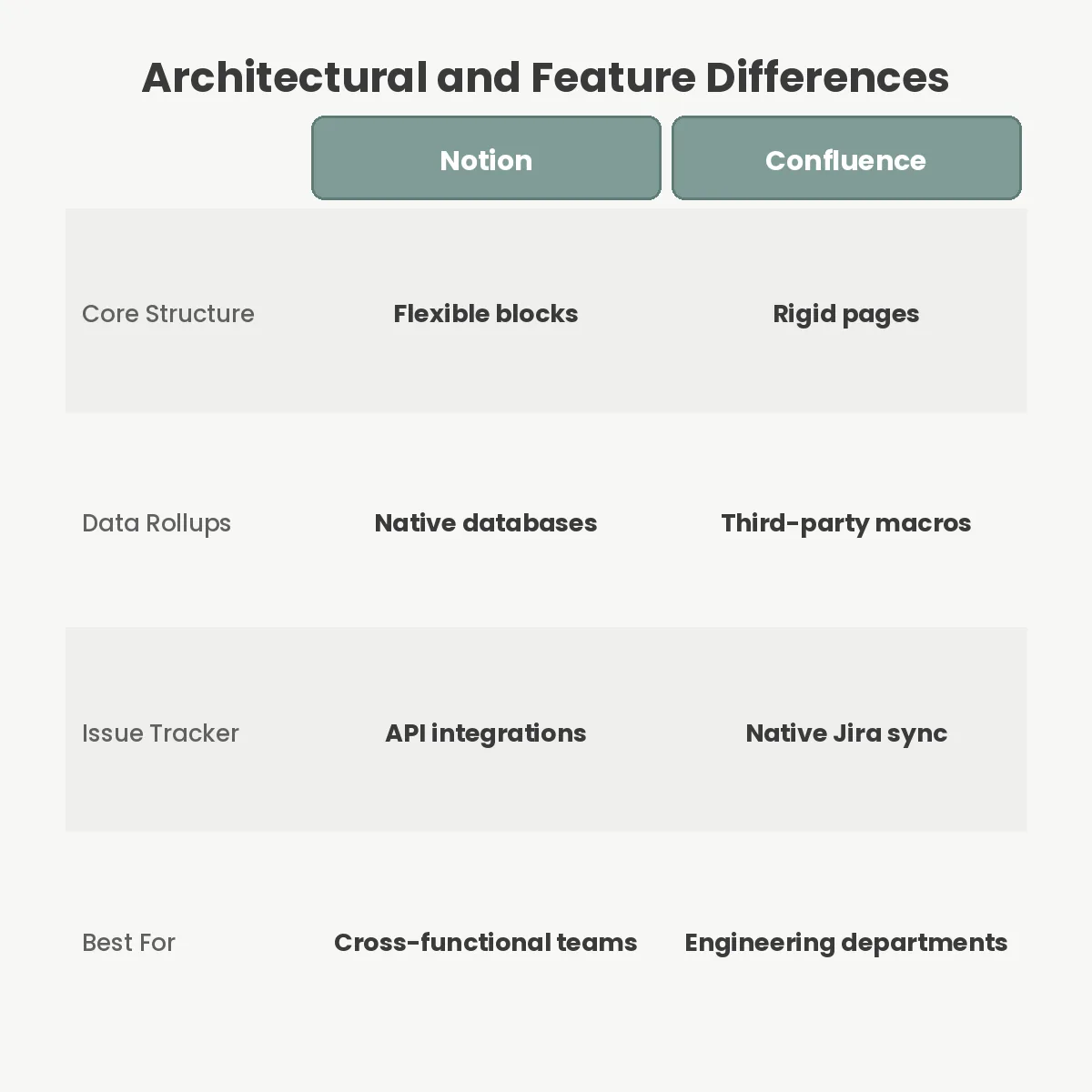
Software architecture dictates how your team organizes its thoughts. Confluence relies on a traditional page tree format. It acts like a digital filing cabinet where every document lives inside a specific space, nested under a parent page. This hierarchical design mirrors how most corporations structure their internal departments. If you put a document in the human resources folder, it stays exactly there.
Notion takes an entirely different approach by treating everything as a block. A paragraph of text, an image, a task checkbox, or an entire nested table are all independent modules. Because these blocks are modular, you can embed functional databases directly inside your pages and filter them dynamically based on user tags or project status.
This difference changes how documents surface across your organization. Instead of copying a meeting note into a client folder and an active project folder, Notion allows you to create one database entry and tag it. The note appears automatically in any workspace view filtering for those tags. This prevents out-of-date duplicate documents from circulating as you begin consolidating enterprise SaaS vendors and streamlining operations.
Base subscription costs rarely tell the whole story for enterprise software. Confluence Standard costs $6.05 per user per month for growing teams, offering a highly predictable expense model. Notion Plus runs slightly higher at $8 per user per month when billed annually, or $10 on a month-to-month plan.
Generative capabilities drastically alter this math. Both companies recently integrated artificial intelligence directly into their editors, but they charge for it differently. Notion treats its AI tools as an optional add-on, charging an extra $8 per user per month on top of the base subscription. If you want Notion AI on the Plus tier, your total cost doubles to $16 per user.
Atlassian bundles its Atlassian Intelligence features into its Premium tier, which costs $11.55 per user per month. For companies that view AI summarization and writing assistance as mandatory requirements, Confluence Premium provides a cheaper per-seat cost than outfitting a team with Notion Plus and the AI add-on.

A knowledge base cannot exist in a vacuum; it must communicate with the tools your staff already uses. Confluence holds a massive advantage for technical teams because it natively connects with Jira. This creates a two-way sync where a project manager can embed live Jira issues directly into a Confluence product requirements document. When an engineer updates the ticket status in Jira, the Confluence page updates instantly without manual intervention.
Notion counters this with broad, third-party flexibility. While it offers a basic Jira sync, its real power lies in custom API connections. By automating workflows between apps, teams can push Slack messages, Google Calendar events, and GitHub commits directly into Notion databases. It serves as a blank canvas for operations managers who want to build custom internal tooling without writing code.
Before committing, audit what software your teams refuse to give up. If your engineering department relies on the Atlassian stack, forcing them into a different ecosystem will create friction. If your marketing team lives in Figma and external web apps, they will benefit more from Notion’s embedding capabilities.
Total freedom often leads to total chaos. Notion’s flexibility is its biggest trap. Because any user can create a new database or nest pages infinitely, workspaces frequently devolve into a messy web of orphaned documents. Without strict administrative templates and enforcement, employees build custom views that make sense only to them, alienating the rest of the company.
Confluence’s rigid structure prevents this exact failure mode. The software forces you to pick a space and a parent page before you start typing. It also relies on a cascading permission structure. If you restrict a parent page, all child pages inherit that restriction automatically. This makes passing compliance audits significantly easier because access control is predictable and centrally managed.
You can mitigate access risks in flexible tools by enforcing strict authentication policies. Using a team password manager and single sign-on (SSO) ensures that offboarded employees immediately lose access to internal wikis, regardless of how messy the internal permissions have become.
Knowledge bases assume you have a fast, permanent internet connection. Neither platform excels at offline work, which becomes a severe limitation for teams that travel frequently or operate in secure, air-gapped environments.
Notion caches recently opened pages in your browser or desktop app. If you lose your connection, you can edit these cached documents, and the system syncs your changes once you return online. However, you cannot proactively download an entire workspace or a large database for an upcoming flight. If you did not open the page recently, it remains inaccessible.
Confluence provides better export tools for long-term archiving. Administrators can export entire spaces as PDF documents, HTML files, or XML backups. Atlassian’s enterprise documentation highlights this as a core feature for strict regulatory compliance, ensuring that records remain readable outside the proprietary software environment.
Beyond the philosophical differences, the mechanics of how you format text matter. Notion offers an exceptionally clean writing experience. You type a forward slash to bring up a menu of 50 different content types, from toggle headings to Kanban boards. This minimalist interface gets out of the way, encouraging team members to actually write documentation.
Confluence feels closer to Microsoft Word. It utilizes a static toolbar across the top of the editor and relies heavily on Macros to insert complex elements like roadmaps or charts. While this feels clunky to modern web users, it offers deep, granular formatting control that technical writers require for complex software documentation.
To see how both platforms update their capabilities, you can track their developer ecosystems. The Notion API changelog shows a steady addition of automation hooks, while Atlassian focuses heavily on enterprise security enhancements and data residency controls.
Pick your tool based on how your company manages approvals and workflows. If your organization operates strictly top-down, demands granular compliance tracking, and runs engineering sprints through Jira, buy Confluence. Its rigidity is a feature that enforces organizational discipline.
If you run agile, cross-functional squads where marketing, design, and development need a shared, adaptable workspace, get Notion. Its database architecture allows different departments to view the exact same data through entirely different lenses.
Sign up for a trial of both platforms, map out one real, active project, and invite a small pilot group. The software your team actually updates without being reminded is the one you should purchase.
Yes, Notion provides a native importer tool that converts Confluence spaces into nested pages. However, you will lose specialized macros and Jira-specific formatting during the transfer. Plan for significant manual cleanup if your workspace relies heavily on custom Atlassian plugins.
Yes, Confluence offers a free tier that supports up to 10 users. It includes basic access controls and standard page creation but limits storage to 2 gigabytes and removes advanced permissions. Growing teams usually hit this ceiling within their first year.
Neither tool handles offline editing perfectly, but Notion caches recently opened pages for offline access. If you lose internet connection, you can edit cached documents, and the software will sync changes once you reconnect. You cannot download an entire workspace offline.
You do not need Jira to use Confluence, but its primary advantage is that native integration. If your company uses alternative project management tools, Confluence behaves like a standard wiki, and you miss out on the automated status tracking features.
You Can Get More Information!