Postgres Connection Pooling Architectures: PgBouncer, PgCat, and RDS Proxy Analyzed
Postgres connection pooling reduces database memory exhaustion by multiplexing thousands...

Make email marketing simplified

Make email marketing simplified

Make email marketing simplified

Make email marketing simplified

Make email marketing simplified

Make email marketing simplified

Make email marketing simplified

Make email marketing simplified

Make email marketing simplified

Make email marketing simplified

Make email marketing simplified

Make email marketing simplified

Make email marketing simplified

Make email marketing simplified

Make email marketing simplified

We use cookies for our website to give you the most relevant experience by remembering your preferences. By clicking “accept”, you consent to use of ALL the cookies
This website uses cookies to improve your experience while you navigate through the website. Out of these, the cookies that are categorized as necessary are stored on your browser as they are essential for the working of basic functionalities of the website. We also use third-party cookies that help us analyze and understand how you use this website. These cookies will be stored in your browser only with your consent. You also have the option to opt-out of these cookies. But opting out of some of these cookies may affect your browsing experience.
Necessary cookies are absolutely essential for the website to function properly. These cookies ensure basic functionalities and security features of the website, anonymously.
| Cookie | Duration | Description |
|---|---|---|
| cookielawinfo-checkbox-functional | 11 months | This cookie is set by GDPR Cookie Consent plugin. The cookie is used to store the user consent for the cookies in the category “Analytics”. |
| cookielawinfo-checkbox-functional | 11 months | The cookie is set by GDPR cookie consent to record the user consent for the cookies in the category “Functional”. |
| cookielawinfo-checkbox-necessary | 11 months | This cookie is set by GDPR Cookie Consent plugin. The cookies is used to store the user consent for the cookies in the category “Necessary”. |
| cookielawinfo-checkbox-others | 11 months | This cookie is set by GDPR Cookie Consent plugin. The cookie is used to store the user consent for the cookies in the category “Other. |
| cookielawinfo-checkbox-performance | 11 months | This cookie is set by GDPR Cookie Consent plugin. The cookie is used to store the user consent for the cookies in the category “Performance”. |
| viewed_cookie_policy | 11 months | The cookie is set by the GDPR Cookie Consent plugin and is used to store whether or not user has consented to the use of cookies. It does not store any personal data. |
Functional cookies help to perform certain functionalities like sharing the content of the website on social media platforms, collect feedbacks, and other third-party features.
Performance cookies are used to understand and analyze the key performance indexes of the website which helps in delivering a better user experience for the visitors.
Analytical cookies are used to understand how visitors interact with the website. These cookies help provide information on metrics the number of visitors, bounce rate, traffic source, etc.
Advertisement cookies are used to provide visitors with relevant ads and marketing campaigns. These cookies track visitors across websites and collect information to provide customized ads.
Other uncategorized cookies are those that are being analyzed and have not been classified into a category as yet.
Cyberia Tech, Inc. respects your privacy. This Privacy Policy explains how we collect, use, and share your information. By using our services, you agree to this policy. If any other agreements conflict with this Privacy Policy, the terms of those agreements prevail.
Cyberia Tech complies with the EU-US and Swiss-US Privacy Shield Frameworks for handling personal data from the EEA, UK, and Switzerland. In case of any conflict, the Privacy Shield Principles prevail. Learn more at Privacy Shield. Key Definitions
Information linked to an individual, transferred from the EEA, UK, or Switzerland to the U.S.
Data revealing race, religion, health, sexual orientation, and similar categories.
Effective Date: [ 2026 / 11 / 15 ]
Welcome to The Cyberia Tech ! By accessing or using our website or services, you agree to
comply with and be bound by these Terms of Use and our Privacy Policy. If you do not agree with
these terms, please do not use our Services.
Loading
0 %
Your First Piece of the Puzzle in
Business Growth



An AI scheduling assistant automatically rearranges your calendar based on task priorities, meetings, and deadlines. For aggressive to-do list management, Motion is the strongest choice. If you want to protect daily habits, choose Reclaim. To optimize team meeting placements and free up uninterrupted blocks, Clockwise wins.
You start Monday with a pristine calendar. By Tuesday afternoon, three urgent meetings have overwritten your work blocks, and your to-do list is permanently derailed. Manual calendar management costs the average knowledge worker hours every single week. AI scheduling assistants promise to fix this by treating your time as fluid, automatically moving tasks when life gets in the way. You have to choose the right algorithm for how your team actually operates, because delegating your calendar to software fundamentally changes how you work.
Standard calendars are static. If you block an hour for a task and someone schedules over it, that task is simply buried. AI scheduling assistants replace this static grid with a priority-based logic engine. You input tasks with duration estimates, priority levels, and deadlines. The software then acts as a continuous background processor, reading your available calendar slots and placing tasks into them.
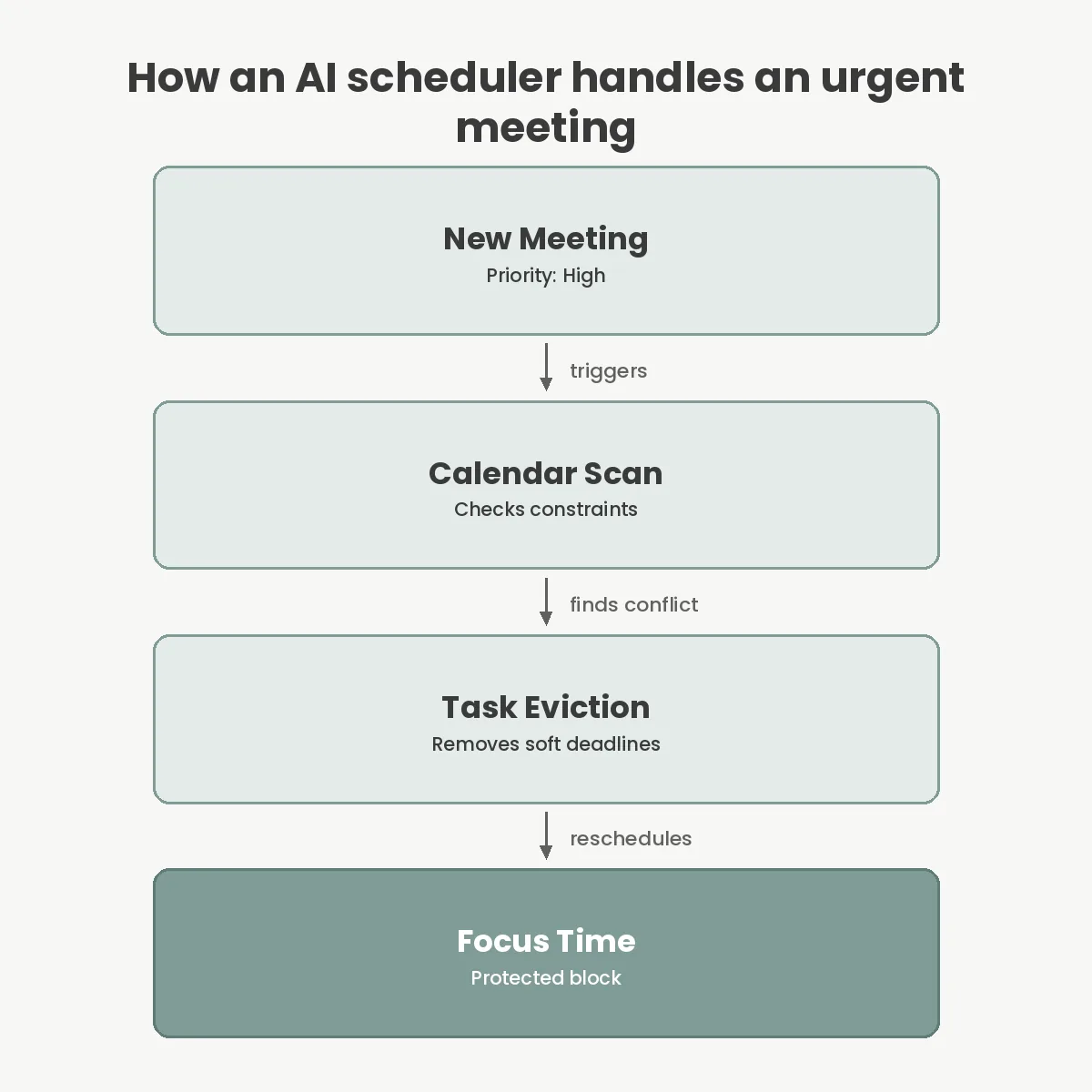
When an unexpected meeting drops onto your schedule, the assistant immediately evicts the task that was sitting there. It scans forward in your week, identifies the next open slot, and drops the evicted task there. If this cascading effect threatens a strict deadline, the software alerts you that your current workload exceeds your available hours.
This dynamic shifting relies entirely on your calendar’s API. The tool must have permission to read your existing events, create new blocks, and delete the blocks it previously generated. You are no longer managing your time directly; you are managing the constraints and rules that tell the engine how to place your tasks.
Motion operates on the premise that your to-do list and your calendar should be the exact same entity. You do not schedule tasks; you simply dump them into Motion with a priority level and a deadline. The algorithm takes over entirely, filling every gap between your meetings with actionable work.
The primary advantage here is ruthless prioritization. Motion recognizes ‘Soft’ versus ‘Hard’ deadlines. A soft deadline will happily get pushed to Friday if a client meeting overrides your Tuesday morning. A hard deadline forces the algorithm to carve out time at all costs, eventually flashing red warnings if mathematical reality means you cannot finish your list.
This level of automation comes with a strict pricing model. Motion costs $12 per user per month on its team tier when billed annually, making it the most expensive option of the major players. You are paying for a complete project management replacement rather than just a calendar add-on. If your team already lives in Jira or Asana, forcing them to duplicate their tickets into Motion creates unnecessary administrative overhead.
While Motion treats your day as a factory assembly line, Reclaim.ai focuses heavily on maintaining routines and protecting personal capacity. You define ‘Habits’—recurring commitments like a 30-minute inbox triage, an hour for lunch, or a weekly code review. Reclaim attempts to schedule these habits at your preferred times, but keeps them fluid. If a meeting lands on your lunch break, Reclaim silently moves your lunch to the next logical slot.
Reclaim shines in environments where knowledge workers struggle to balance deep work with administrative overhead. The Starter tier costs $8 per user per month, making it highly accessible for smaller teams. It integrates deeply with Google Calendar, utilizing Google’s API to continuously shuffle blocks without triggering email notifications for every change.
The notable drawback lies in its ecosystem limitations. As of late 2024, Reclaim’s Microsoft Outlook integration remains in beta. If your enterprise strictly relies on Microsoft 365, Reclaim will struggle to sync your availability correctly, leading to double-bookings and broken habit schedules.
Clockwise takes a fundamentally different approach. Instead of focusing on individual task lists, it optimizes time at the organizational level. The core feature is ‘Focus Time’. The algorithm actively looks for fragmented gaps in your day—a 30-minute hole here, a 45-minute gap there—and attempts to consolidate them.
It achieves this by identifying flexible internal meetings. If a weekly 1:1 can happen anywhere on Thursday afternoon, Clockwise will automatically shift that meeting to eliminate calendar gaps. By default, it requires a minimum block of two hours to qualify as Focus Time, enforcing a standard for deep work that prevents context switching.
At $11.50 per user per month for teams, Clockwise is an infrastructure investment. It includes native Slack integration that automatically updates your status based on your calendar, preventing colleagues from messaging you during a deep work block. This makes it exceptional for engineering and product teams that suffer from constant low-level interruptions.
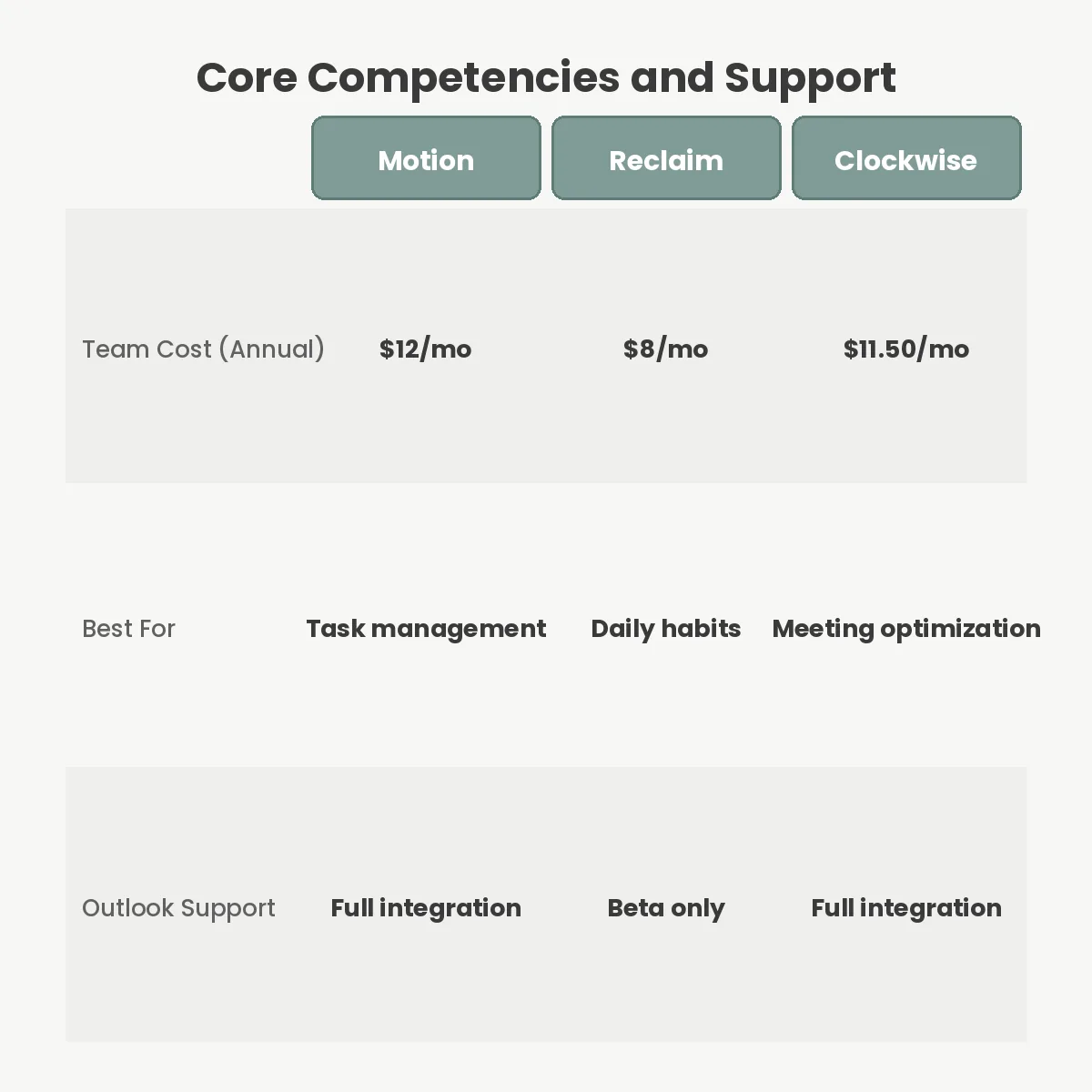
| Feature | Motion | Reclaim.ai | Clockwise |
|---|---|---|---|
| Primary Focus | Strict task deadlines | Flexible habits and routines | Team meeting optimization |
| Team Pricing (Annual) | $12.00 / month | $8.00 / month | $11.50 / month |
| Outlook Support | Full integration | Beta status only | Full integration |
| Project Management | Replaces your current tool | Integrates with existing tools | Does not manage tasks |
Your choice depends entirely on the problem you are trying to solve. If tasks are slipping through the cracks, choose Motion. If your team is burning out because they skip lunch and daily routines, deploy Reclaim. If your organization is drowning in fragmented meetings that prevent actual work, you need Clockwise.
Delegating your time to an algorithm forces you to surrender control. If you have a client-facing role—such as sales or executive consulting—where you must accommodate external schedules instantly, AI scheduling assistants often get in the way. An external stakeholder does not care that your software designated Tuesday at 2 PM as ‘Focus Time’.
Furthermore, these tools are only as smart as the data you feed them. A productivity tool cannot magically create a 26-hour day. If you assign yourself forty hours of tasks and spend thirty hours in meetings, the software will simply flash continuous warnings that your schedule is mathematically impossible. It highlights capacity issues; it cannot solve them for you.
Finally, there is the social cost. When you allow a machine to automatically shuffle internal meetings, colleagues may feel disrespected by the constant calendar updates. You must communicate to your team that the software is handling the adjustments, establishing a culture where flexible meeting times are expected rather than considered rude.
The most frequent failure mode is underestimating task duration. Users consistently tell the software a project will take one hour when it actually requires three. When the hour expires, the AI assumes the work is complete and moves on to the next item. By Thursday, the user has abandoned the tool entirely because the calendar no longer reflects reality.
Another common mistake is failing to configure buffer times. If you allow the assistant to stack tasks back-to-back from 9 AM to 5 PM without explicitly programming transition periods, you will burn out within days. You must program mandatory breathers between deep work blocks.
Lastly, ignoring native integrations leads to duplicate data entry. If your engineering team uses Jira, forcing them to manually re-type their tickets into Motion guarantees poor adoption. You must use the provided API connections to ensure tasks flow from your system of record directly into the scheduling engine.
No, tools like Motion, Reclaim, and Clockwise only require access to your calendar metadata, such as event titles, attendees, and durations. They do not request or require permission to read the contents of your email inbox.
Yes, all three platforms allow you to sync personal and work calendars. They merge your availability, ensuring a personal appointment blocks time on your work calendar without revealing the private details to your colleagues.
The software automatically pushes the unfinished task to your next available time slot. If the task has a strict deadline that you are mathematically about to miss, the system will generate an alert so you can manually intervene.
Clockwise only moves meetings if all participants have opted into flexible scheduling for that specific event. It respects strict start times for standard appointments and will never automatically shift a meeting that involves an external client.
Before deploying any of these platforms across an entire organization, run a two-week pilot with your most meeting-heavy department. Force them to input real task estimates and allow the software to control their availability. If they spend more time fighting the algorithm than doing actual work, you have the wrong tool. AI scheduling is powerful, but it requires you to trust the math.
You Can Get More Information!