Reduce AWS NAT Gateway Costs: The VPC Endpoint Migration
To reduce AWS NAT Gateway costs, you must intercept internal...

Make email marketing simplified

Make email marketing simplified

Make email marketing simplified

Make email marketing simplified

Make email marketing simplified

Make email marketing simplified

Make email marketing simplified

Make email marketing simplified

Make email marketing simplified

Make email marketing simplified

Make email marketing simplified

Make email marketing simplified

Make email marketing simplified

Make email marketing simplified

Make email marketing simplified

We use cookies for our website to give you the most relevant experience by remembering your preferences. By clicking “accept”, you consent to use of ALL the cookies
This website uses cookies to improve your experience while you navigate through the website. Out of these, the cookies that are categorized as necessary are stored on your browser as they are essential for the working of basic functionalities of the website. We also use third-party cookies that help us analyze and understand how you use this website. These cookies will be stored in your browser only with your consent. You also have the option to opt-out of these cookies. But opting out of some of these cookies may affect your browsing experience.
Necessary cookies are absolutely essential for the website to function properly. These cookies ensure basic functionalities and security features of the website, anonymously.
| Cookie | Duration | Description |
|---|---|---|
| cookielawinfo-checkbox-functional | 11 months | This cookie is set by GDPR Cookie Consent plugin. The cookie is used to store the user consent for the cookies in the category “Analytics”. |
| cookielawinfo-checkbox-functional | 11 months | The cookie is set by GDPR cookie consent to record the user consent for the cookies in the category “Functional”. |
| cookielawinfo-checkbox-necessary | 11 months | This cookie is set by GDPR Cookie Consent plugin. The cookies is used to store the user consent for the cookies in the category “Necessary”. |
| cookielawinfo-checkbox-others | 11 months | This cookie is set by GDPR Cookie Consent plugin. The cookie is used to store the user consent for the cookies in the category “Other. |
| cookielawinfo-checkbox-performance | 11 months | This cookie is set by GDPR Cookie Consent plugin. The cookie is used to store the user consent for the cookies in the category “Performance”. |
| viewed_cookie_policy | 11 months | The cookie is set by the GDPR Cookie Consent plugin and is used to store whether or not user has consented to the use of cookies. It does not store any personal data. |
Functional cookies help to perform certain functionalities like sharing the content of the website on social media platforms, collect feedbacks, and other third-party features.
Performance cookies are used to understand and analyze the key performance indexes of the website which helps in delivering a better user experience for the visitors.
Analytical cookies are used to understand how visitors interact with the website. These cookies help provide information on metrics the number of visitors, bounce rate, traffic source, etc.
Advertisement cookies are used to provide visitors with relevant ads and marketing campaigns. These cookies track visitors across websites and collect information to provide customized ads.
Other uncategorized cookies are those that are being analyzed and have not been classified into a category as yet.
Cyberia Tech, Inc. respects your privacy. This Privacy Policy explains how we collect, use, and share your information. By using our services, you agree to this policy. If any other agreements conflict with this Privacy Policy, the terms of those agreements prevail.
Cyberia Tech complies with the EU-US and Swiss-US Privacy Shield Frameworks for handling personal data from the EEA, UK, and Switzerland. In case of any conflict, the Privacy Shield Principles prevail. Learn more at Privacy Shield. Key Definitions
Information linked to an individual, transferred from the EEA, UK, or Switzerland to the U.S.
Data revealing race, religion, health, sexual orientation, and similar categories.
Effective Date: [ 2026 / 11 / 08 ]
Welcome to The Cyberia Tech ! By accessing or using our website or services, you agree to
comply with and be bound by these Terms of Use and our Privacy Policy. If you do not agree with
these terms, please do not use our Services.
Loading
0 %
Your First Piece of the Puzzle in
Business Growth



To reduce AWS NAT Gateway costs, you must intercept internal traffic destined for AWS APIs before it routes through the gateway. Deploying Gateway Endpoints for S3 and DynamoDB eliminates data processing fees entirely, while routing remaining internal API traffic through Interface Endpoints via AWS PrivateLink reduces per-gigabyte processing charges by 77 percent.
Engineers building within Amazon Web Services usually notice the infrastructure bill long before the compute bill. A standard deployment pattern—placing application workloads in private subnets and routing outbound traffic through a public NAT Gateway—seems correct. It matches standard security doctrine. But at $0.045 per gigabyte processed in the us-east-1 region, streaming 50 TB of data to an S3 bucket turns into a $2,250 monthly surprise. The cost of data transfer outpaces the storage itself. Relying on default routing tables creates an architectural debt that scales linearly with your application traffic.
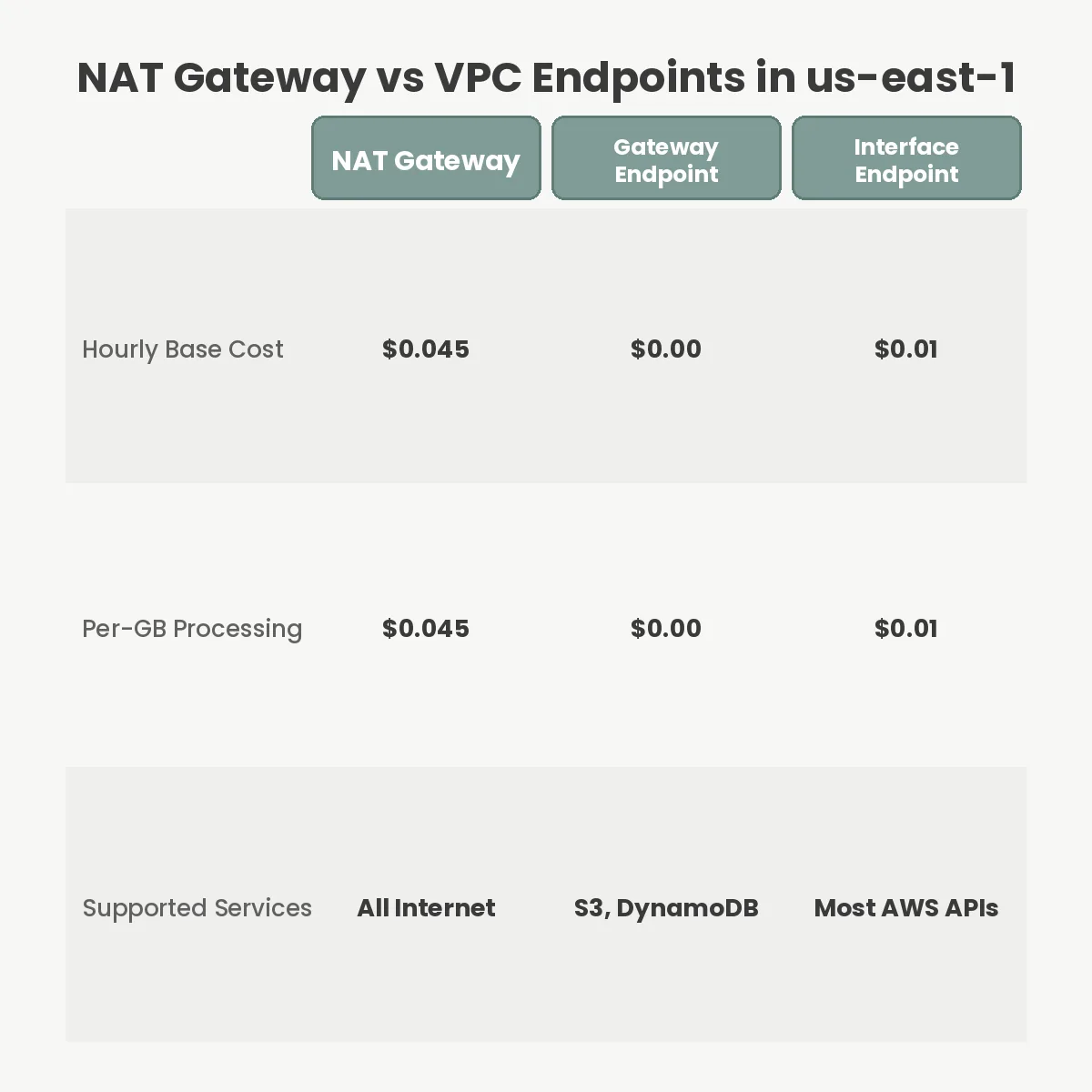
To fix the architecture, you must define exactly how the billing mechanism operates. AWS charges for a NAT Gateway across two dimensions. First is the hourly uptime fee. In us-east-1, this is $0.045 per hour, amounting to approximately $32.40 per month per Availability Zone (AZ). If you run a highly available architecture across three AZs, your baseline cost is $97.20 before a single packet leaves the network.
The second dimension is the data processing fee, which acts as the real budget drain. AWS charges $0.045 for every gigabyte that passes through the NAT Gateway. Crucially, this applies regardless of the destination. If your EC2 instance in a private subnet pulls a 2 GB container image from Elastic Container Registry (ECR), or writes a 5 GB backup to S3, that traffic routes out through the NAT Gateway and back into the AWS network over the public internet gateway. You pay $0.045 per GB for traffic that never actually left the AWS physical infrastructure.
Many teams assume that FinOps cloud strategy stops at right-sizing EC2 instances or buying Compute Savings Plans. However, networking fees often constitute up to 30 percent of an enterprise cloud bill. The default VPC wizard creates this exact costly topology to prioritize connectivity over cost efficiency.
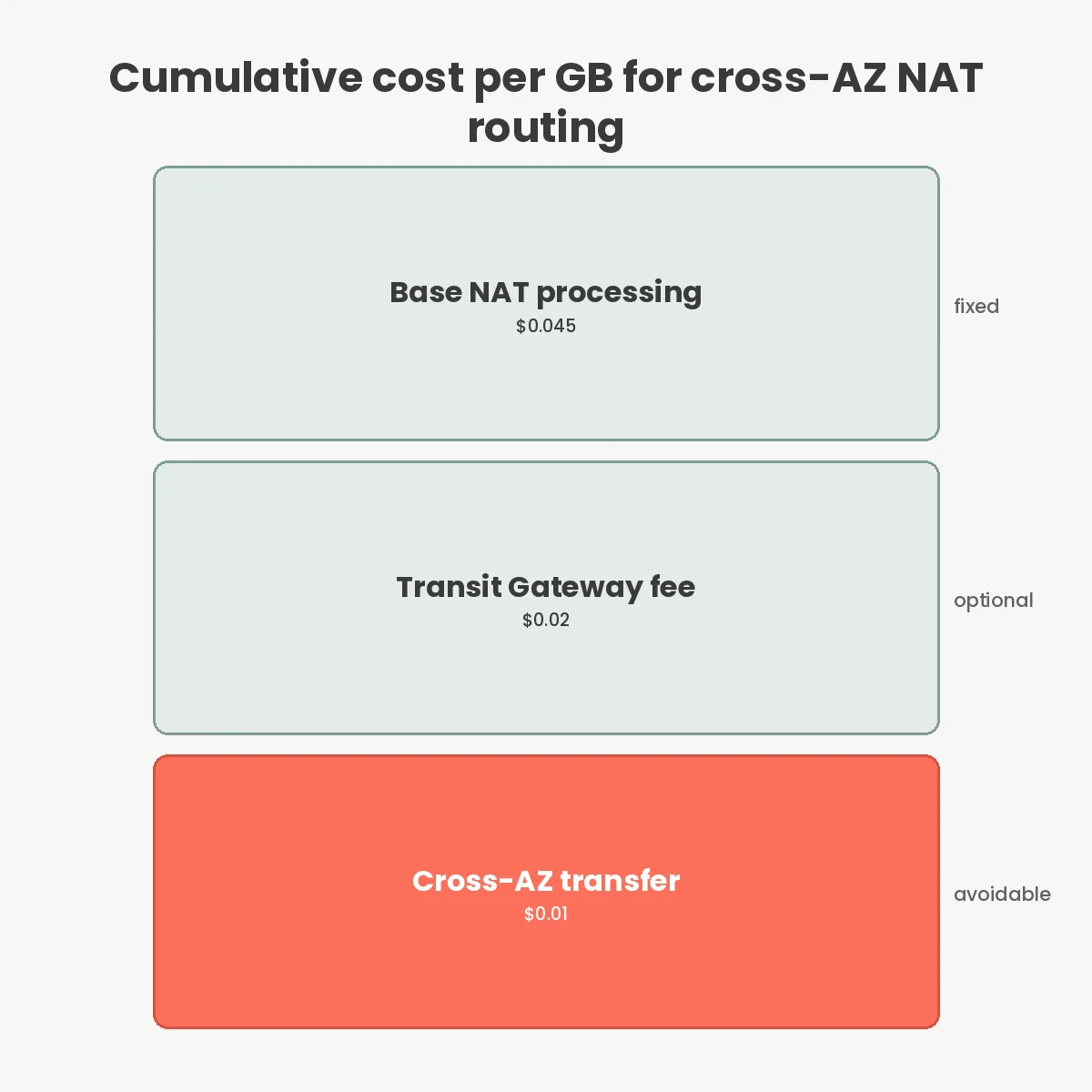
The data processing fee is rarely the only charge applied to a packet. Cloud networking costs stack based on the physical path the packet takes. When a workload in a private subnet accesses an external resource, you risk triggering a multiplier effect depending on your subnet alignment.
Consider a scenario where an application runs in us-east-1a, but the NAT Gateway resides in us-east-1b. AWS levies a $0.01 per GB charge for cross-AZ data transfer. The packet incurs the $0.01 cross-AZ fee, reaches the NAT Gateway, incurs the $0.045 processing fee, and then exits. If you centralize your egress through a Transit Gateway in a dedicated networking VPC, the math gets worse. Transit Gateway processing adds another $0.02 per GB. A single gigabyte of internal traffic can suddenly cost $0.075 just in transit fees.
This stacking effect is why centralizing egress without strict route filtering causes bill shock. You pay for the privilege of moving the data between physical data centers (the AZs), pay the Transit Gateway to inspect it, and pay the NAT Gateway to rewrite the IP headers.
The most immediate intervention to lower AWS NAT Gateway costs is deploying Gateway Endpoints. AWS offers these specifically for S3 and DynamoDB. Unlike almost every other networking primitive in AWS, Gateway Endpoints are entirely free. They carry no hourly charge and zero data processing fees.
A Gateway Endpoint acts as a route table target. When you create one, AWS injects a prefix list (for example, pl-63a5400a for S3 in us-east-1) into your VPC route table. Any packet destined for an IP address within that prefix list routes directly to the AWS service over the internal backbone, bypassing the NAT Gateway entirely.
Because S3 often handles the largest payload volumes—database backups, static assets, log shipping—this single architectural change usually yields the highest ROI. If your system pushes 10 TB of logs to S3 monthly, adding the Gateway Endpoint instantly removes $450 from your next invoice. The operation requires zero application code changes; the AWS SDK automatically utilizes the updated network route.
S3 and DynamoDB are the exceptions. For other AWS services—such as ECR, Secrets Manager, Kinesis, or CloudWatch—you must use Interface Endpoints, powered by AWS PrivateLink. An Interface Endpoint deploys an Elastic Network Interface (ENI) directly into your private subnet, assigned a private IP address from your CIDR block.
These are not free, but they are significantly cheaper than a NAT Gateway. Interface Endpoints cost $0.01 per hour (roughly $7.20 per month) and charge a data processing fee starting at $0.01 per GB. Compared to the NAT Gateway’s $0.045 per GB, you achieve an immediate 77 percent reduction in processing costs for API traffic.
To use PrivateLink effectively, you must enable EnableDnsSupport and EnableDnsHostnames on your VPC. When enabled, AWS intercepts the public DNS request (such as logs.us-east-1.amazonaws.com) and resolves it to the private IP address of your Interface Endpoint. Traffic never attempts to find a public route, neutralizing the risk of NAT Gateway traversal entirely.
Migrating every service to an endpoint is not always mathematically sound. You must evaluate the break-even point before provisioning. Because Interface Endpoints carry an hourly fee per AZ, deploying 15 different endpoints across 3 AZs generates roughly $324 in fixed monthly costs.
If your application only pulls 5 GB of configuration data from AWS Systems Manager per month, the NAT Gateway processing fee for that traffic is just $0.22. Paying $21.60 in baseline uptime fees for the Systems Manager Interface Endpoints results in a net loss. Maintain the NAT Gateway for low-volume, heterogeneous traffic, and reserve Interface Endpoints for high-throughput APIs like Kinesis or ECR.
Furthermore, VPC Endpoints only resolve AWS traffic. If your application relies on external third-party APIs like Stripe, Twilio, or external Kubernetes networking telemetry layers outside of AWS, you still require a NAT Gateway. Attempting to replace egress entirely is only viable in highly restricted, air-gapped environments or cloud repatriation economics models where external dependencies are strictly proxied.
The most frequent failure mode when deploying VPC Endpoints involves IAM policies. By default, an endpoint is created with a permissive policy: {"Statement": [{"Effect": "Allow", "Principal": "*", "Action": "*", "Resource": "*"}]}. Security teams often lock this down improperly, causing the application to drop packets silently because the endpoint policy denies the s3:PutObject action, even if the EC2 instance profile allows it. The intersection of the IAM Role and the Endpoint Policy determines the final access.
Another prevalent error is neglecting the route table association for Gateway Endpoints. Creating the endpoint does nothing until you explicitly check the boxes to associate it with your private subnet route tables. Until that route propagates, traffic continues falling back to the 0.0.0.0/0 rule pointing to the NAT Gateway.
Lastly, engineering teams frequently misconfigure cross-region traffic. VPC Endpoints are strictly regional. If your resources are in us-east-1 but you request an S3 bucket located in us-west-2, the traffic cannot use the us-east-1 Gateway Endpoint. It will bypass the local endpoint, hit the NAT Gateway, incur the $0.045 per GB processing fee, and generate an additional inter-region data transfer charge. Always explicitly specify the correct regional endpoint in your AWS SDK configurations.
No, VPC Endpoints are strictly confined to their local region. If an instance attempts to communicate with an AWS service in a different region, the traffic will bypass the local endpoint and route through your NAT Gateway over the public internet.
You likely missed updating the subnet route tables for Gateway Endpoints, or failed to enable Private DNS resolution for Interface Endpoints. Without these configurations, AWS DNS continues returning public IPs, forcing your traffic back through the NAT Gateway route.
Yes, by centralizing Interface Endpoints in a dedicated networking VPC and connecting your application VPCs via AWS Transit Gateway. However, you must calculate whether the Transit Gateway processing fees negate the cost savings of the shared endpoint.
Yes, on-premises workloads can access AWS services through Interface Endpoints over AWS Direct Connect or Site-to-Site VPN. You must configure inbound Route 53 Resolver endpoints to ensure your on-premises servers can resolve the PrivateLink DNS names.
Managing cloud infrastructure requires explicit control over the network packet path. Relying on default routing topologies guarantees you will overpay for internal data transit. To optimize your bill, audit your VPC Flow Logs to identify the highest volume destinations. Deploy Gateway Endpoints immediately for S3 and DynamoDB, as they carry zero risk and zero cost. For high-volume AWS APIs like ECR and Kinesis, calculate the break-even point and deploy Interface Endpoints where the $0.01 per GB rate outperforms the fixed hourly cost. Treat the NAT Gateway as a strict proxy for external third-party traffic, not a default router for your internal systems.
You Can Get More Information!