Ollama vs vLLM: Which Local LLM Server Should You Choose?
Ollama and vLLM serve completely different stages of the AI...

Make email marketing simplified

Make email marketing simplified

Make email marketing simplified

Make email marketing simplified

Make email marketing simplified

Make email marketing simplified

Make email marketing simplified

Make email marketing simplified

Make email marketing simplified

Make email marketing simplified

Make email marketing simplified

Make email marketing simplified

Make email marketing simplified

Make email marketing simplified

Make email marketing simplified

We use cookies for our website to give you the most relevant experience by remembering your preferences. By clicking “accept”, you consent to use of ALL the cookies
This website uses cookies to improve your experience while you navigate through the website. Out of these, the cookies that are categorized as necessary are stored on your browser as they are essential for the working of basic functionalities of the website. We also use third-party cookies that help us analyze and understand how you use this website. These cookies will be stored in your browser only with your consent. You also have the option to opt-out of these cookies. But opting out of some of these cookies may affect your browsing experience.
Necessary cookies are absolutely essential for the website to function properly. These cookies ensure basic functionalities and security features of the website, anonymously.
| Cookie | Duration | Description |
|---|---|---|
| cookielawinfo-checkbox-functional | 11 months | This cookie is set by GDPR Cookie Consent plugin. The cookie is used to store the user consent for the cookies in the category “Analytics”. |
| cookielawinfo-checkbox-functional | 11 months | The cookie is set by GDPR cookie consent to record the user consent for the cookies in the category “Functional”. |
| cookielawinfo-checkbox-necessary | 11 months | This cookie is set by GDPR Cookie Consent plugin. The cookies is used to store the user consent for the cookies in the category “Necessary”. |
| cookielawinfo-checkbox-others | 11 months | This cookie is set by GDPR Cookie Consent plugin. The cookie is used to store the user consent for the cookies in the category “Other. |
| cookielawinfo-checkbox-performance | 11 months | This cookie is set by GDPR Cookie Consent plugin. The cookie is used to store the user consent for the cookies in the category “Performance”. |
| viewed_cookie_policy | 11 months | The cookie is set by the GDPR Cookie Consent plugin and is used to store whether or not user has consented to the use of cookies. It does not store any personal data. |
Functional cookies help to perform certain functionalities like sharing the content of the website on social media platforms, collect feedbacks, and other third-party features.
Performance cookies are used to understand and analyze the key performance indexes of the website which helps in delivering a better user experience for the visitors.
Analytical cookies are used to understand how visitors interact with the website. These cookies help provide information on metrics the number of visitors, bounce rate, traffic source, etc.
Advertisement cookies are used to provide visitors with relevant ads and marketing campaigns. These cookies track visitors across websites and collect information to provide customized ads.
Other uncategorized cookies are those that are being analyzed and have not been classified into a category as yet.
Cyberia Tech, Inc. respects your privacy. This Privacy Policy explains how we collect, use, and share your information. By using our services, you agree to this policy. If any other agreements conflict with this Privacy Policy, the terms of those agreements prevail.
Cyberia Tech complies with the EU-US and Swiss-US Privacy Shield Frameworks for handling personal data from the EEA, UK, and Switzerland. In case of any conflict, the Privacy Shield Principles prevail. Learn more at Privacy Shield. Key Definitions
Information linked to an individual, transferred from the EEA, UK, or Switzerland to the U.S.
Data revealing race, religion, health, sexual orientation, and similar categories.
Effective Date: [ 2026 / 11 / 23 ]
Welcome to The Cyberia Tech ! By accessing or using our website or services, you agree to
comply with and be bound by these Terms of Use and our Privacy Policy. If you do not agree with
these terms, please do not use our Services.
Loading
0 %
Your First Piece of the Puzzle in
Business Growth


Ollama and vLLM serve completely different stages of the AI lifecycle. Ollama is built for frictionless local prototyping on consumer hardware, wrapping llama.cpp for simple execution. vLLM is engineered for high-concurrency production inference, utilizing continuous batching and PagedAttention to maximize throughput on data center GPUs. Your traffic profile dictates your choice.
Self-hosting large language models forces a hard choice between developer velocity and hardware efficiency. If you pick the wrong inference engine, you either burn expensive VRAM on idle workloads or face massive latency spikes when concurrency scales. The technical divide is stark. Engines like vLLM use PagedAttention to cut KV cache waste by up to 96 percent, but demand rigorous CUDA configurations. Conversely, Ollama provides a frictionless local experience but chokes under simultaneous production requests. You need to align your backend architecture with your actual traffic profile.
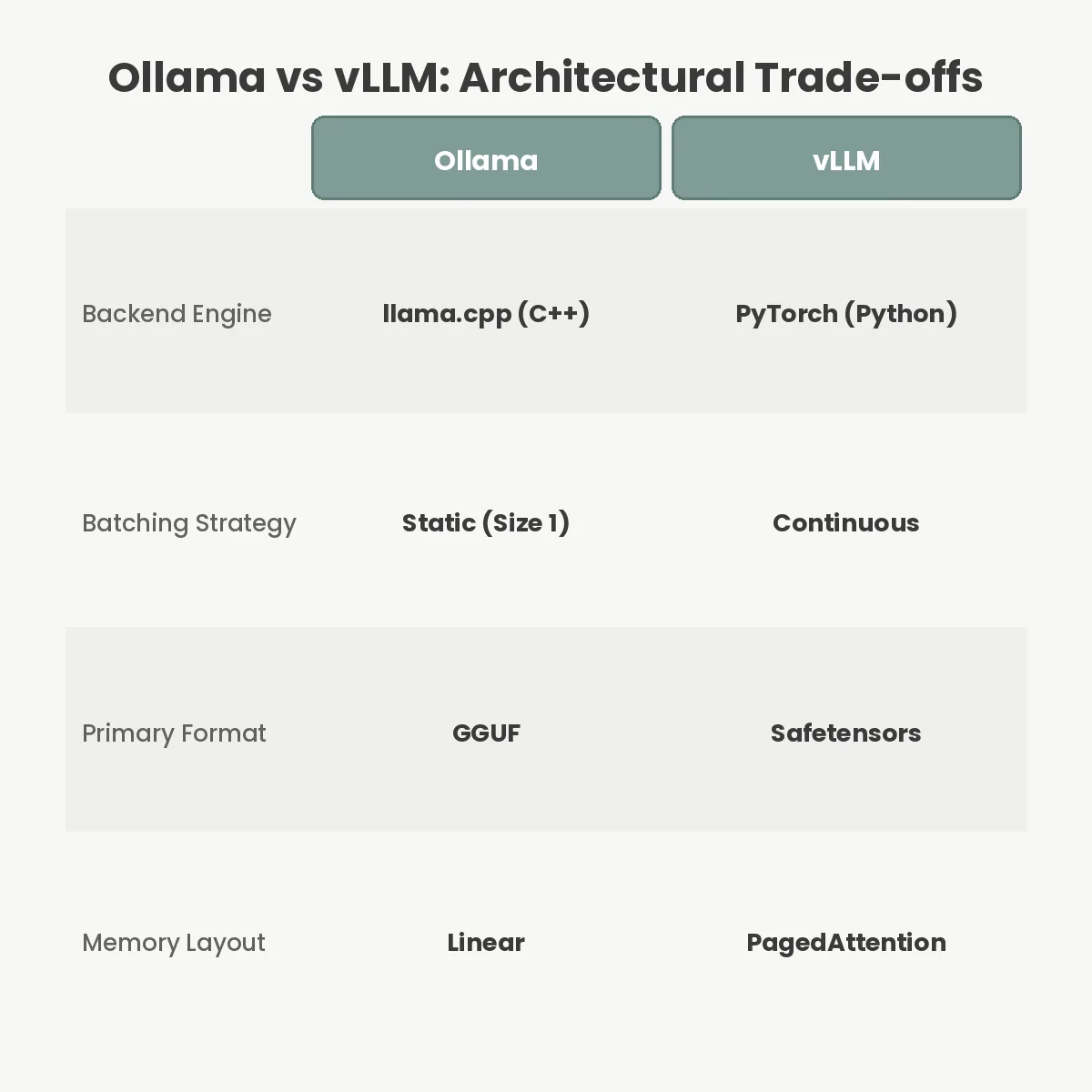
The fundamental divergence between these tools lies in their runtime dependencies. Ollama is essentially a Go wrapper around the C++ based llama.cpp project. It compiles down to a single binary. It uses the GGUF file format, which packages model weights, tokenizers, and metadata into one easily transportable file. This architecture allows Ollama to dynamically offload layers between your system RAM and GPU VRAM. If your model exceeds the 24GB limit of an RTX 4090, Ollama gracefully falls back to CPU execution. Performance drops, but the application does not crash.
vLLM operates on an entirely different stack. It is a Python-heavy orchestration engine built over PyTorch and Triton, heavily optimized for NVIDIA hardware. It does not treat the GPU as an optional accelerator; it expects full control over the underlying compute. Instead of dynamic layer offloading, vLLM loads the entire model into GPU memory. If the model and the KV cache do not fit entirely in VRAM, the server fails to start. This rigidity is intentional. vLLM sacrifices desktop flexibility to achieve predictable, bounded latency in data center environments.
Your choice of model format dictates your engine. Ollama depends on GGUF for integer quantization, specifically targeting the Q4_0 format for minimal accuracy loss on consumer hardware. Check the Ollama GitHub repository for specific supported architectures. vLLM natively supports safetensors and relies on AWQ or GPTQ for quantization. Migrating a model from Ollama to vLLM requires completely repackaging the weights.
Generating tokens sequentially requires the model to remember past context. This mechanism, the KV (Key-Value) cache, consumes enormous amounts of memory. In standard PyTorch implementations, memory is allocated contiguously based on the maximum sequence length. Because request lengths are unpredictable, up to 80 percent of this pre-allocated memory remains unused. This fragmentation acts as a hard ceiling on concurrent requests.
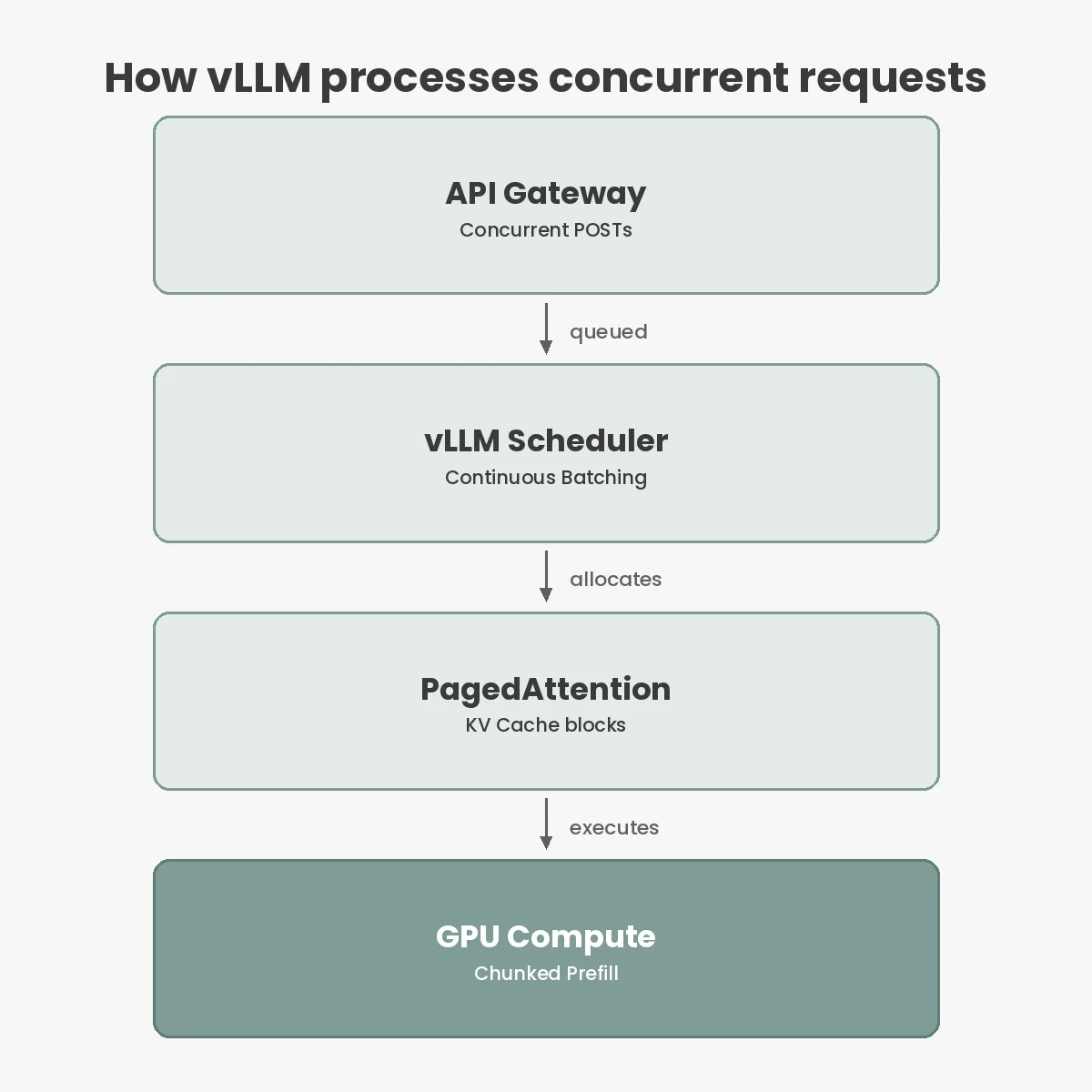
vLLM solves this memory fragmentation with PagedAttention. Inspired by operating system virtual memory, PagedAttention divides the KV cache into fixed-size blocks of tokens. The engine allocates these blocks non-contiguously. This approach eliminates external fragmentation and restricts internal fragmentation to the final block of a sequence. The result is a reduction in memory waste to under 4 percent. By reclaiming this VRAM, vLLM can load far more concurrent requests into the same GPU.
Ollama handles memory much more simply. Because it optimizes for single-user local environments, it does not implement advanced page-level memory management. It allocates context linearly. When you test a model locally, this linear allocation is invisible. However, if you attempt to serve multiple distinct prompts simultaneously, Ollama will rapidly exhaust VRAM or queue the requests sequentially, spiking time-to-first-token latency.
Inference performance is measured across two opposing metrics: time-to-first-token latency and total token throughput. Ollama optimizes exclusively for latency. It uses static batching, or a batch size of one, prioritizing the immediate processing of a single incoming prompt. For a developer writing code alongside a local assistant, this responsiveness is necessary.
vLLM optimizes for throughput using continuous batching. Traditional static batching waits for all sequences in a batch to finish before loading the next set. Because LLM responses vary wildly in length, early-finishing requests sit idle, wasting GPU cycles. Continuous batching operates at the iteration level. The exact moment a request finishes generating its final token, vLLM ejects it from the batch and inserts a new pending request. This keeps GPU utilization near maximum.
The performance delta is significant. Under high concurrency, continuous batching allows vLLM to deliver up to 4x the total token throughput compared to static batching implementations. Handling concurrency in inference shares architectural principles with database scaling. Just as backend engineers implement connection pooling for PostgreSQL to manage high transaction volume without exhausting memory, vLLM requires continuous batching to manage concurrent inference state.
Downloading models differs wildly between the two platforms. Ollama acts as a registry. You run a single command and the daemon handles the download, verification, and storage of the GGUF file. It abstracts the file system entirely, treating models like Docker images.
vLLM expects a flat directory of safetensors. You typically use the Hugging Face CLI to download the weights manually. You must ensure the tokenizer configuration matches the specific quantization format, whether AWQ or GPTQ. There is no automated model management built into the engine itself.
This introduces a deployment trade-off. Ollama’s registry approach is extremely fast for local developers but creates headaches for CI/CD pipelines. vLLM’s file-based approach integrates cleanly into containerized Kubernetes deployments where models are mounted via persistent volumes, avoiding redundant downloads during auto-scaling events.
Deploying vLLM imposes strict hardware and software prerequisites. The engine requires CUDA 12.1 or higher, as detailed in the official vLLM documentation. It relies heavily on FlashAttention, which demands NVIDIA GPUs with compute capability 8.0 or above, such as the Ampere or Hopper architectures. Furthermore, vLLM pre-allocates 90 percent of available GPU memory at startup by default. You cannot easily run other machine learning workloads on the same card.
Ollama’s limitations manifest in production networking. It lacks native authentication, rate limiting, and distributed tracing. The API is designed for localhost access. Exposing Ollama directly to the internet is a severe security risk. You must place it behind a reverse proxy like Nginx or Envoy to handle TLS termination and token validation. Additionally, Ollama cannot shard a single model across multiple servers.
Understanding the hardware threshold is critical before attempting to provision infrastructure for either engine. The technical requirements differ fundamentally based on their underlying architecture.
| Inference Engine | Minimum GPU Memory | Recommended Architecture | Multi-GPU Support |
|---|---|---|---|
| Ollama | 8GB (for 7B models) | Consumer RTX / Apple Silicon | Limited (single machine) |
| vLLM | 24GB+ (for 7B models) | NVIDIA Ampere/Hopper (A100/H100) | Native (via Ray tensor parallelism) |
The most frequent failure mode when deploying vLLM is VRAM out-of-memory errors during the prefill phase. While PagedAttention manages the generation phase efficiently, the initial processing of a massive prompt requires contiguous memory. If developers set the sequence length parameter too high without sufficient hardware, the scheduler crashes immediately upon receiving a long context window.
Another common mistake is attempting to use Ollama for high-traffic web applications. Engineers often assume that because a 7-billion parameter model generates 40 tokens per second locally, it can handle 40 simultaneous users generating one token per second. Without continuous batching, the engine serializes the requests. User 40 waits for the previous 39 requests to complete entirely before seeing their first token, resulting in connection timeouts. Delivering these delayed tokens to the frontend also requires proper transport architecture; developers often face secondary bottlenecks deciding between SSE vs WebSockets for LLM streaming.
Mismatched quantization formats also break deployments. Developers frequently download a GGUF file expecting it to work with vLLM, or pull an AWQ safetensor model expecting Ollama to run it. The underlying C++ and Python engines do not cross-compile these formats. You must source the exact weights formatted for your specific inference server.
Yes, you can run vLLM on an RTX 4090, but you must manually limit the GPU memory utilization fraction. By default, vLLM pre-allocates 90 percent of the available 24GB of VRAM, which can crash your desktop environment if a display server is running simultaneously.
No. Ollama relies on llama.cpp, which currently processes requests sequentially using static batching. If multiple users send distinct prompts at the exact same time, Ollama places them in a queue. This behavior severely increases time-to-first-token latency for everyone except the first user in line.
You cannot directly copy the model files. Ollama uses the GGUF file format, while vLLM requires safetensors quantized with AWQ or GPTQ. You must download a completely separate, properly formatted version of the model weights directly from a registry repository like Hugging Face.
Ollama is vastly superior for Apple Silicon. Its underlying llama.cpp backend is deeply optimized for Apple Metal Performance Shaders. While vLLM maintains experimental Mac support, it currently lacks the stability and performance optimizations that make Ollama run perfectly on M-series unified memory.
Choosing between Ollama and vLLM is not a debate over which engine is objectively superior. The decision is a function of your deployment environment and traffic profile. If you are prototyping locally, building an internal tool to evaluate the ROI of enterprise AI assistants under strict privacy rules, or deploying on Apple Silicon, Ollama provides an unmatched developer experience. It allows you to focus on the application logic rather than CUDA drivers.
If you are building a public-facing AI application where multiple users query the model simultaneously, Ollama will bottleneck. In these production environments, the memory efficiency of PagedAttention and the throughput gains of continuous batching make vLLM mandatory. Secure your data center GPUs, accept the configuration overhead, and structure your backend to handle AWQ or GPTQ safetensors.
You Can Get More Information!