How to Calculate and Reduce Multi-Cloud Egress Costs in 2026
Learn how to model, forecast, and structurally reduce data egress fees when operating across multiple cloud providers.

Make email marketing simplified

Make email marketing simplified

Make email marketing simplified

Make email marketing simplified

Make email marketing simplified

Make email marketing simplified

Make email marketing simplified

Make email marketing simplified

Make email marketing simplified

Make email marketing simplified

Make email marketing simplified

Make email marketing simplified

Make email marketing simplified

Make email marketing simplified

Make email marketing simplified

We use cookies for our website to give you the most relevant experience by remembering your preferences. By clicking “accept”, you consent to use of ALL the cookies
This website uses cookies to improve your experience while you navigate through the website. Out of these, the cookies that are categorized as necessary are stored on your browser as they are essential for the working of basic functionalities of the website. We also use third-party cookies that help us analyze and understand how you use this website. These cookies will be stored in your browser only with your consent. You also have the option to opt-out of these cookies. But opting out of some of these cookies may affect your browsing experience.
Necessary cookies are absolutely essential for the website to function properly. These cookies ensure basic functionalities and security features of the website, anonymously.
| Cookie | Duration | Description |
|---|---|---|
| cookielawinfo-checkbox-functional | 11 months | This cookie is set by GDPR Cookie Consent plugin. The cookie is used to store the user consent for the cookies in the category “Analytics”. |
| cookielawinfo-checkbox-functional | 11 months | The cookie is set by GDPR cookie consent to record the user consent for the cookies in the category “Functional”. |
| cookielawinfo-checkbox-necessary | 11 months | This cookie is set by GDPR Cookie Consent plugin. The cookies is used to store the user consent for the cookies in the category “Necessary”. |
| cookielawinfo-checkbox-others | 11 months | This cookie is set by GDPR Cookie Consent plugin. The cookie is used to store the user consent for the cookies in the category “Other. |
| cookielawinfo-checkbox-performance | 11 months | This cookie is set by GDPR Cookie Consent plugin. The cookie is used to store the user consent for the cookies in the category “Performance”. |
| viewed_cookie_policy | 11 months | The cookie is set by the GDPR Cookie Consent plugin and is used to store whether or not user has consented to the use of cookies. It does not store any personal data. |
Functional cookies help to perform certain functionalities like sharing the content of the website on social media platforms, collect feedbacks, and other third-party features.
Performance cookies are used to understand and analyze the key performance indexes of the website which helps in delivering a better user experience for the visitors.
Analytical cookies are used to understand how visitors interact with the website. These cookies help provide information on metrics the number of visitors, bounce rate, traffic source, etc.
Advertisement cookies are used to provide visitors with relevant ads and marketing campaigns. These cookies track visitors across websites and collect information to provide customized ads.
Other uncategorized cookies are those that are being analyzed and have not been classified into a category as yet.
Cyberia Tech, Inc. respects your privacy. This Privacy Policy explains how we collect, use, and share your information. By using our services, you agree to this policy. If any other agreements conflict with this Privacy Policy, the terms of those agreements prevail.
Cyberia Tech complies with the EU-US and Swiss-US Privacy Shield Frameworks for handling personal data from the EEA, UK, and Switzerland. In case of any conflict, the Privacy Shield Principles prevail. Learn more at Privacy Shield. Key Definitions
Information linked to an individual, transferred from the EEA, UK, or Switzerland to the U.S.
Data revealing race, religion, health, sexual orientation, and similar categories.
Effective Date: [ 2026 / 11 / 26 ]
Welcome to The Cyberia Tech ! By accessing or using our website or services, you agree to
comply with and be bound by these Terms of Use and our Privacy Policy. If you do not agree with
these terms, please do not use our Services.
Loading
0 %
Your First Piece of the Puzzle in
Business Growth



Common terraform state management mistakes include relying on the sensitive flag for encryption, neglecting external lock tables, and over-splitting workspaces. These errors expose plaintext credentials in JSON files, permit concurrent overwrites, and create unobservable cross-stack deployment failures across production environments.
Infrastructure as Code deployments crash when teams treat state files like static logs rather than active databases. A single concurrent write operation against an unlocked remote backend can corrupt the mapping between your declared configuration and physical cloud resources. The resulting recovery process often requires manual intervention, extending downtime and destroying confidence in automated pipelines. Managing state correctly is a foundational requirement for any modern web application infrastructure. Teams must audit exactly how their deployment pipelines lock, encrypt, and structure these critical JSON files.
Developers frequently assume that marking a variable as secure protects it throughout the entire infrastructure lifecycle. Terraform 0.15 introduced the sensitive argument for variable and output blocks. Adding this flag prevents the CLI and the HCP Terraform UI from rendering the actual value on screen. It masks the output with a generic placeholder during plan and apply phases.
This UI masking creates a false sense of security. The sensitive flag does not encrypt or hash the underlying data. Terraform stores state as plaintext JSON by default. Any database password, private key, or API token passed into a module will be written directly into terraform.tfstate in cleartext. Anyone with read access to the storage backend—whether an S3 bucket or a local CI/CD runner—can extract these credentials instantly.
HashiCorp has released subsequent features to mitigate this exposure, provided teams adopt them. Terraform 1.10 introduced the ephemeral argument, which prevents external data references from being persisted in the state or plan files altogether. Following that, Terraform 1.11 added a write-only argument on managed resources. You must utilize these newer arguments, or rely entirely on backend storage encryption at rest, to actually secure terraform remote state security.
Concurrent pipeline executions will destroy a state file if locking mechanisms fail. When two CI/CD runners attempt to apply changes simultaneously, the resulting race condition overwrites the JSON structure, leading to orphaned cloud resources and immediate iac deployment failures. Locking ensures that a single process holds exclusive write access until its operation completes.
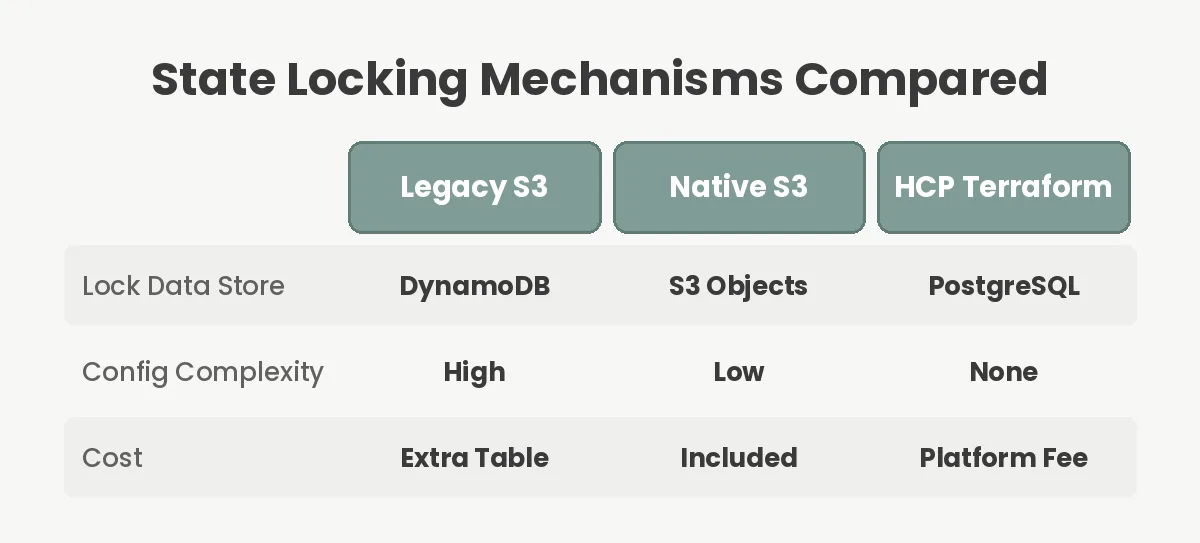
The standard AWS S3 remote backend traditionally required an external Amazon DynamoDB table to function as the lock manager. Teams frequently misconfigure this by deploying the S3 bucket but forgetting the dynamodb_table parameter, leaving their state silently unlocked. You must actively configure both the storage bucket and the NoSQL table, ensuring the execution role has dynamodb:PutItem and dynamodb:DeleteItem permissions.
However, practitioner architectures are shifting in 2026. While official baseline tutorials still heavily reference DynamoDB, recent field reports indicate that the separate DynamoDB table pattern is being deprecated in favor of native S3 lock objects. Migrating to native S3 locking eliminates the cross-service IAM complexity and reduces the risk of the lock table becoming detached from its corresponding state bucket.
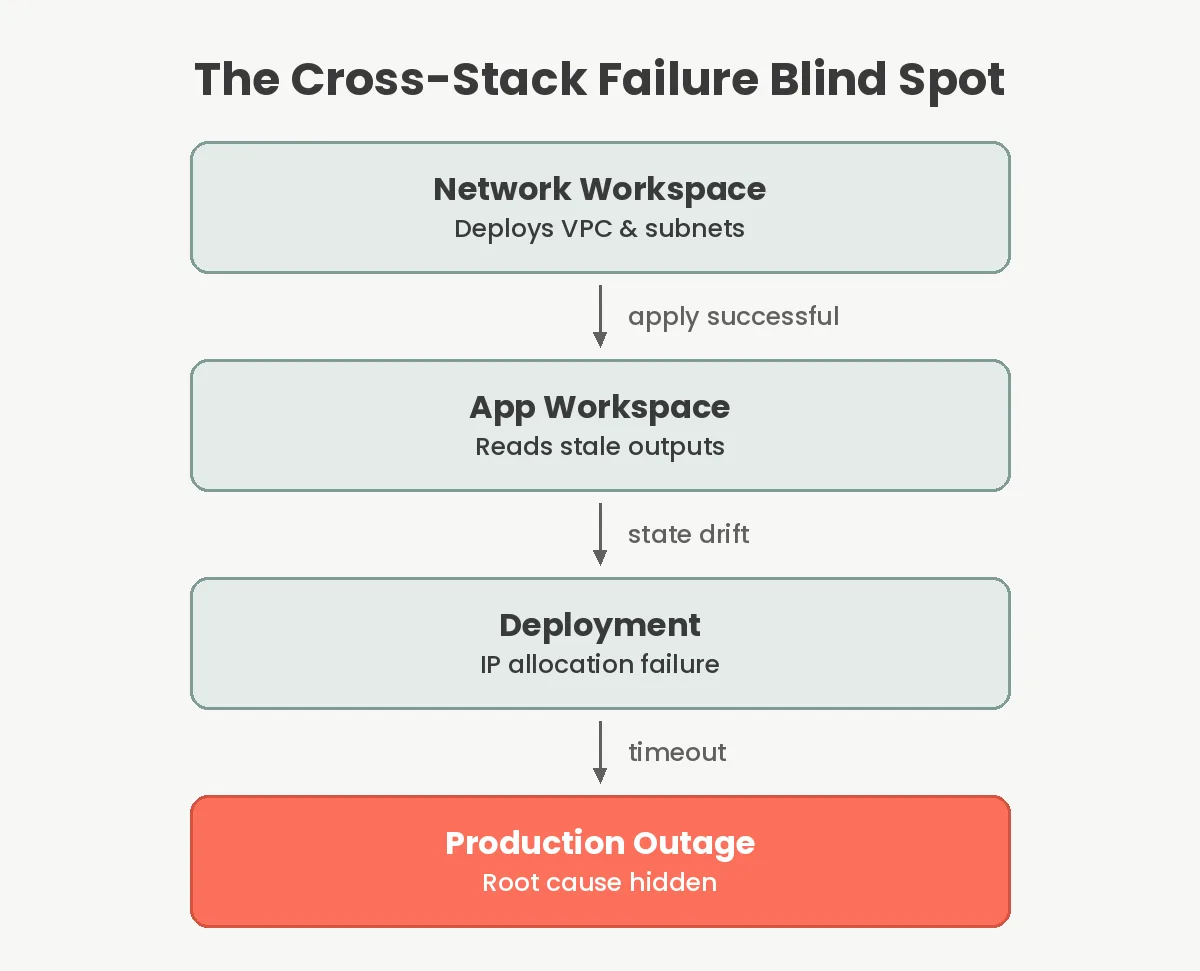
Micro-segmenting infrastructure into dozens of isolated workspaces creates severe operational blind spots. Teams often separate networking (VPCs, subnets) into one workspace and application compute (EC2, ECS) into another. This limits the blast radius of any single deployment, but it fragments the state file graph.
When a networking change accidentally restricts a security group, the application team’s alarms will fire. Because the application team’s local state and configuration look perfectly fine, root cause diagnosis becomes incredibly difficult. Their pipeline reports zero drift, completely masking the upstream networking modification that actually broke the environment. This cross-stack failure mode demands sophisticated external correlation tooling to detect.
You must balance workspace isolation against observability. Group tightly coupled resources—like a load balancer and its target application instances—into the same state file. Use data sources to bridge distinct workspaces only when the lifecycle of those resources is genuinely asynchronous. Treating state boundaries as strict API contracts requires rigorous versioning and testing to prevent silent upstream breakages.
Historically, teams attempted to encrypt sensitive values locally using a PGP key within a specific provider block before writing to the state file. This legacy workaround existed for environments where state had to be stored in cleartext. The provider would intercept the string, encrypt it with the public key, and write the resulting ciphertext into the JSON.
HashiCorp strongly discourages this pattern, and supported providers are actively removing the functionality. PGP encryption within the provider layer introduces brittle dependencies on local keyrings and complicates disaster recovery. If the private key is lost, the state becomes permanently corrupted, requiring manual resource deletion and a complete state rebuild.
Modern architectures require platform-level encryption. HCP Terraform and Terraform Enterprise automatically encrypt state at rest and protect it with TLS in transit. Specifically, HCP Terraform uses Vault Transit Encryption to secure state files stored in Blob Storage. Relying on these native backend controls ensures consistent encryption without polluting the Terraform code with cryptographic configuration.
Default configuration limits routinely bottleneck enterprise deployments. By default, the Terraform CLI performs a maximum of 10 operations in parallel, governed by the -parallelism=10 flag. When applying hundreds of resources, this low concurrency ceiling stretches deployment times from minutes to hours, tying up valuable CI/CD pipeline minutes.
Similarly, self-hosted environments impose strict limits. Terraform Enterprise instances default to allowing 10 concurrent runs per node, configurable via the TFE_CAPACITY_CONCURRENCY setting. Exhausting this pool causes pending runs to queue indefinitely, blocking emergency hotfixes during an outage. Teams must monitor queue depth and scale their enterprise node count accordingly.
API payloads also present hidden limits during automated user provisioning. Terraform Enterprise enforces a hard maximum request body size limit of 1 MB for SCIM POST, PUT, and PATCH requests. Attempting to sync massive enterprise directory groups via the SCIM API will silently fail if the payload exceeds this boundary, leaving user access privileges dangerously out of sync with your identity provider.
Transitioning from local execution to a remote backend exposes latent configuration errors. Local state files forgive missing IAM permissions and network timeouts because the process runs directly on the developer’s machine with their administrative credentials. Remote runners operate under strict least-privilege principles.
A frequent failure mode occurs during the initial terraform init migration phase. If the execution environment lacks outbound internet access to the remote backend API, the migration stalls indefinitely. This is especially prevalent when locking down architectures to Kubernetes clusters against privilege escalation, where restrictive egress policies block the required HTTPS traffic to the state storage bucket.
Another major failure mode is state lock abandonment. If a CI/CD runner is aggressively terminated by a timeout policy during an apply phase, it cannot send the unlock API call. The remote backend remains locked permanently. Operators must manually intervene with the terraform force-unlock command, which requires elevated privileges and extreme caution to ensure no phantom processes are still modifying resources.

Enterprise compliance policies often mandate that organizations retain total control over their encryption keys, prompting the adoption of Hold Your Own Key (HYOK) setups. HYOK for HCP Terraform supports AWS Key Management Service, Azure Key Vault, Google Cloud Key Management, and the Vault transit secrets engine. This ensures the SaaS provider cannot read the state data without the customer’s active key.
Deploying HYOK introduces a critical external dependency into your deployment path. If your chosen KMS experiences an outage, or if network connectivity between HCP Terraform and your key vault drops, all infrastructure operations halt. You cannot read state, plan changes, or apply emergency fixes. This architecture binds your availability directly to the uptime of the external key manager.
Furthermore, HYOK architectures incur increased operational latency. Every state read and write requires a synchronous network call to the external KMS for cryptographic operations. This overhead is negligible for small workspaces but cascades into noticeable delays for sprawling environments with frequent pipeline triggers. Teams must weigh the compliance benefits against the added latency and the risk of catastrophic lockouts.
| Encryption Architecture | Key Custodian | Network Dependency | Operational Latency |
|---|---|---|---|
| HCP Default Encryption | HashiCorp | Internal SaaS Only | Minimal |
| Cloud Backend (S3/KMS) | Cloud Provider | IAM Connectivity | Low |
| Hold Your Own Key (HYOK) | Customer | External KMS API | Moderate to High |
Scaling state management requires deliberate architectural choices to prevent bottlenecks similar to those seen when AWS NAT Gateway costs multiply across disorganized VPCs. You must structure workspaces logically to minimize dependencies while maintaining visibility.
No. The sensitive flag only masks values in the command line interface and UI logs. Terraform still writes the variables into the state file as plaintext JSON, requiring backend encryption to actually secure the data.
You must implement state locking on your remote backend. For AWS S3, this traditionally means configuring a DynamoDB lock table, though native S3 locking is emerging as an alternative to prevent race conditions during deployments.
Over-splitting infrastructure into heavily isolated workspaces causes these failures. When a core networking state changes, dependent application workspaces fail to deploy because their local state data has silently drifted out of sync with reality.
The Terraform CLI defaults to a maximum of 10 parallel operations. You can modify this limit using the -parallelism flag to speed up large deployments, though it requires sufficient API rate limits from your cloud provider.
Terraform state is the definitive source of truth for your production infrastructure. Treating it as a simple text file rather than a critical operational database leads directly to plaintext secret exposure and catastrophic deployment race conditions. The mechanisms that govern state locking and encryption dictate the reliability of every subsequent deployment.
Audit your remote backend configurations immediately. Verify that your locking mechanisms—whether DynamoDB tables or native S3 objects—are actively engaging during pipeline runs. Review your workspace boundaries to ensure you aren’t masking cross-stack drift. By hardening your state management architecture, you eliminate the silent failure modes that compromise automated deployment pipelines.
You Can Get More Information!