Obsidian vs Logseq vs Anytype: Choosing a Local-First Knowledge Base
The best local-first note app depends entirely on your workflow....

Make email marketing simplified

Make email marketing simplified

Make email marketing simplified

Make email marketing simplified

Make email marketing simplified

Make email marketing simplified

Make email marketing simplified

Make email marketing simplified

Make email marketing simplified

Make email marketing simplified

Make email marketing simplified

Make email marketing simplified

Make email marketing simplified

Make email marketing simplified

Make email marketing simplified

We use cookies for our website to give you the most relevant experience by remembering your preferences. By clicking “accept”, you consent to use of ALL the cookies
This website uses cookies to improve your experience while you navigate through the website. Out of these, the cookies that are categorized as necessary are stored on your browser as they are essential for the working of basic functionalities of the website. We also use third-party cookies that help us analyze and understand how you use this website. These cookies will be stored in your browser only with your consent. You also have the option to opt-out of these cookies. But opting out of some of these cookies may affect your browsing experience.
Necessary cookies are absolutely essential for the website to function properly. These cookies ensure basic functionalities and security features of the website, anonymously.
| Cookie | Duration | Description |
|---|---|---|
| cookielawinfo-checkbox-functional | 11 months | This cookie is set by GDPR Cookie Consent plugin. The cookie is used to store the user consent for the cookies in the category “Analytics”. |
| cookielawinfo-checkbox-functional | 11 months | The cookie is set by GDPR cookie consent to record the user consent for the cookies in the category “Functional”. |
| cookielawinfo-checkbox-necessary | 11 months | This cookie is set by GDPR Cookie Consent plugin. The cookies is used to store the user consent for the cookies in the category “Necessary”. |
| cookielawinfo-checkbox-others | 11 months | This cookie is set by GDPR Cookie Consent plugin. The cookie is used to store the user consent for the cookies in the category “Other. |
| cookielawinfo-checkbox-performance | 11 months | This cookie is set by GDPR Cookie Consent plugin. The cookie is used to store the user consent for the cookies in the category “Performance”. |
| viewed_cookie_policy | 11 months | The cookie is set by the GDPR Cookie Consent plugin and is used to store whether or not user has consented to the use of cookies. It does not store any personal data. |
Functional cookies help to perform certain functionalities like sharing the content of the website on social media platforms, collect feedbacks, and other third-party features.
Performance cookies are used to understand and analyze the key performance indexes of the website which helps in delivering a better user experience for the visitors.
Analytical cookies are used to understand how visitors interact with the website. These cookies help provide information on metrics the number of visitors, bounce rate, traffic source, etc.
Advertisement cookies are used to provide visitors with relevant ads and marketing campaigns. These cookies track visitors across websites and collect information to provide customized ads.
Other uncategorized cookies are those that are being analyzed and have not been classified into a category as yet.
Cyberia Tech, Inc. respects your privacy. This Privacy Policy explains how we collect, use, and share your information. By using our services, you agree to this policy. If any other agreements conflict with this Privacy Policy, the terms of those agreements prevail.
Cyberia Tech complies with the EU-US and Swiss-US Privacy Shield Frameworks for handling personal data from the EEA, UK, and Switzerland. In case of any conflict, the Privacy Shield Principles prevail. Learn more at Privacy Shield. Key Definitions
Information linked to an individual, transferred from the EEA, UK, or Switzerland to the U.S.
Data revealing race, religion, health, sexual orientation, and similar categories.
Effective Date: [ 2026 / 11 / 19 ]
Welcome to The Cyberia Tech ! By accessing or using our website or services, you agree to
comply with and be bound by these Terms of Use and our Privacy Policy. If you do not agree with
these terms, please do not use our Services.
Loading
0 %
Your First Piece of the Puzzle in
Business Growth



The best local-first note app depends entirely on your workflow. Obsidian excels at long-form writing and connected thought, Logseq is purpose-built for daily journaling and outliners, and Anytype offers a block-based, visually appealing workspace similar to Notion. All three store files directly on your hard drive, guaranteeing absolute data ownership.
If your internet goes down, can you access your most critical project notes? For millions of people relying on cloud-first tools, the answer is a frustrating no. Beyond offline access, storing everything on a corporate server leaves your personal knowledge base vulnerable to subscription price hikes, server outages, and changing privacy policies. Moving to a local-first application flips that dynamic. You hold the files, and you decide how they sync. Here is how the three biggest contenders stack up for your daily workflow.
Most modern productivity tools rent you access to your own brain. When you use cloud-only platforms, your text lives in a proprietary database. If that service shuts down, exporting your work into a usable format is often a nightmare.
Local-first software reverses this model. Your notes live directly on your device’s hard drive first, usually as plain text files. Syncing is treated as an optional layer on top, rather than a mandatory requirement. This means your text loads instantly without a loading spinner, and your data remains entirely private. According to Notion’s security documentation, while data is encrypted at rest on Amazon Web Services (AWS), it is not end-to-end encrypted by default, meaning employees could theoretically access it under specific legal or technical circumstances.
By switching to a local-first system, you eliminate that risk completely. You also future-proof your writing. Because apps like Obsidian and Logseq rely heavily on standard Markdown, you can open your vault in almost any text editor decades from now. If a proprietary application goes bankrupt tomorrow, you simply open your documents in a basic text program and continue working without losing a single character of your intellectual property.
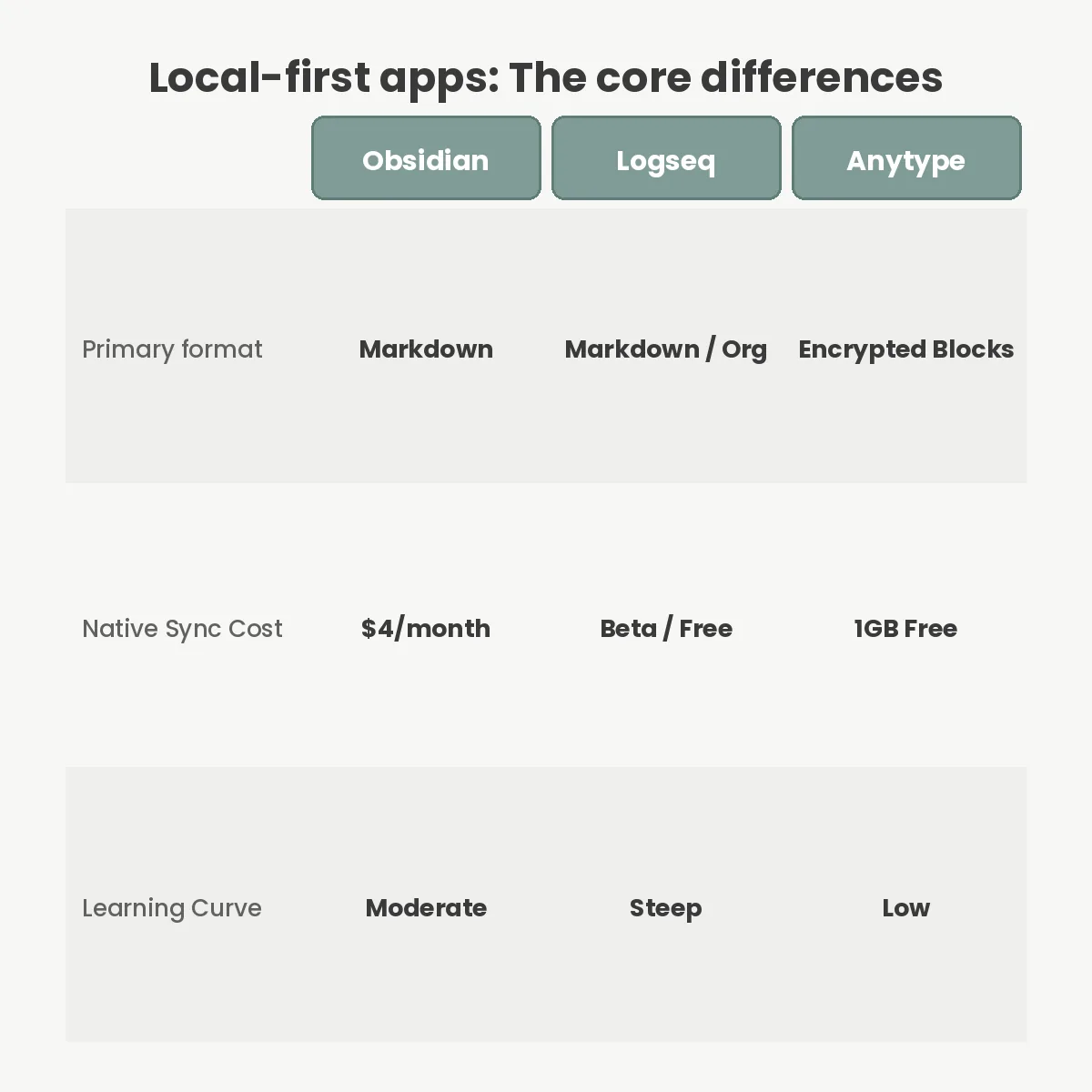
Obsidian is essentially an incredibly fast text editor built over a local folder of Markdown files. It has become the default recommendation for people who want total control over their knowledge management. As of version 1.7, the interface has grown highly polished, yet it retains its core philosophy: your data is just a folder on your computer.
The real strength of this platform is its ecosystem. With thousands of community plugins, you can transform a basic text editor into a task manager, a Kanban board, or a spaced-repetition flashcard system. You connect ideas using wikilinks, generating a visual graph of your thoughts over time. This makes it incredibly powerful for researchers who need to see how distinct concepts relate to one another organically.
While the software itself is free for personal use, automatic syncing across devices requires a paid add-on. Obsidian Sync currently costs $4 per month for the Standard tier (1GB of storage) or $8 per month for the Plus tier (10GB). You can choose to sync via iCloud or a third-party drive, but setting that up requires some technical patience.
If Obsidian is a blank piece of paper, Logseq is a rigid, powerful list. It functions as an outliner, meaning every single paragraph you write is a bullet point. This structure allows you to zoom in on specific blocks and reference them anywhere else in your database.
Logseq prioritizes a daily journal approach. When you open the application, you are greeted by today’s date. Instead of worrying about where to file a note, you simply write it on your daily page and tag it. The native graph database then aggregates all those tags, building a coherent page dynamically. It supports standard Markdown and Org-mode syntax, ensuring your files remain portable.
The learning curve here is steep. Grasping how block references and queries function takes genuine effort. However, if you are a developer, researcher, or someone who thinks in hierarchical lists, Logseq organizes the chaos automatically.
Anytype takes a completely different visual approach. If you are comparing Microsoft Loop vs Notion, you might appreciate Anytype’s block-based editor, which feels immediately familiar. You type a slash, and a menu appears offering headers, toggles, databases, and checklists.
Under the hood, Anytype does not use flat Markdown files. Instead, it relies on its open-source Any-Sync protocol to securely distribute encrypted data between your devices on a peer-to-peer network. You get the aesthetic and database features of a modern workspace, combined with cryptographic privacy. They currently provide 1GB of backup storage entirely for free.
This makes it the easiest transition for non-technical users who want out of the cloud. You do not have to learn Markdown syntax or configure complex plugin settings to make it look visually appealing. The application handles the design beautifully right out of the box, allowing you to focus entirely on capturing information rather than formatting it.
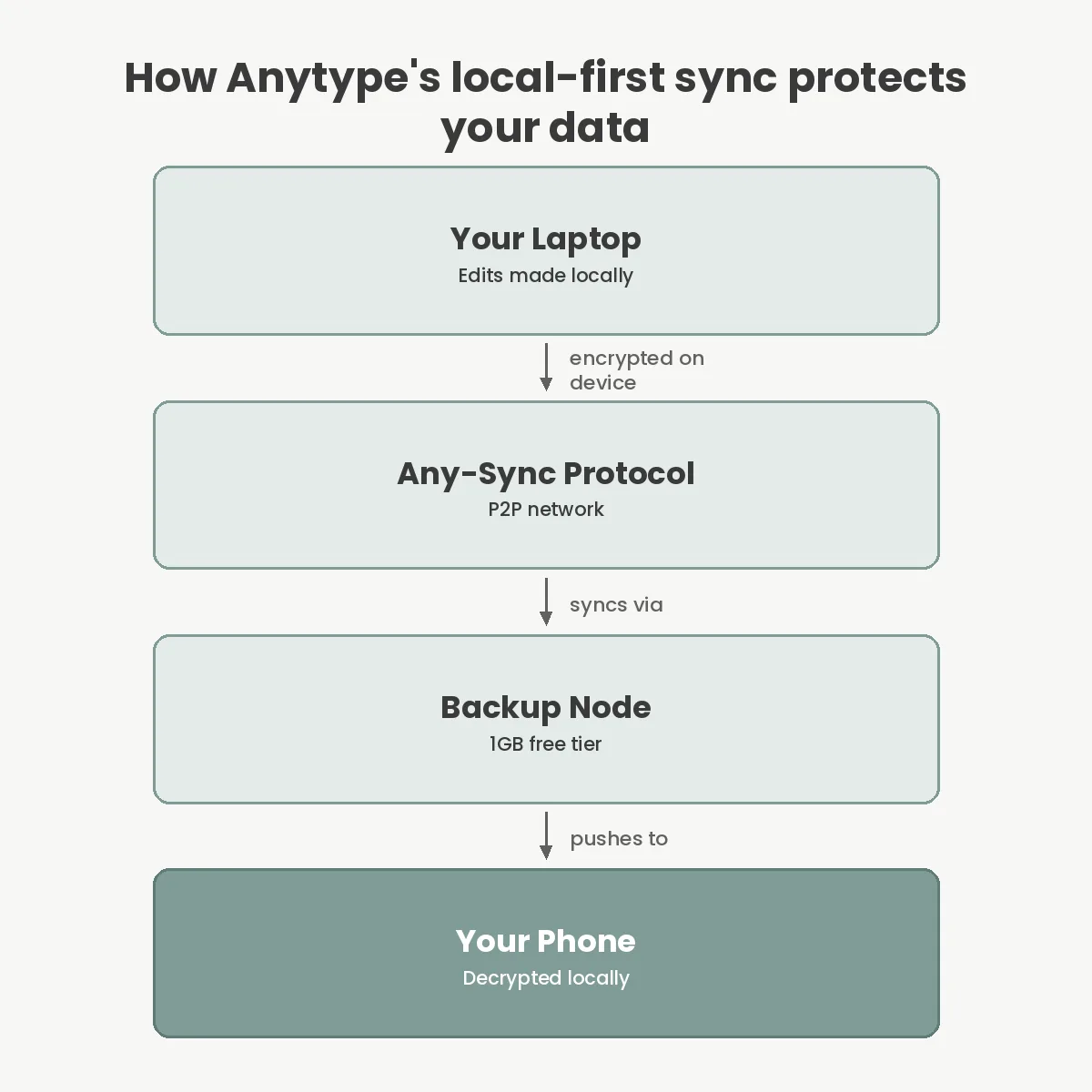
Understanding how these tools differ requires looking at their foundational architecture. While they all respect your privacy, the technical execution creates drastically different user experiences.
| Feature | Obsidian | Logseq | Anytype |
|---|---|---|---|
| Data Format | Flat Markdown files | Markdown / Org files | Encrypted local blocks |
| Default Structure | Freeform documents | Bullet-point outliner | Visual block pages |
| Native Sync | $4/mo (Standard) | Currently in Beta | 1GB Free via Any-Sync |
| Mobile App Quality | Excellent, fast | Passable, needs work | Highly polished |
Choosing between them is largely a matter of identifying how you prefer to structure data. Outliners excel at rapid logging, while freeform documents are better for drafting long articles.
Local-first software is not flawless. The biggest sacrifice you make is frictionless collaboration. If you are managing a team of ten people, trying to sync a shared Obsidian vault over Git is an exercise in misery. Cloud-native tools are built from the ground up for multiplayer editing. If you are evaluating Notion vs Confluence for corporate documentation, stick to the cloud.
Syncing between your own laptop and phone can also occasionally fail if you rely on free third-party workarounds instead of paying for native sync. Background syncing on iOS is notoriously aggressive about pausing inactive apps, meaning you might open your phone and wait a few seconds for yesterday’s desktop notes to appear.
Finally, managing your own backups becomes your direct responsibility. A cloud service automatically backs up your data on redundant servers. With local files, if you drop your laptop in a river and never set up an external sync, your knowledge base is gone forever. You must treat these files just as securely as you would the database of your best team password manager, ensuring you follow the 3-2-1 backup rule for your most critical documents.
The most frequent error new users make is over-complicating their setup. People download Obsidian, install forty plugins, attempt to build a perfectly automated productivity machine, and burn out within a week. Start with plain text and only add a plugin when a specific friction point annoys you.
Another mistake is trying to force a tool to fit the wrong mental model. If you hate bullet points, do not force yourself to use Logseq just because a productivity influencer recommended it. If you want pretty databases, Anytype is your answer.
Lastly, failing to test the mobile experience before committing is a critical error. Write notes on your phone and see if the sync speed and interface feel natural to you. If capturing a quick thought takes too many taps, you will stop using the system entirely.
Yes, you can sync Obsidian for free using third-party services like iCloud Drive, Dropbox, or Syncthing. However, configuring these solutions often requires technical troubleshooting, and background syncing on mobile devices can be unreliable compared to paying for their native service.
Yes, despite using a proprietary block-based structure internally, Anytype allows you to export your entire workspace as standard Markdown files. This built-in functionality ensures that you can always move your private data to another application if you decide to leave the platform.
Logseq is highly effective for students who take lecture notes in a rapid, bullet-point format and need to resurface specific concepts later. In contrast, Obsidian is generally better suited for students writing long-form essays or research papers requiring extensive paragraph-based drafting.
Plain text Markdown files consume an incredibly small amount of storage on your device. A vault containing ten thousand notes will typically use less than fifty megabytes of space. The only elements that consume significant storage are embedded images, PDFs, and videos.
Choosing your personal knowledge base comes down to how you naturally process information. If you want a limitless, highly customizable text environment, download Obsidian. If your brain operates in daily lists and interconnected bullet points, Logseq will serve you best. For those who want the aesthetic and structure of Notion without sacrificing their privacy to the cloud, Anytype is the clear winner. Your next step is to pick one, migrate ten active pages of notes, and use it exclusively for a week to see if the mental model matches your working style.
You Can Get More Information!