HTMX vs React: When to Drop SPAs for Hypermedia
HTMX vs React comes down to where you manage state....

Make email marketing simplified

Make email marketing simplified

Make email marketing simplified

Make email marketing simplified

Make email marketing simplified

Make email marketing simplified

Make email marketing simplified

Make email marketing simplified

Make email marketing simplified

Make email marketing simplified

Make email marketing simplified

Make email marketing simplified

Make email marketing simplified

Make email marketing simplified

Make email marketing simplified

We use cookies for our website to give you the most relevant experience by remembering your preferences. By clicking “accept”, you consent to use of ALL the cookies
This website uses cookies to improve your experience while you navigate through the website. Out of these, the cookies that are categorized as necessary are stored on your browser as they are essential for the working of basic functionalities of the website. We also use third-party cookies that help us analyze and understand how you use this website. These cookies will be stored in your browser only with your consent. You also have the option to opt-out of these cookies. But opting out of some of these cookies may affect your browsing experience.
Necessary cookies are absolutely essential for the website to function properly. These cookies ensure basic functionalities and security features of the website, anonymously.
| Cookie | Duration | Description |
|---|---|---|
| cookielawinfo-checkbox-functional | 11 months | This cookie is set by GDPR Cookie Consent plugin. The cookie is used to store the user consent for the cookies in the category “Analytics”. |
| cookielawinfo-checkbox-functional | 11 months | The cookie is set by GDPR cookie consent to record the user consent for the cookies in the category “Functional”. |
| cookielawinfo-checkbox-necessary | 11 months | This cookie is set by GDPR Cookie Consent plugin. The cookies is used to store the user consent for the cookies in the category “Necessary”. |
| cookielawinfo-checkbox-others | 11 months | This cookie is set by GDPR Cookie Consent plugin. The cookie is used to store the user consent for the cookies in the category “Other. |
| cookielawinfo-checkbox-performance | 11 months | This cookie is set by GDPR Cookie Consent plugin. The cookie is used to store the user consent for the cookies in the category “Performance”. |
| viewed_cookie_policy | 11 months | The cookie is set by the GDPR Cookie Consent plugin and is used to store whether or not user has consented to the use of cookies. It does not store any personal data. |
Functional cookies help to perform certain functionalities like sharing the content of the website on social media platforms, collect feedbacks, and other third-party features.
Performance cookies are used to understand and analyze the key performance indexes of the website which helps in delivering a better user experience for the visitors.
Analytical cookies are used to understand how visitors interact with the website. These cookies help provide information on metrics the number of visitors, bounce rate, traffic source, etc.
Advertisement cookies are used to provide visitors with relevant ads and marketing campaigns. These cookies track visitors across websites and collect information to provide customized ads.
Other uncategorized cookies are those that are being analyzed and have not been classified into a category as yet.
Cyberia Tech, Inc. respects your privacy. This Privacy Policy explains how we collect, use, and share your information. By using our services, you agree to this policy. If any other agreements conflict with this Privacy Policy, the terms of those agreements prevail.
Cyberia Tech complies with the EU-US and Swiss-US Privacy Shield Frameworks for handling personal data from the EEA, UK, and Switzerland. In case of any conflict, the Privacy Shield Principles prevail. Learn more at Privacy Shield. Key Definitions
Information linked to an individual, transferred from the EEA, UK, or Switzerland to the U.S.
Data revealing race, religion, health, sexual orientation, and similar categories.
Effective Date: [ 2026 / 11 / 09 ]
Welcome to The Cyberia Tech ! By accessing or using our website or services, you agree to
comply with and be bound by these Terms of Use and our Privacy Policy. If you do not agree with
these terms, please do not use our Services.
Loading
0 %
Your First Piece of the Puzzle in
Business Growth



HTMX vs React comes down to where you manage state. HTMX excels at data-heavy, server-rendered applications by replacing JSON payloads with raw HTML over the wire. React remains the required architecture for highly interactive, offline-capable client experiences that depend on complex local state management.
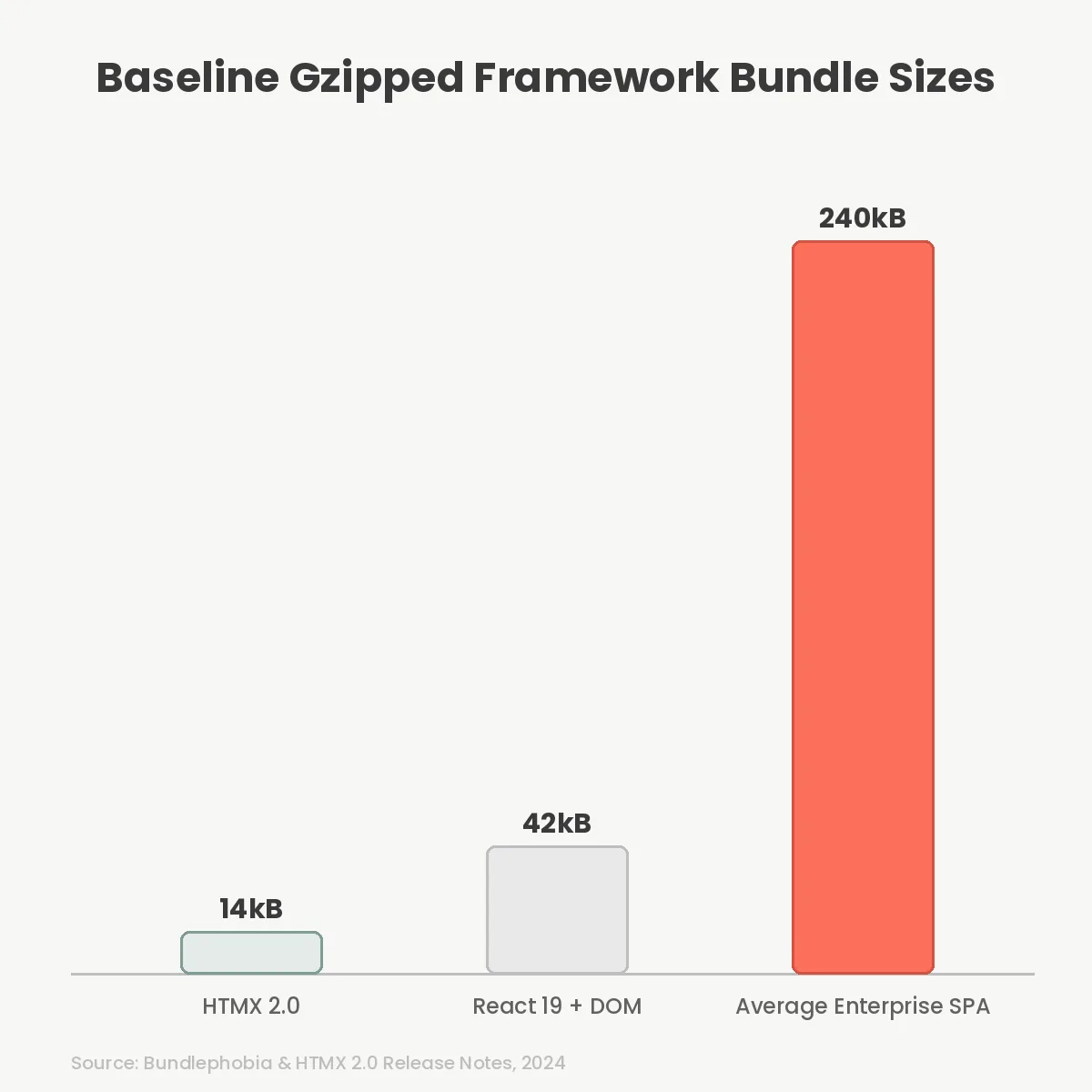
Client-side JavaScript bundles are out of control. We keep throwing hardware at the problem, but parsing 500kB of minified logic still bottlenecks mid-tier mobile devices. You face a choice for your next web app. Stick with the Single Page Application (SPA) model, or shift routing back to the server. With HTMX 2.0 dropping its core footprint to just 14kB gzipped, hypermedia is no longer a fringe concept. It is a strict architectural trade-off. Here is how you evaluate it.
React relies on JSON APIs. Your server sends raw data records. Your client parses that data and builds the DOM. This requires maintaining two separate routing logic trees. You have a router on the backend handling data endpoints, and a router on the frontend tracking the user’s current view.
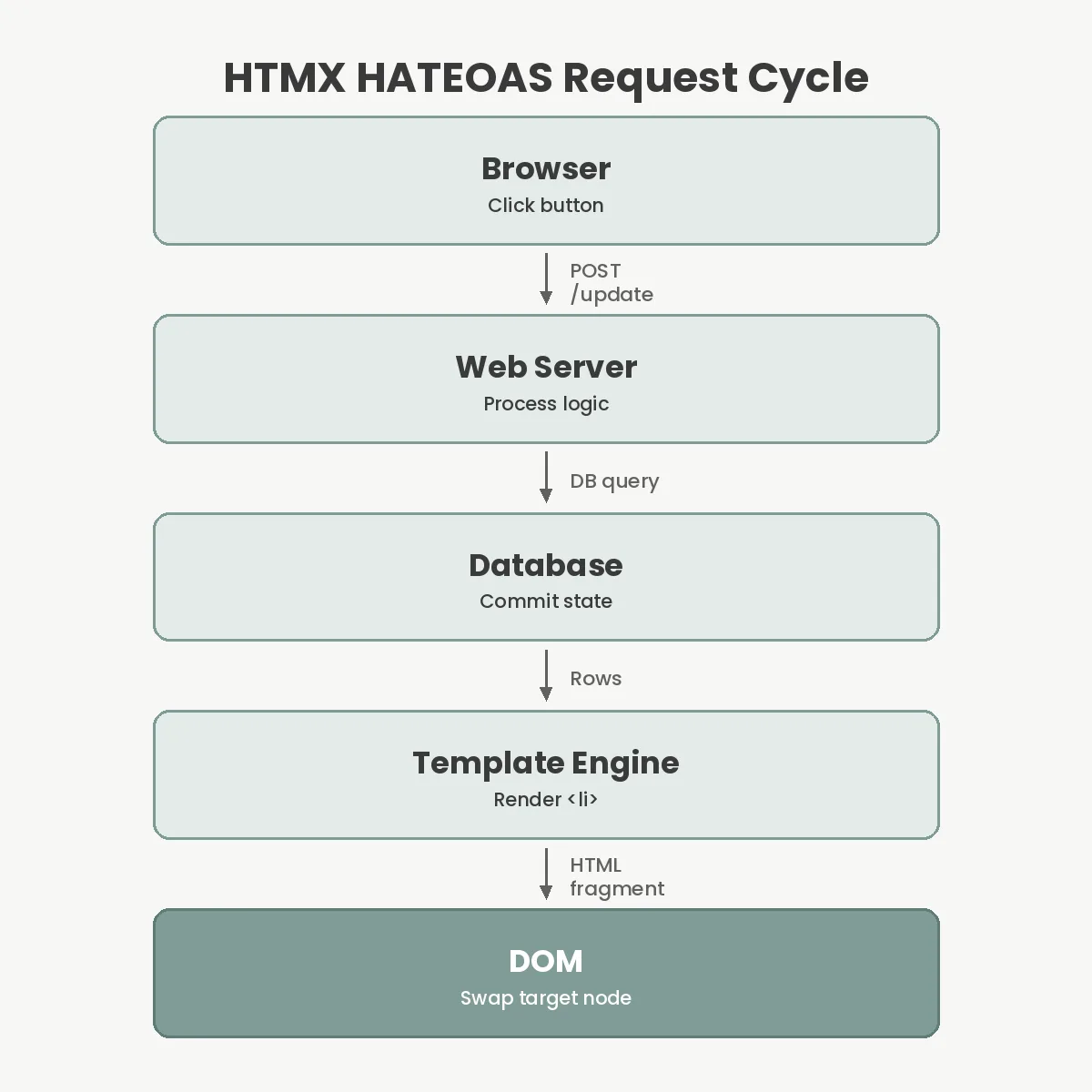
HTMX uses Hypermedia As The Engine Of Application State (HATEOAS). Your server renders HTML fragments directly. The client simply swaps those fragments into the live DOM based on user interactions. You write HTML attributes to declare what should happen when a button is clicked.
This eliminates client-side state synchronization. You do not need Redux, Zustand, or React Context. The server acts as the single source of truth. If a database record updates, the server sends the exact new HTML representation. The browser updates immediately without needing to reconcile a virtual DOM against a massive client-side state object.
Google officially replaced First Input Delay (FID) with Interaction to Next Paint (INP) as a Core Web Vital in March 2024. Heavy JavaScript hydration destroys INP scores. The browser main thread blocks while React reconciles its virtual DOM, leaving users tapping unresponsive buttons.
HTMX bypasses reconciliation entirely. Swapping a DOM node is a native browser operation executed in C++ under the hood. The HTMX 2.0 core payload is 14kB gzipped. React 19 combined with ReactDOM sits around 42kB gzipped for a hello-world baseline. Real-world SPA bundles routinely exceed 200kB before you even write your first component.
Less JavaScript execution means faster time to interactive on constrained CPU devices. Mobile browsers spend less battery parsing logic. You push the computation back to your server fleet, which you can scale horizontally, instead of relying on the unpredictable hardware in your user’s pocket.
Adopting HTMX fundamentally changes your backend architecture. You stop writing generic JSON endpoints intended for multiple consumers. You start writing hypermedia endpoints tailored exactly to specific UI components.
This creates tighter coupling between your server and your user interface. This approach pairs beautifully with a modular monolith design, keeping domain logic and UI representation in the same codebase. However, if you need to serve a native mobile app alongside your web app, HTMX introduces friction. Native iOS and Android apps consume JSON, not HTML.
If you render HTML fragments for HTMX, you end up maintaining two separate API layers: one hypermedia layer for the browser, one JSON layer for mobile. React decoupled this. SPA architectures let you build one generic API layer for all clients. Furthermore, serving pre-rendered HTML fragments requires aggressive server-side optimization. You will want an in-memory datastore to serve those fragments at sub-millisecond latency, requiring a well-tuned Valkey web app caching strategy.
Do not use HTMX for highly interactive canvas tools. If you are building a spreadsheet, an image editor, or a complex drag-and-drop dashboard, hypermedia is the wrong tool entirely. It assumes document-centric workflows.
Network latency dictates interaction speed in a hypermedia system. Every state change requires a full round trip to the server. If your user is on a spotty cellular connection with 300ms latency, every button click feels sluggish. React handles optimistic UI updates gracefully by modifying local state immediately. HTMX requires complex event-handling extensions to fake state changes before the server responds.
Offline support is practically nonexistent. A React application wrapped in a Progressive Web App (PWA) shell can function without a connection, queuing operations in a Service Worker. HTMX requires the server to exist. If the network drops, the application stops functioning entirely.
| Feature | HTMX (Hypermedia) | React (SPA) |
|---|---|---|
| State Source | Server database | Client memory |
| API Payload | HTML fragments | JSON data |
| Routing | Server endpoints | Browser History API |
| Offline Capability | None | High (Service Workers) |
React projects fail through complexity exhaustion. Engineering teams spend weeks reinventing browser defaults. Form submissions, routing, and history management are native features that SPAs must emulate painfully in JavaScript space.
Large React codebases often collapse into monolithic bundles. Teams attempt complex micro-frontends architecture to fix it, introducing immense build-pipeline complexity and CI/CD fragility just to ship a dashboard update.
Data fetching waterfalls are another SPA trap. Component A fetches data, renders Component B, which then fetches its own data. React 19 addresses this with Server Components, released in December 2024, but that forces you into heavy meta-frameworks like Next.js, shifting you away from the pure client-side model anyway.
HTMX simplifies your build step immensely. There is no Webpack, Vite, or Babel configuration required. You drop a script tag into your HTML document and start building features. Your backend engineers can ship UI changes without context-switching into a Node.js build ecosystem.
Because you are sending more HTML over the wire, optimizing network transport is critical. Utilizing HTTP/3 protocols ensures those markup fragments arrive without head-of-line blocking, keeping the user experience snappy even under packet loss.
No. HTMX replaces React for document-centric and CRUD applications where state lives on the server. It cannot replace React for complex client-side tools like canvas editors, video timelines, or offline-first progressive web apps that require local memory.
Yes. HTMX is backend-agnostic. You can generate the HTML fragments using Node.js, Python, Go, or Rust. Any server capable of returning an HTTP response works, though it pairs especially well with native templating engines over JSON APIs.
Search engines parse the initial server-rendered HTML perfectly. Since HTMX avoids client-side rendering for the initial page load, web crawlers index your content immediately without needing to execute JavaScript or wait for client-side data fetching waterfalls.
Released in June 2024, version 2.0 dropped support for Internet Explorer 11 and tightened the extension API. This reduced the core bundle size to 14kB while maintaining backwards compatibility for the vast majority of existing hypermedia attributes.
Stop treating React as the default for every web engineering project. Look directly at your requirements. If you are building a dashboard, a content management system, or an internal data-entry portal, HTMX removes massive layers of client-side complexity. If you need offline data synchronization, high-frequency state updates, or mobile-app API parity, stick with React. Your architecture should reflect your application’s actual constraints, not industry momentum. Evaluate your user’s network latency, count your client states, and make the strict engineering call.
You Can Get More Information!